
CRM: Enhanced Multiple-Document Email Capabilities
In MYOB Acumatica 2025 R2, we introduced the ability of sending multiple documents in a single email. In Version 2026.1.1, this functionality has been expanded. You can now attach multiple shipments in a single customer email and multiple purchase orders to one vendor email. In addition, you can have the system combine multiple documents generated in HTML or Excel format into a single file and attach it to the email.
Multiple-Document Emails for Shipments and Purchase Orders
You email shipments to customers on the Process Shipments (SO503000) form and purchase orders to vendors on the Print/Email Purchase Orders (PO503000) form. On both of these forms, you can use the following check boxes:
- Send Documents in One Email: Select this check box to attach multiple processed documents to a single email and send it to the applicable customer or vendor.
- Combine Documents into One File: If you select this check box,
the system combines multiple documents into a single file. Attention:You can combine up to 100 documents into a single file. If you select more than 100 documents, the system creates multiple emails, each within this limit.
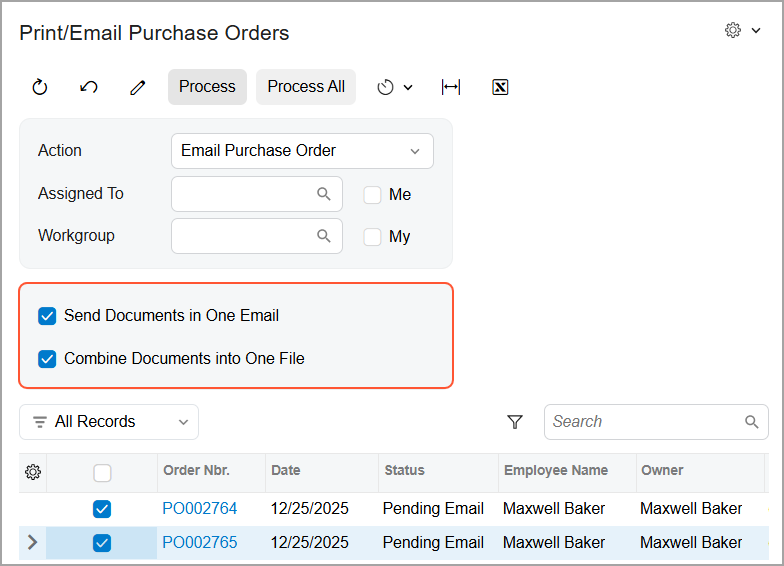
These check boxes are available when you select Email Shipment or Email Purchase Order in the Action box.
New Email Templates for Multiple-Document Emails
To simplify sending multiple shipments or purchase orders in a single email, you can use predefined email templates with the following mailing IDs on the indicated preference forms.
| Preference Form | Mailing ID | Document Type | Report |
|---|---|---|---|
| Purchase Orders Preferences (PO101000) | Purchase Order Multiple | Purchase Orders | Purchase Order (PO641000) |
| Sales Orders Preferences (SO101000) | Shipment Multiple | Shipments | Shipment Confirmation (SO642000) |
These email templates define the look and content of the emails to be sent to customer or vendor contacts for the processed shipments and purchase orders.
Additional File Formats for Multiple-Document Emails
Now for each mailing ID listed below, you can also choose HTML or Excel as the document format on the corresponding forms. When the system creates individual documents or combines multiple documents into a single file on processing forms, it uses the selected format.
| Mailing ID | Forms |
|---|---|
| Invoice Multiple |
|
| CRQuote Multiple |
|
| PMQuote Multiple |
|
| Purchase Order Multiple |
|
|
|
Learn More
For more information about email templates, see Email Templates.