Inventory and Order Management: Automated Paperwork at the Shipping Desk
Automated paperwork at the shipping desk—such as shipping labels, shipment confirmations, and commercial invoices—is essential for increasing operational efficiency, minimizing manual errors, and accelerating order processing. In MYOB Acumatica 2026.1.1, you can improve the workflow at the shipping desk by turning on the automatic printing of shipping paperwork. With this functionality turned on, the needed documents can be automatically printed when you confirm a shipment on the Shipments (SO302000) form.
Essential Highlights
The automated workflow for shipping paperwork on both the Shipments (SO302000) form and the Pick, Pack, and Ship (SO302020) form provides a consistent experience and reduces training requirements across different system configurations. Additional benefits include:
- Increased Efficiency: With fewer manual clicks required, you can handle more shipments in less time.
- Reduced Errors: You can rely on the system to print the right documents for every shipment.
- Better User Experience: The one-click process for generating all required shipping documents helps you move through your shipping tasks with less effort.
- Flexibility: You can configure the printing process to fit your operational needs and preferences.
Configuring DeviceHub
If you already use DeviceHub to print shipping documents on the Pick, Pack, and Ship (SO302020) form, you may already have your settings configured. The new capability uses prints these shipping documents via DeviceHub too. However, before you configure the automated shipping paperwork, verify the following:
- DeviceHub is installed and the required printers are set up. For more details, see Getting Started with DeviceHub.
- A default DeviceHub
printer is specified in one of the following locations:
- The Printing Settings tab of the User Profile (SM203010) form for each user who will print shipping documents
- The Mailing & Printing tab of the Sales Orders Preferences (SO101000) form
- The Branch Details tab of the Branches (CS102000) form
- The Company Details tab of Companies (CS101500) form
Configuring Automated Shipping Paperwork
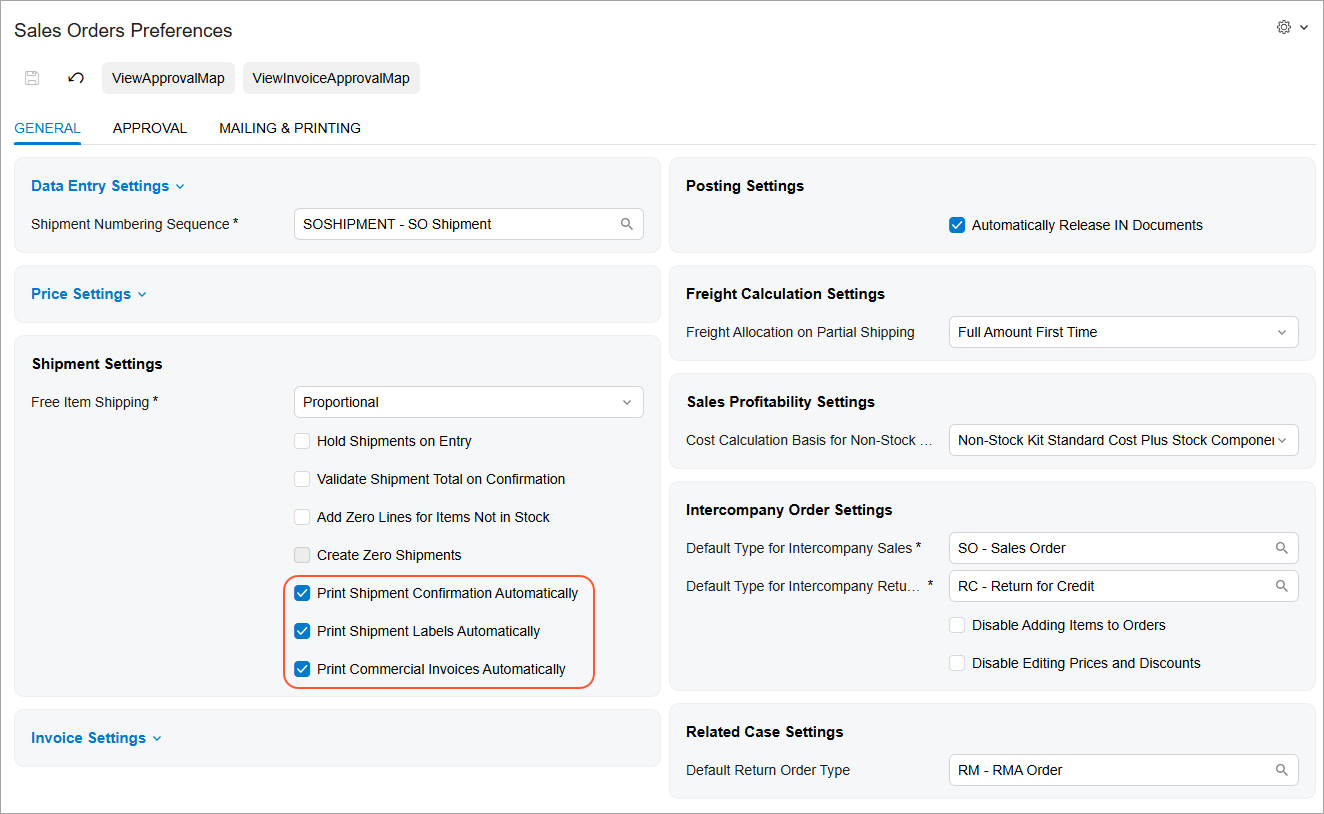
To turn on the printing of shipping documents, select the following check boxes on the Sales Orders Preferences (SO101000) form:
- Print Shipment Confirmation Automatically
- Print Shipment Labels Automatically
- Print Commercial Invoices Automatically
The location of these check boxes depends on the state of the Fulfillment check box on the Enable/Disable Features (CS100000) form:
- Selected: The check boxes appear in the Fulfillment Settings section of the Warehouse Management tab.
- Cleared: The check boxes appear in the Shipment Settings section of the General tab (shown below).