
Finance: Anomaly Detection for Journal Entries—Now Powered by Generic Inquiries
In MYOB Acumatica 2026.1.1, you can now analyze journal entry anomalies through a modern, inquiry-driven framework. The new GL-ML-Journal Entries Analysis generic inquiry and the Journal Entries Analysis (GL3010ML) form replace the legacy GL Anomaly Detection feature.
This update delivers a more flexible, inquiry-driven approach to identifying unusual journal activity—while aligning anomaly detection with the broader AI Studio framework.
What's New
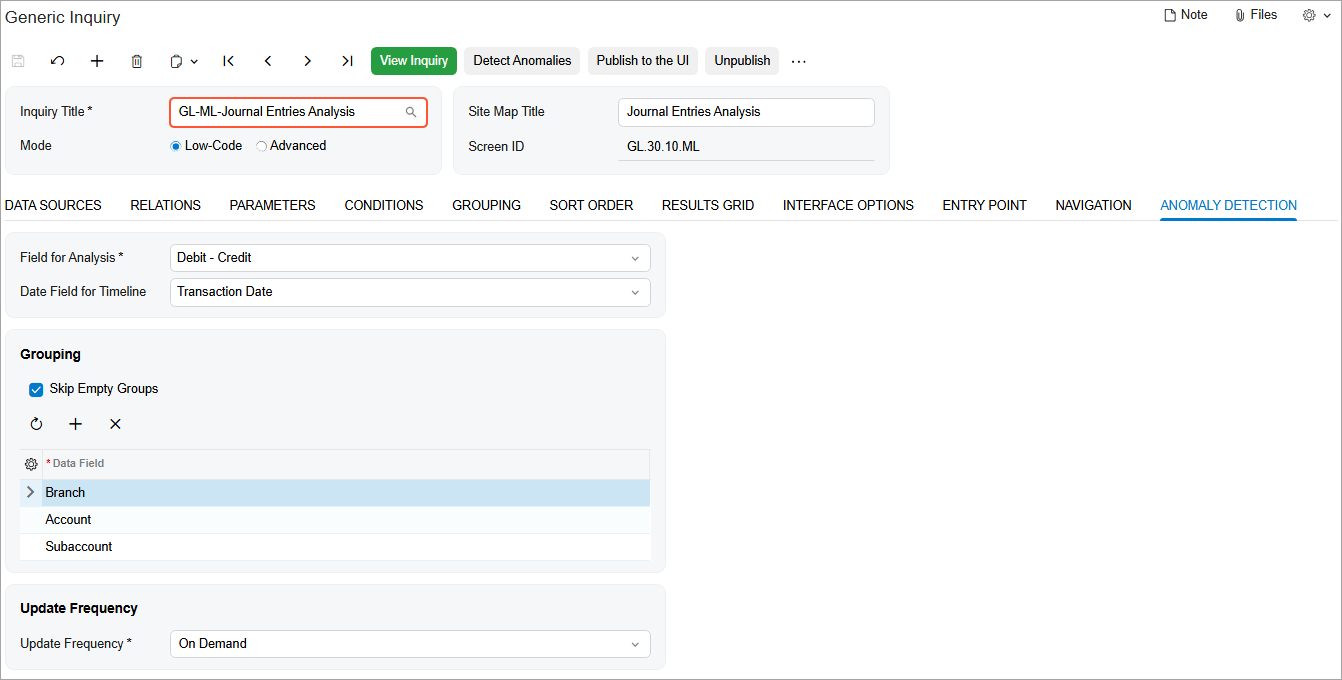
The new GL-ML-Journal Entries Analysis generic inquiry (shown below) has been added to help you identify anomalies in journal entries posted through the Journal Transactions (GL301000) form. This inquiry:
- Leverages AI-based analysis through an external calculation service
- Evaluates transaction patterns and expected values
- Flags entries with varying levels of anomaly severity
Anomaly detection is now performed through a generic inquiry for greater transparency and extensibility.
How Anomaly Detection Works
To detect anomalies:
- Open the Generic Inquiry (SM208000) form.
- In the Inquiry Title box, select GL-ML-Journal Entries Analysis.
- On the Anomaly Detection tab, specify the needed settings.
- On the form toolbar, click Detect Anomalies. The Detect Anomalies in Generic Inquiries (ML502000) form opens.
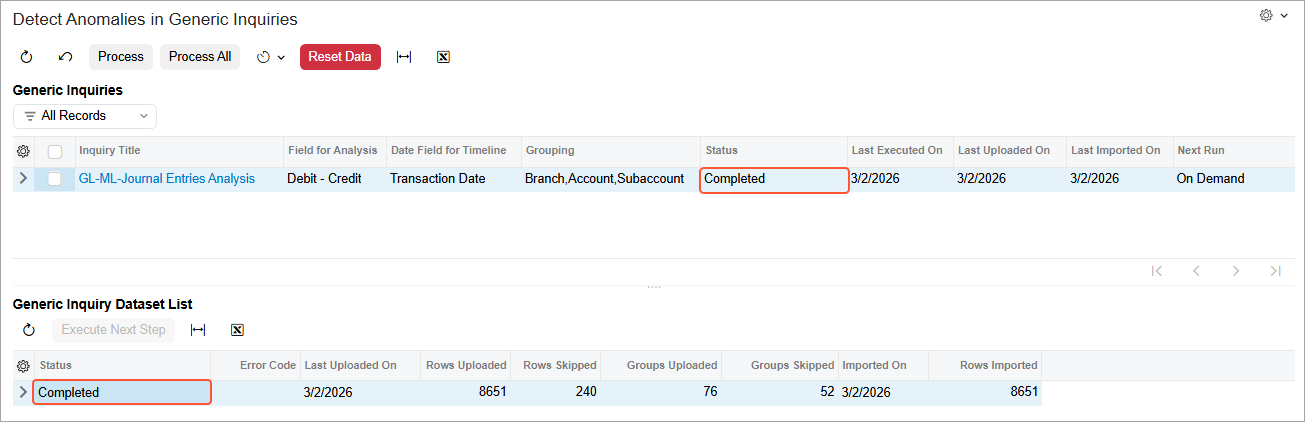
- In the Generic Inquiry Dataset List table, select the Included check box for the inquiry and then click Process.
- On the toolbar of the Generic Inquiry Dataset List table, click Execute Next Step.
- On the form toolbar, click Process. The system sends the inquiry
dataset to the external AI service, which:
- Calculates the expected transaction values
- Compares them with the actual values
- Assigns anomaly severity levels
When analysis finishes, the processing status changes from Calculation in Progress to Completed (see below).
Reviewing Detected Anomalies
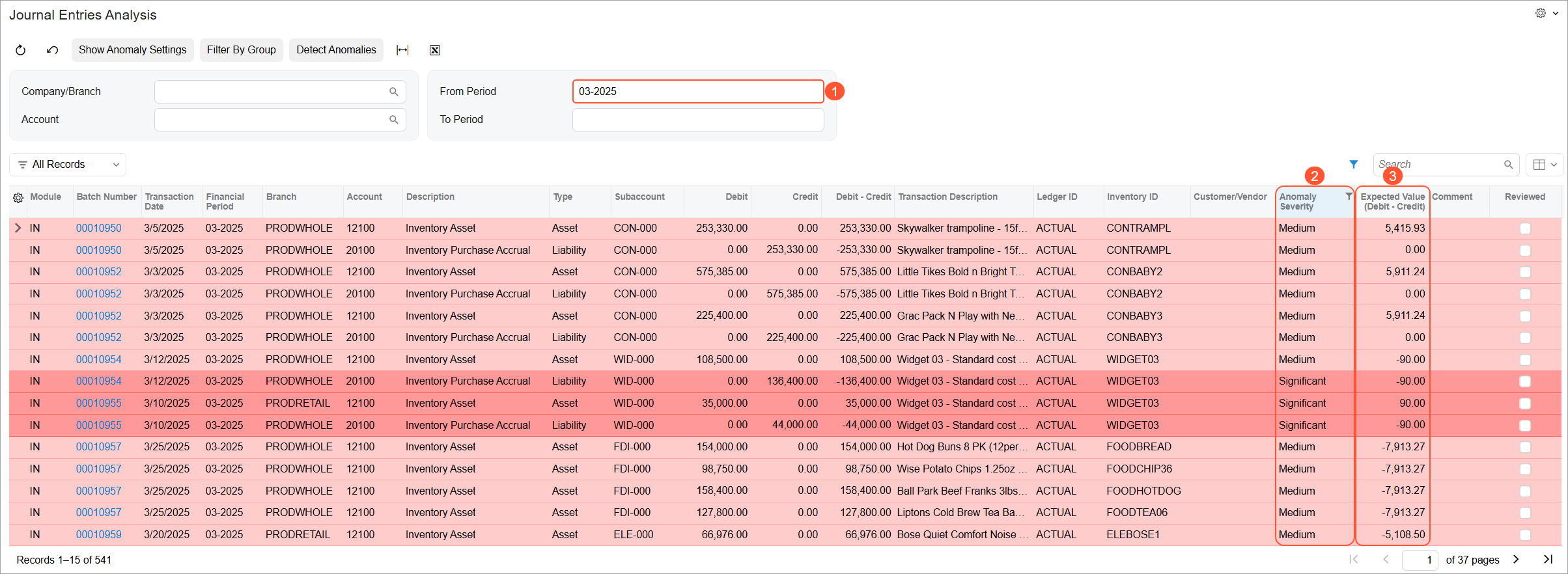
You use the new Journal Entries Analysis (GL3010ML) generic inquiry form to review the results (see below).
Key Highlights:
- The From Period box (Item 1) is filled in by default with the period one year prior to the current period. This limits the dataset to one year of transactions, for more efficient and focused analysis.
- The Expected Value (Debit – Credit) column (Item 3) displays the AI-calculated expected results.
- The Anomaly Severity column (Item 2) classifies each transaction
as:
- Normal
- Medium
- Significant
The greater the variance between the expected value and the actual value, the higher the severity level. This makes it easy to quickly prioritize transactions that require review.
Marking Transactions as Reviewed
If a flagged transaction on the Journal Entries Analysis (GL3010ML) form is determined to be valid, do the following in its row:
- Select the Reviewed check box.
- Enter an explanation in the Comment column (see below).
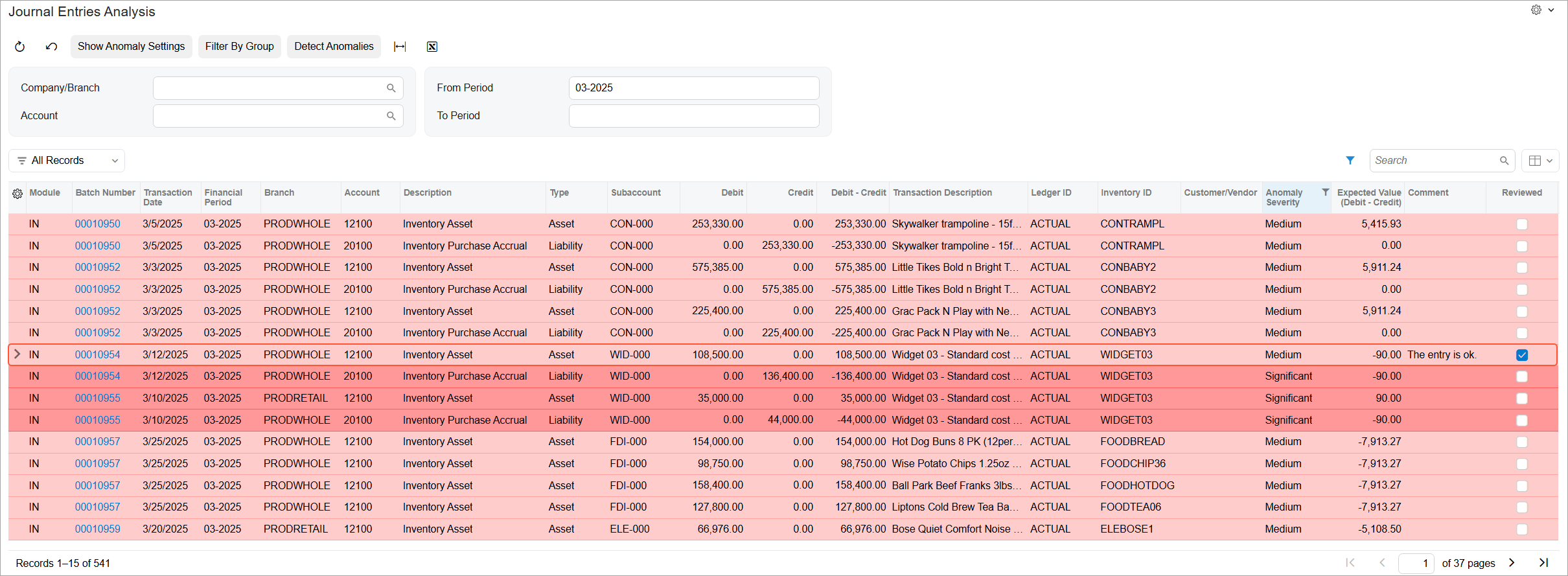
Documenting review decisions in the inquiry supports audit transparency.
Deprecated Functionality
As part of this enhancement, the legacy GL Anomaly Detection feature has been deprecated in Version 2026.1.1. The following forms, inquiries, and dashboards are no longer supported:
- Analyze Accounting Transactions (GL510000)
- Review Anomaly Predictions (GL406000)
- Reclassified YTD by Amount (GL0011DB)
- Unprocessed GL Transactions with High Score (GL0005DB)
- Reclassified YTD by Class (GL0009DB)
- GL-Accepted Prediction % (GL0012DB)
- Reclassifications by Period (GL0008DB)
- Anomalies this Period (GL0007DB)
- Open Anomalies by Confidence (GL0006DB)
- Reclassified YTD by Confidence (GL0010DB)
- Companies with Pending Anomaly Detection (GL0004DB)
- GL Anomalies (DBGL0001)
To detect anomalies in journal entries, you can use generic inquiries with the Detect Anomalies check box selected.
For more details about the AI enhancements, see AI Studio: Nested Generic Inquiries in Anomaly Detection and AI Studio: Renaming of AI Features.
Why This Matters
This enhancement delivers:
- A more unified AI experience through AI Studio
- Greater flexibility through generic inquiries
- A simplified anomaly detection workflow
- Improved transparency into the expected versus actual transaction values
- Better auditability through review tracking
By embedding anomaly detection into the generic inquiry framework, MYOB Acumatica provides a more scalable and extensible foundation for AI-driven financial analysis.