
Time and Expenses: Employee Utilization Visibility
Starting in MYOB Acumatica 2026.1.1, you can use the Employee Utilization (EP408000) inquiry form to view how employee time is allocated across project and non-project activities. This visibility helps you understand how the available labor capacity is used across billable and non-billable activities, supporting better resource planning and workload balancing.
Key Benefits
With the Employee Utilization (EP408000) inquiry form, you can:
- Allocate resources more effectively by identifying underutilized or overloaded employees.
- Increase profitability by monitoring how much of employees’ available time is billable.
- Support accurate forecasting and capacity planning by analyzing utilization trends over time.
- Improve project visibility by reviewing detailed breakdowns of billable and non-billable activities.
Exploring Employee Utilization
On the Employee Utilization (EP408000) form, you can view metrics that show how employees allocate their time between project and non-project work, as well as across billable and non-billable activities. The metrics are calculated based on employees’ released time activities within the specified period.
In the Show Employees box, you can select how the system displays and calculates data—either for employees who’ve created at least one time activity or for all employees.
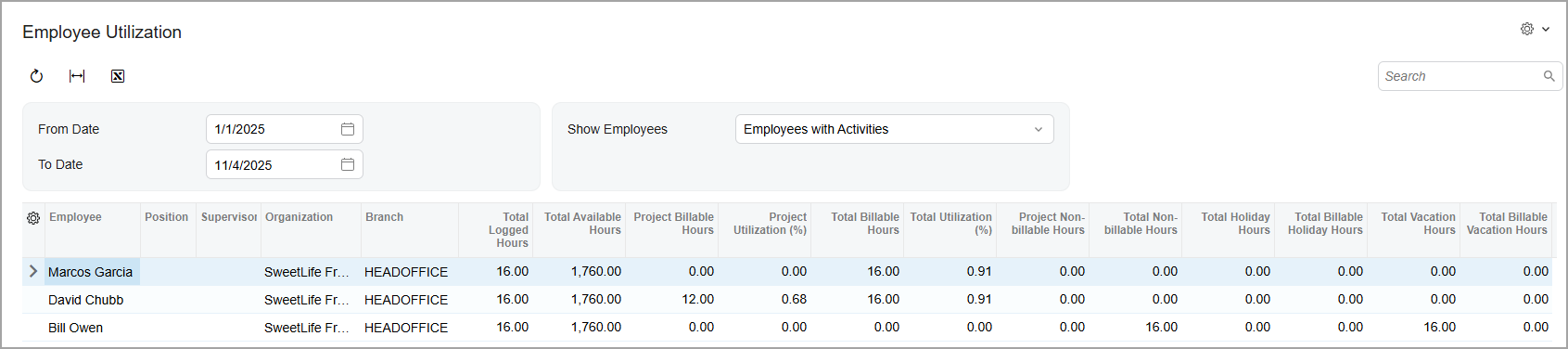
The following metrics show the total number of hours logged by employees for project and non-project activities:
- Total Logged Hours
- Project Billable Hours
- Total Billable Hours
- Project Non-Billable Hours
- Total Non-Billable Hours
The following utilization metrics are calculated by using Total Available Hours, which represents the total number of working hours the employee is available to work, based on the employee's work calendar:
- Project Utilization (%): The percentage of an employee’s total
available working hours spent on billable project work. It’s calculated as
follows.
Project Billable Hours / Total Available Hours x 100 - Total Utilization (%): The percentage of an employee’s total
available working hours spent on billable work. It’s calculated by using the following
formula.
Total Billable Hours / Total Available Hours x 100
The remaining metrics show the total number of hours the employees spent on non-working activities:
- Total Holiday Hours
- Total Billable Holiday Hours
- Total Vacation Hours
- Total Billable Vacation Hours
Access Rights
The following user roles have the listed access rights to this inquiry form:
- Administrator: Delete
- Acumatica Support: Delete
- PR Admin: View Only
- PR Manager: View Only
- PM Operations Manager: View Only
- PM Financial Controller: View Only