
Platform: Generic Inquiry Enhancements
Starting in MYOB Acumatica 2026.1.1, you can now do the following while working with generic inquiries:
- Skip the calculation of the total number of records in any generic inquiry. If the associated generic inquiry form has many records, this helps it load faster by avoiding extra requests for record counting.
- Pass parameter values of the parent generic inquiry to its child inquiry. To do this, you define the parameter in the parent inquiry and reuse its value in the child inquiry.
- Declare inquiry parameters by using Generic Inquiry Query Language.
Skipping a Generic Inquiry’s Record Count
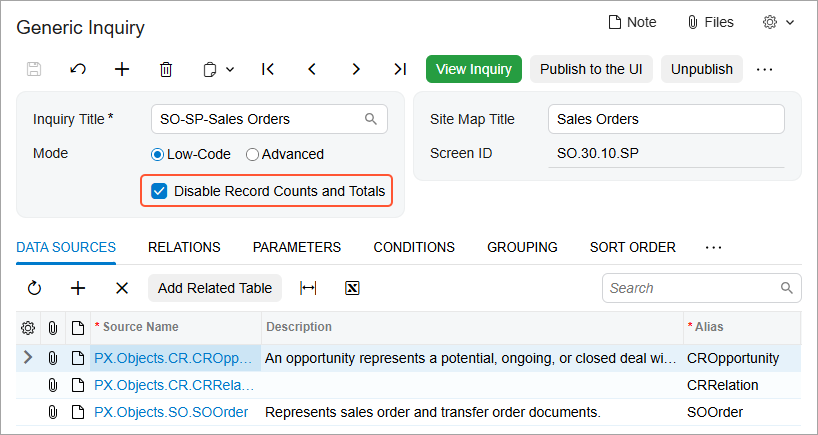
The loading of generic inquiry forms that contain many records could take a long time. Now you can speed up this process by skipping requests that calculate the total number of records in the inquiry form. To do so, select the new Disable Record Counts and Totals check box in the Summary area of the Generic Inquiry (SM208000) form, as shown below.
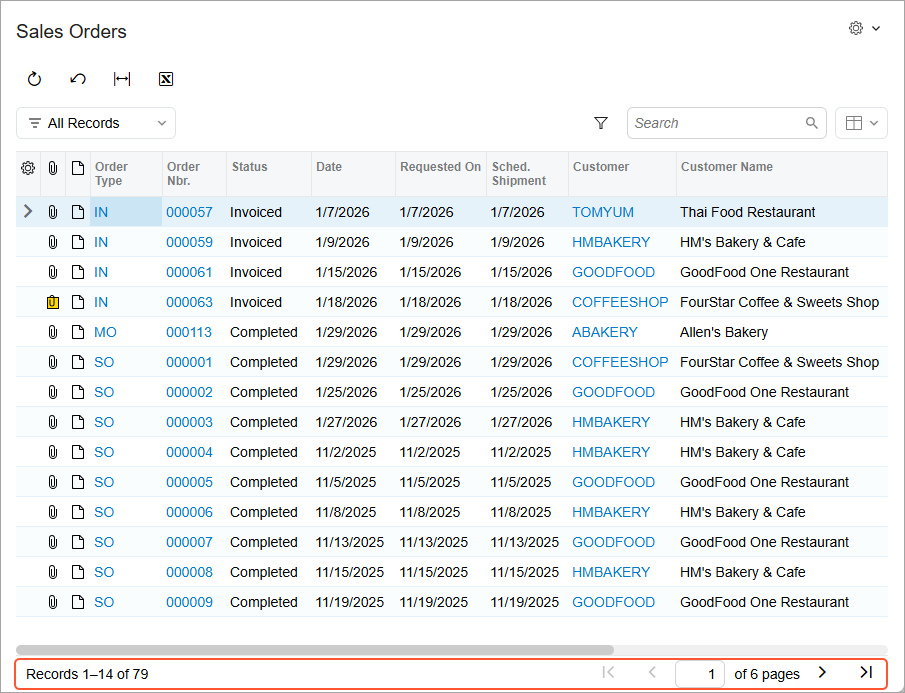
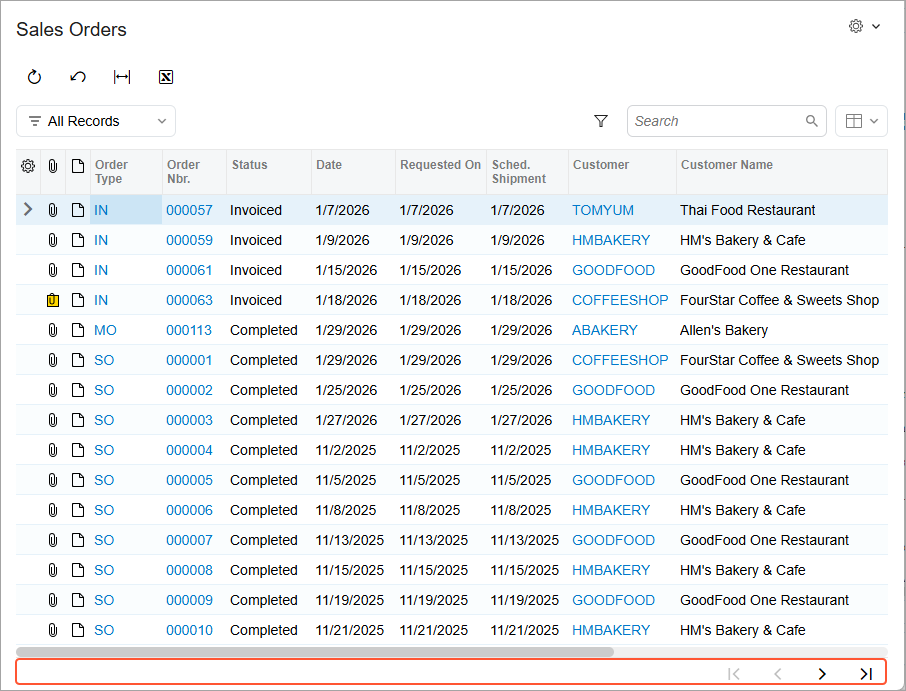
When this check box is selected, the associated generic inquiry form loads faster, but it won’t display the number of records or pages in the footer, as shown in the second screenshot below.
 |
 |
Passing Parameter Values to a Nested Generic Inquiry
Previously, when you used a generic inquiry as a data source for another generic inquiry and wanted to use the same parameter value in both inquiries, you had to define the same parameter in both of them. Starting in MYOB Acumatica 2026.1.1, you can set a parameter in the parent inquiry and use its value in the child inquiry.
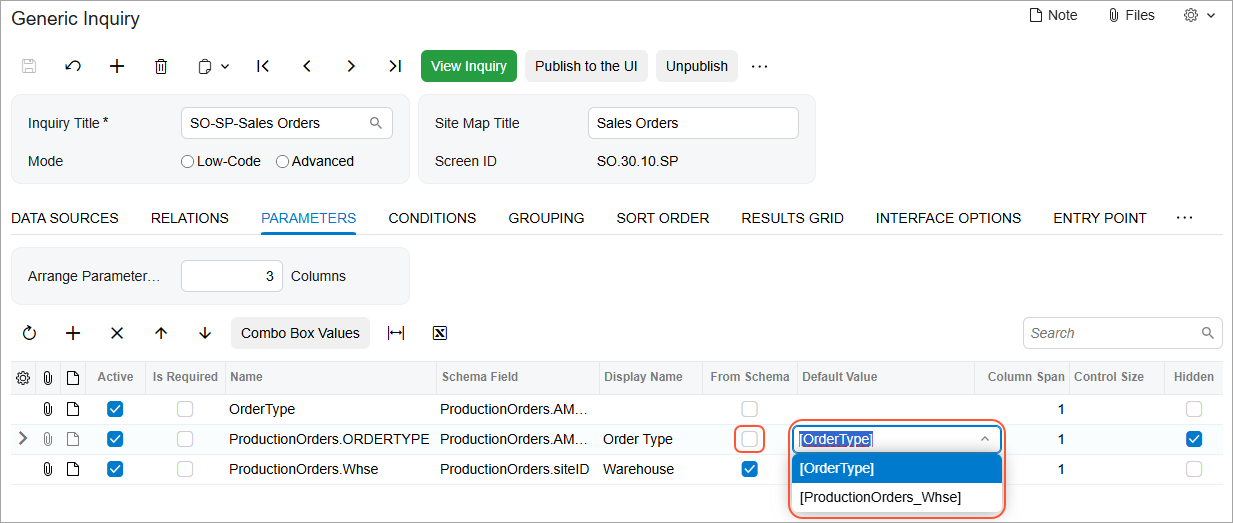
You specify the inquiry parameters on the Parameters tab of the Generic Inquiry (SM208000) form. When you define a parameter for a child inquiry and the From Schema check box isn’t selected, the Default Value column displays a drop-down list with the values of the parent inquiry parameters. (See the child inquiry below.) The parameter names are displayed in brackets to avoid confusion with text values.
Declaring Parameters in Generic Inquiry Query Language
Generic Inquiry Query Language (GIQL) is a powerful SQL-like language that was introduced in MYOB Acumatica 2025 R2 to streamline how you create generic inquiries. Starting in MYOB Acumatica 2026.1.1, you can you can define inquiry parameters by using GIQL and later reuse them in the GIQL expressions.
To define a parameter, use the DECLARE statement. Each parameter can
include essential properties, such as the display name, schema or field type, and default
value. For example, the following code declares two parameters that are linked to the
[PX.Objects.AM.AMProdItem].EndDate schema, have the
From
Date and
To
Date display names, and have preselected default values.
DECLARE EndDateFrom SCHEMA [PX.Objects.AM.AMProdItem].EndDate DEFAULT @MonthStart-12 AS 'From Date'
DECLARE ToEndDate SCHEMA [PX.Objects.AM.AMProdItem].EndDate DEFAULT @Today AS 'To Date'
You can then refer to these parameters in GIQL expressions, as shown in the following example.
WHERE (AMProdItem.EndDate >= EndDateFrom
OR EndDateFrom IS NULL)
AND (AMProdItem.EndDate <= ToEndDate
OR ToEndDate IS NULL)
Learn More
For details on using generic inquiries as data sources, see Data from Multiple Data Sources: Use of Generic Inquiry as Data Source.
To learn further details about declaring parameters in GIQL, see GIQL: Defining Parameters.