
Integrations: Synchronizing with Exchange Server via Microsoft Graph
Starting in MYOB Acumatica 2026 R1, you can integrate with Microsoft Exchange Server using the Microsoft Graph API, which replaces the deprecated Exchange Web Services API. You can synchronize emails, contacts, events, and tasks between MYOB Acumatica and Microsoft Exchange Server.
Replacement for the Exchange Web Services API
In previous versions, MYOB Acumatica connected to Microsoft Exchange Server using the Exchange Web Services (EWS) API. Microsoft plans to retire Exchange Web Services on October 1, 2026. We recommend using the Microsoft Graph API to integrate MYOB Acumatica 2026 R1 with Exchange Server.
Connecting to an Exchange Server via Microsoft Graph
To set up a connection with an Exchange server using the Microsoft Graph API, use the Exchange Integration Configuration (SM204015) form. On the form, you select the Microsoft Graph (Microsoft 365) option in the Web Services box. Then you configure a connector of the Microsoft Graph type on the External Applications (SM301000) form and specify the connector in the External Application box on the Exchange Integration Configuration form.
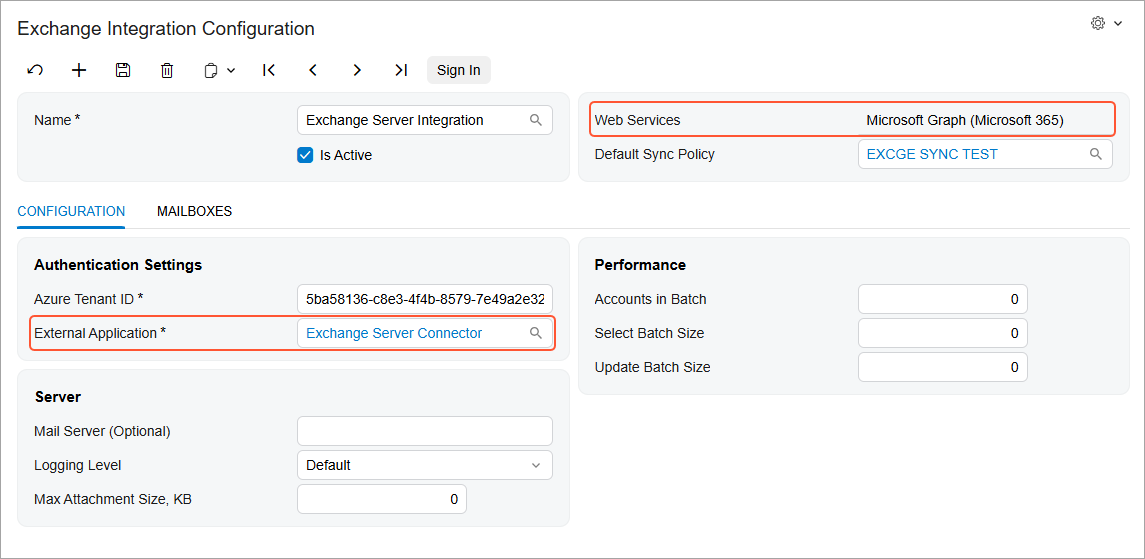
While you configure the connector, you need to register the connector in the Microsoft Azure Portal to obtain the needed settings for the connector. For details on registering the connection in the Microsoft Azure Portal, see To Create a System Email Account for Office 365 with OAuth 2.0.
Learn More
Expand your knowledge by reading the following topics: Synchronizing MYOB Acumatica with Microsoft Exchange Server