
Inventory and Order Management: Automated Receiving with Recommended Putaway Locations
The previous update of MYOB Acumatica introduced a smarter and easier way to manage warehouse distribution through its directed putaway process. Version 2026.1.1 builds on those improvements to further optimize and simplify the simultaneous automated receiving and putaway of goods. This enhancement will be particularly useful for warehouse workers in companies that don't use a single staging location before putting goods away.
Here’s what you’ll need to know about the new capability to make the most of it.
Configuring Recommendations for Automated Receiving
To help warehouse workers take advantage of putaway recommendations during receiving, you need to do the following:
- On the Warehouse Management tab of the Purchase Orders Preferences (PO101000) form, select the Request
Location for Each Item on Receiving check box and clear the following check
boxes:
- Use Single Receiving Location
- Use Default Receiving Location
- For each stock item you want to put away on receipt, specify a location in the
Default Putaway To box (General tab) of
the Item Warehouse Details (IN204500) form.Tip:Alternatively, you can specify this location for the default warehouse in the stock item's settings on the Stock Items (IN202500) form.
- If you also receive and put away non-stock items, specify a location in the Non-Stock Location box (Default Locations tab) of the Warehouses (IN204000) form.
Receiving Items with Putaway Recommendations
Once the configuration is complete, a warehouse worker will see a recommended location when they receive items with the updated settings. The recommendation appears as a system prompt in Receive mode on the Receive and Put Away screen (shown below) when the worker scans the item's barcode.
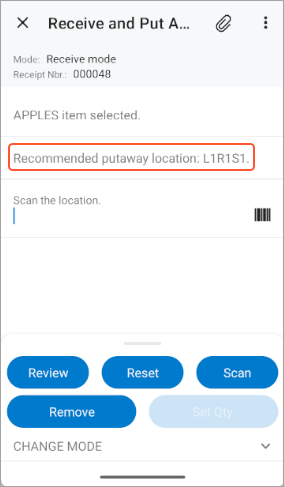
The warehouse worker can scan the recommended location if they’re going to put the item away immediately; they can scan a different one if they want to receive the item in the staging area or another temporary location.