
Inventory and Order Management: Changes to Processing of Vendor Bills
In MYOB Acumatica 2026.1.1, AP clerks and inventory managers gain a more flexible process for handling vendor bills. The update introduces the ability to select the type of the purchase document the system links to a recognized AP bill. The new ability makes it easier to process documents in nonstandard vendor scenarios without running into system limitations. Additionally, users will have less room for unintended errors in bill reversal, which helps keep inventory costs and vendor balances accurate.
Let's walk through what's changed.
Improved Recognition of AP Bills
When you recognize an AP bill on the Incoming Documents (AP301100) form, you need to link it to a purchase document in the Link Line dialog box. In previous versions of MYOB Acumatica, the type of suggested documents in this dialog box depended solely on the settings of the bill's vendor. The system used the state of the Allow AP Bill Before Receipt check box on the Vendors (AP303000) form to determine this type:
- Selected: Purchase order
- Cleared: Purchase receipt
This behavior could cause inconvenience if you had to link the bill to another type of document. For example, if you recognized a bill with a service line and the Allow AP Bill Before Receipt check box was cleared, you couldn't link the bill because the purchase receipt did not contain this line.
Now you can override the state of this check box in the new Selected Mode box (shown below) of the Link Line dialog box.
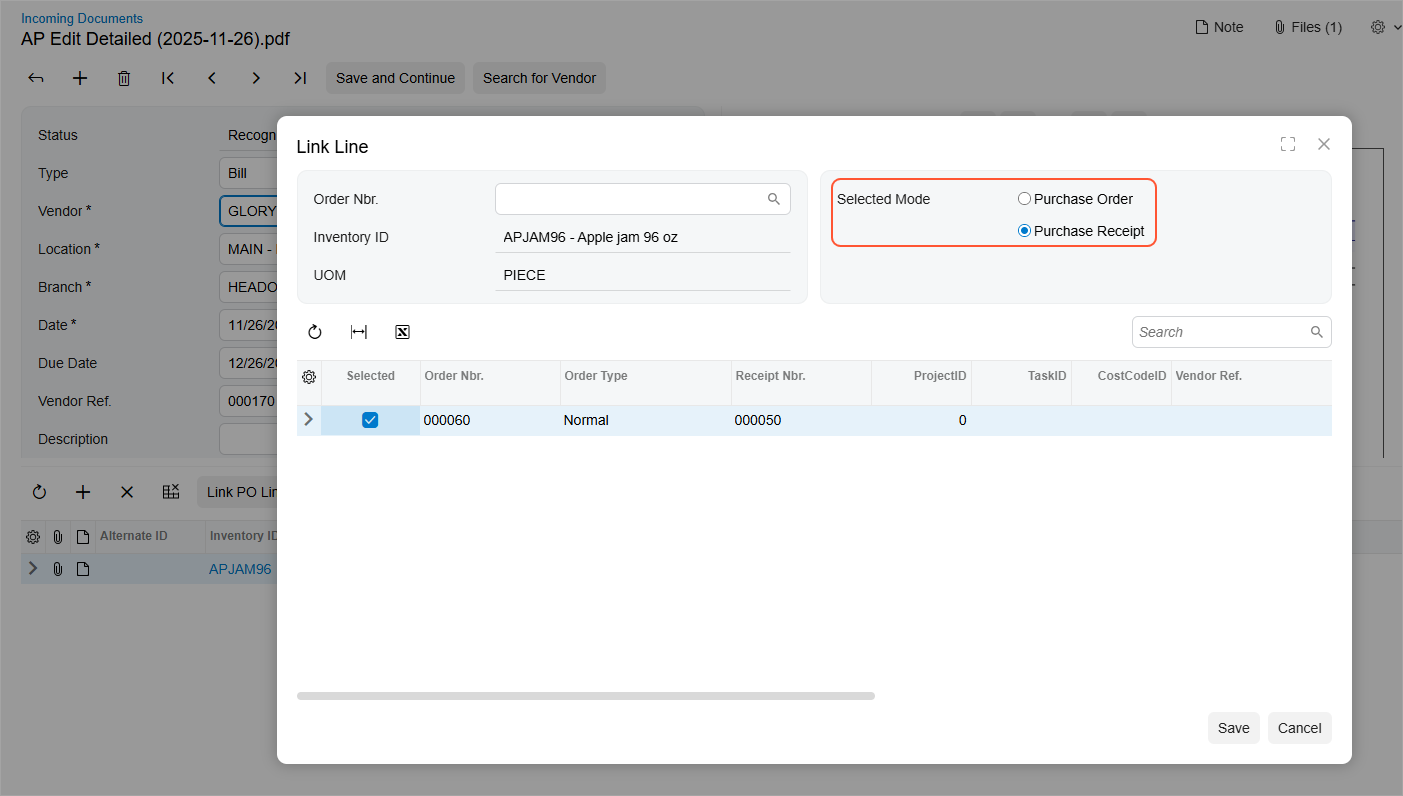
The default option in this box depends on the state of the Allow AP Bill Before Receipt check box for the vendor on the Vendors form:
- Selected: The system selects Purchase Order for all stock and non-stock items.
- Cleared: The system selects Purchase Receipt for the following items:
- Stock items
- Non-stock items that have the Require Receipt check box selected on the Non-Stock Items (IN202000) form.
- Non-stock items with the cleared Require Receipt check box on
the Non-Stock Items form if one of the
following check boxes is selected on the Inventory Preferences (IN101000) form:
- Process Service Lines from Normal Purchase Orders via Purchase Receipts
- Process Service Lines from Drop-Ship Purchase Orders via Purchase Receipts
For items with different settings, the system selects Purchase Order.
Restrictions in Reversal Debit Adjustment
The protection from unintended errors has been reinforced on the Bills and Adjustments (AR301000) form. If you create a reversal debit adjustment for an AP bill linked to a purchase order, purchase receipt, or subcontract, you won't be able to change the following values of the adjustment:
- Values of any column in lines with stock items and non-stock items that require a purchase receipt
- The values in the Project and Project Task columns in lines with non-stock items that don't require a purchase receipt
This change benefits inventory and AP managers by reducing the following risks:
- Incorrect reversal amounts of taxes and purchase price variances (PPV)
- Posting of the reversed amounts to a wrong account
Learn More
For more information about document recognition, see AP Documents from PDFs: General Information.