
DeviceHub: Improved Print Queue Management
Companies that process a high volume of print jobs need a fast and reliable way to monitor and control the print queue. MYOB Acumatica 2026.1.1 introduces the Manage Print Queue (SM206501) form, a centralized location for managing DeviceHub print jobs. With this form, administrators can:
- Organize and prioritize print jobs
- Monitor the queue for stuck print jobs and errors
- Delete, update, or reprint jobs manually or on a schedule
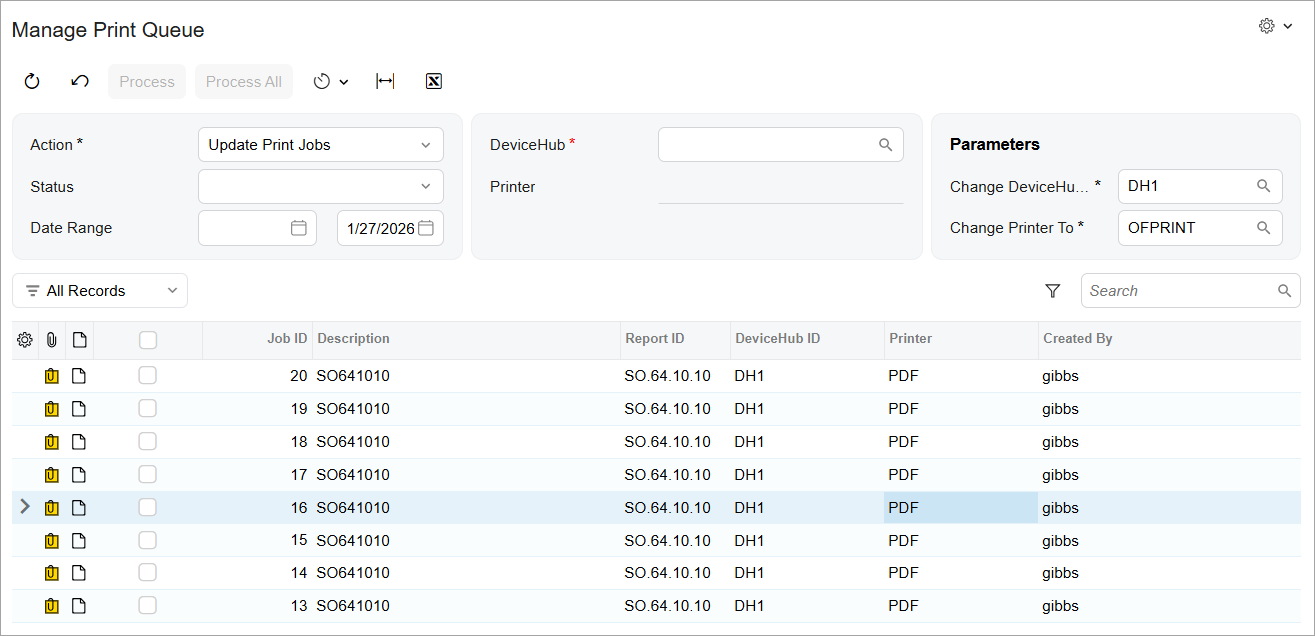
In the Action box, you select what happens to processed print jobs when you click Process or Process All:
- Delete: Deletes the print jobs.
- Reprint: Resends the print jobs to DeviceHub.
- Update Print Jobs: Updates DeviceHub IDs and printers with the Change DeviceHub To and Change Printer To settings in the Selection area.
You can use MYOB Acumatica’s automation schedules to delete print jobs automatically. This approach will help you reduce the unnecessary data in the application database and increase the operational efficiency of printing via DeviceHub.
Learn More
For more information about DeviceHub, see Implementing DeviceHub and Automated Processing: General Information.