
Projects and Construction: Control the Full Project Lifecycle
MYOB Acumatica 2025.2.1 introduces the Closed project status to help you filter out finished projects, focus on active ones, and improve system performance across project-related documents and processes. Projects with this status are automatically hidden from forms and workflows, which keeps lists concise and saves you time selecting the needed project.
Here's how it works.
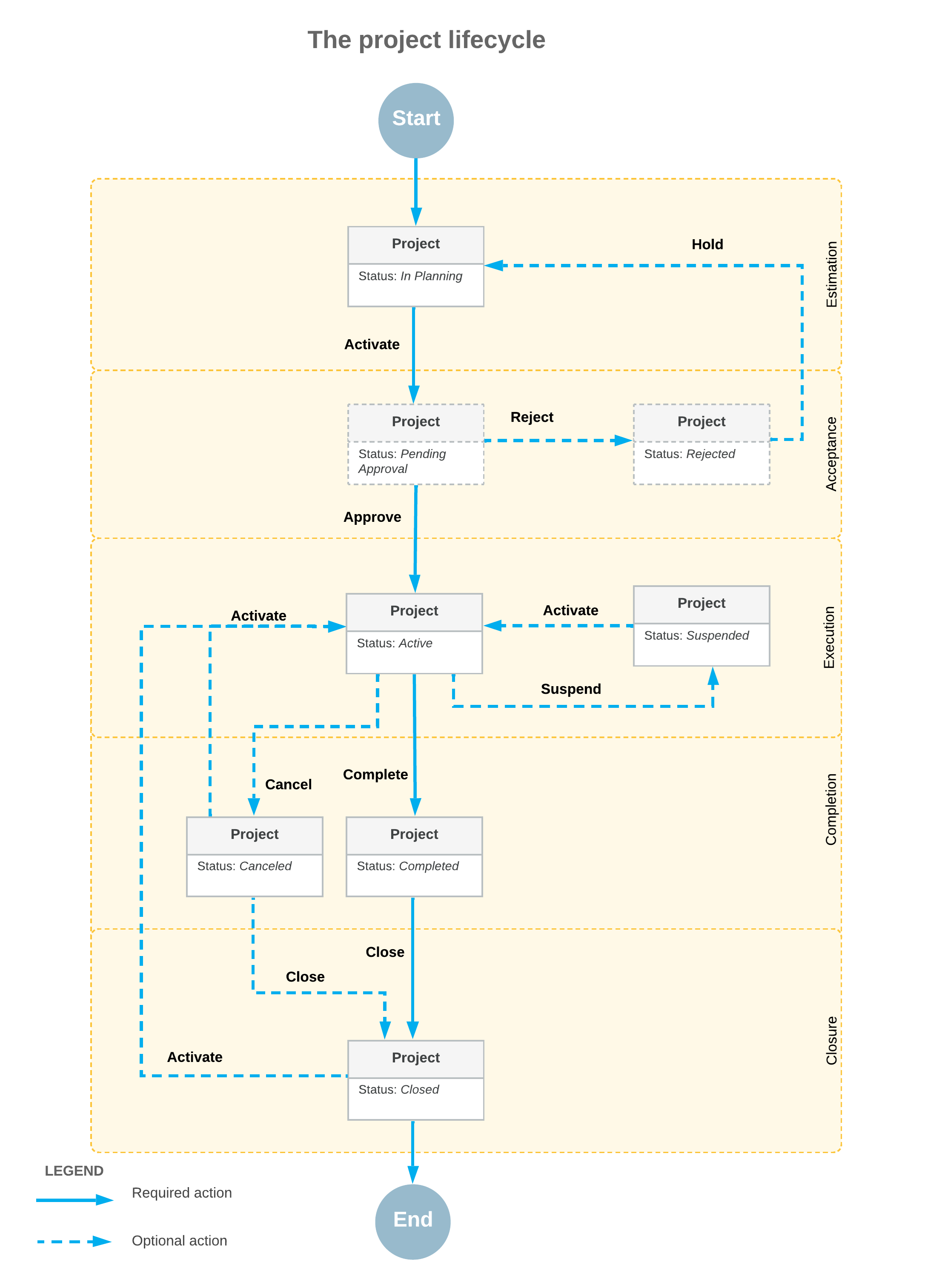
Project Lifecycle with Closure
The following diagram illustrates the project lifecycle, which now includes a project closure stage and the Closed status.
Project Closure
If a project is completed (or canceled) and you don’t expect further activity, you click Close on the form toolbar of the Projects (PM301000) form. The system checks whether the project has any related unprocessed documents. If none are found—meaning that the project is ready for closing—it does the following:
- Assigns the Closed status to the project
- Makes the project's settings, including user-defined fields, and most of the More menu commands read-only on the Projects form
- Makes the project tasks' settings read-only on the Project Tasks (PM302000) and Projects forms
- Hides the project from lookup tables on data entry forms with the Project box or column
- Excludes the project from billing—you can't run billing for it on the Run Project Billing (PM503000) and Projects forms
- Excludes the project from allocation—you can't run allocation on the Run Allocations by Projects (PM502500), Run Allocations by Tasks (PM502000), or Projects form
- Excludes the project from balance recalculation—you can't recalculate its balance on the Recalculate Project Balances (PM504000) or Projects form
These changes help to prevent unintended updates and streamline work by removing closed projects from workflows that involve only non-finished work.
Reports with Closed Projects
Closed projects are hidden from the UI. But you can still analyze closed projects’ past performance and include them in analytics by using these reports, which include projects with all statuses:
- Employee Hours (PM622000): Displays the work hours that your employees have spent on specific projects and project tasks.
- Project Cost History (PM706230): Shows cost transactions for projects. For each project, documents are grouped by account group and cost code (if applicable) and listed by reference number.
- Project Tasks (PM632000): Provides the list of projects with a breakdown of the project tasks, including each task's description, status, start and end dates, and default account (and subaccount, if applicable).
Reopening of a Closed Project
If work resumes on a closed project, click Activate on the form toolbar of the Projects (PM301000) form. The project is assigned the Active status again, becomes visible on data entry forms, and can be billed or included in allocation.
Mobile App
In the mobile app, you can now close projects by tapping Close on the Projects screen.
Closure Readiness Check
To ensure that a project's status can be changed to Closed, the system checks whether documents or records on the forms listed below have been completely processed:
- Activity (CR306010)
- Appointments (FS300200)
- Bills and Adjustments (AP301000)
- Cash Purchases (AP304000)
- Cash Sales (AR304000)
- Cash Transactions (CA304000)
- Change Orders (PM308000)
- Change Requests (PM308500)
- Cost Projection by Date (PM305500)
- Deferral Schedule (DR201500)
- Expense Claim (EP301000)
- Expense Receipt (EP301020)
- Invoices and Memos (AR301000)
- Journal Transactions (GL301000)
- Paychecks and Adjustments (PR302000)
- Payments and Applications (AR302000)
- Pro Forma Invoices (PM307000)
- Production Order Maintenance (AM201500)
- Project Transactions (PM304000)
- Purchase Orders (PO301000)
- Release IN Documents (IN501000)
- Route Service Contracts (FS300800)
- Sales Orders (SO301000)
- Service Contracts (FS305700)
- Service Orders (FS300100)
- Subcontracts (SC301000)
If it finds at least one record, it blocks project closure and displays an error message.
Restricted Operations Related to Closed Projects
For data integrity, the system restricts certain operations—such as voiding, return, or refund—for these documents and transactions related to closed projects:
- A bill on the Bills and Adjustments (AP301000) form
- A payment on the Checks and Payments (AP302000) form
- A cash purchase on the Cash Purchases (AP304000) form
- An invoice on the Invoices and Memos (AR301000) form
- A payment on the Payments and Applications (AR302000) form
- A cash sale on the Cash Sales (AR304000) form
- A GL transaction on the Journal Transactions (GL301000) form
- A GL transaction on the Reclassify Transactions (GL506000) form
- A cash transaction on the Cash Transactions (CA304000) form
Also, you cannot perform these operations if the document or record is related to a closed project:
- Reopening an appointment on the Appointments (FS300200) form by using the Unclose or Reopen menu command
- Creating a production order by using the Estimate (AM303000) form
- Creating a purchase receipt by clicking Enter PO Receipt on the Purchase Orders (PO301000) form
- Creating an invoice by clicking Prepare Invoice on the Sales Orders (SO301000) form
- Reopening a service order on the Service Orders (FS300100) form by using the Unclose or Reopen menu command
- Creating an AP bill by clicking Enter AP Bill on the Subcontracts (SC301000) form
Key Takeaways
- You use the Closed status to exclude completed or canceled projects from project-related processes.
- Closed projects become read-only and are hidden from lookup tables.
- The system will prevent you from closing a project if it has any unprocessed documents.
- Closed projects are excluded from billing and allocation processes.
- Some reports still include closed projects for historical analysis.
- You can reactivate a closed project and continue working with it.
Learn More
Need more details about the project stages and statuses? See Project Creation and Processing: A Project’s Lifecycle.