
CRM: Improved Email Security with TLS Encryption
Your data security just got a boost with the latest versions of the Transport Layer Security (TLS) protocol. MYOB Acumatica 2025.2.1 now exclusively uses TLS 1.2 and TLS 1.3 for mail server connections, ensuring efficient authentication and encrypted communication channels.
Flexible Encryption Settings
On the Email Accounts (SM204002) form, you can now flexibly manage how your system secures connections with mail servers.
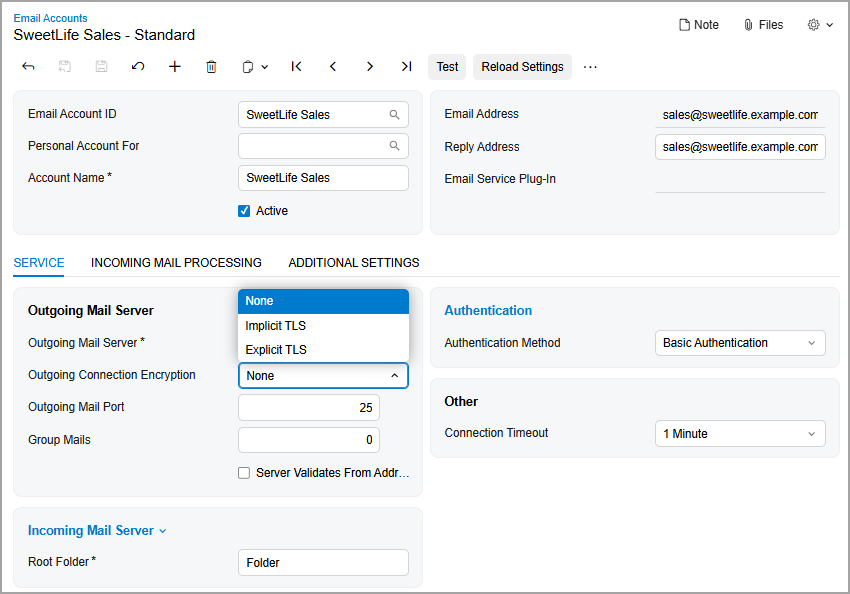
For an outgoing mail server, you select the type of encryption in the Outgoing Connection Encryption box that best meets your company's security requirements (see below):
- None: No encryption is applied. The system uses the default port: 25.
- Implicit TLS: Encryption is applied immediately upon connection. The system uses the default port: 465.
- Explicit TLS (default): The connection starts unencrypted and then upgrades to encryption after it’s established. The system uses the default port: 587.
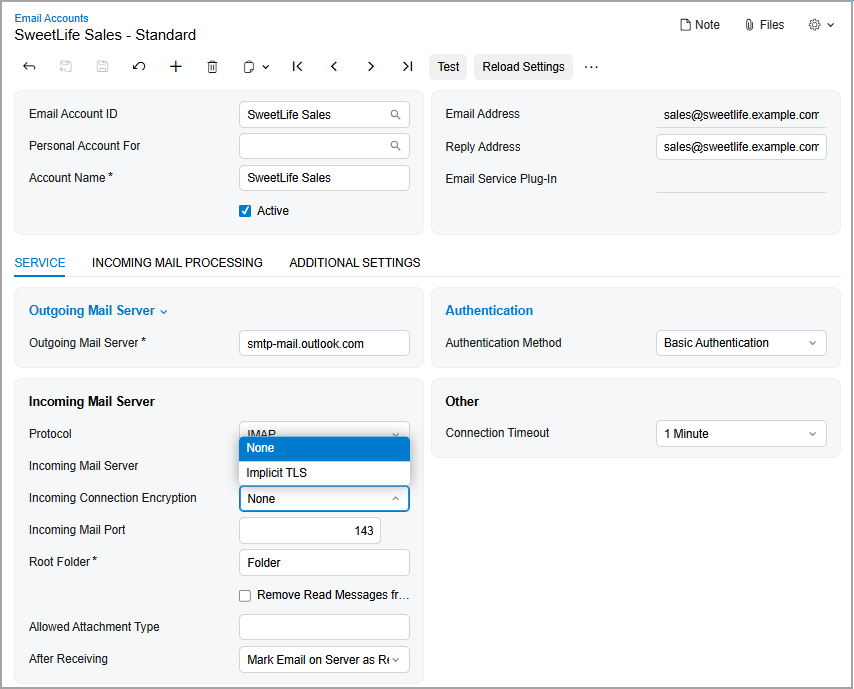
For an incoming mail server, you select one of the following options in the Incoming Connection Encryption box (shown below):
- None: No encryption is applied. The system uses the default ports: 110 for POP3 and 143 for IMAP.
- Implicit TLS (default): Encryption is applied immediately when the connection is established. By default, the system uses the IMAP protocol with port 993. If you select the POP3 protocol, the system uses port 995.
Key Takeaways
Modern TLS encryption and flexible settings enhance email security — with full compatibility and simple setup.