
Integrations: Modern Authentication Model for the Acumatica Add-In for Outlook
To keep the Acumatica add-in for Outlook running smoothly after Microsoft’s deprecation of Exchange identity tokens (effective February 17, 2025), MYOB Acumatica 2025.2.1 now supports Microsoft’s modern authentication model. This change ensures security, reliability, and future compatibility.
Instead of using the deprecated Exchange tokens, the add-in now uses OpenID Connect (OIDC) and Microsoft Entra (formerly Azure AD).
Highlights
- The add-in remains functional even though Microsoft has deprecated Exchange identity tokens for Microsoft 365 subscriptions.
- These updates enable single sign-on (SSO) and modern sign-in with Microsoft Entra.
- As an admin, you don't need to configure user association rules.
- New setup options help you manage identity providers and manifest downloads.
- Exchange on-premises customers can continue using the legacy tokens without interruption.
Modern Sign-In and Seamless Identity Association
You can now sign in to the Acumatica add-in for Outlook using secure, modern OpenID Connect authentication. If your Microsoft 365 account is already linked to an MYOB Acumatica tenant, you’re signed in automatically. If not, just enter your credentials once—the system takes care of linking your accounts for future use. This update simplifies access by:
- Eliminating manual identity mapping: No admin setup is needed to link user accounts.
- Supporting one-time sign-in: Users authenticate once, and the system creates the link between their Outlook and MYOB Acumatica accounts.
- Reducing prompts: Fewer sign-in interruptions create a smoother experience every time you open the add-in.
New OpenID Provider Setting for Outlook Sign-In
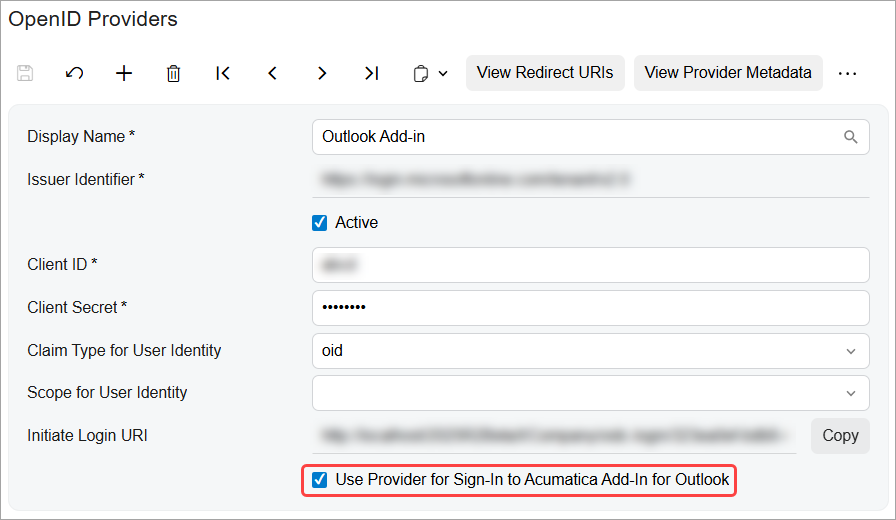
You can now designate a single identity provider for the Acumatica add-in for Outlook by selecting a new check box on the OpenID Providers (SM303020) form. Once the check box is selected for the provider, the system handles conflicts by clearing the check box for other providers in the same tenant.
Updated Manifest Download Options in User Profile
On the User Profile (SM203010) form, users will now see two separate download links—they just need to select the correct one for their setup:
- Get Outlook Add-In Manifest for Exchange Server On-Premises
- Get Outlook Add-In Manifest for Microsoft 365 (shown only when an OpenID provider is configured for the add-in)
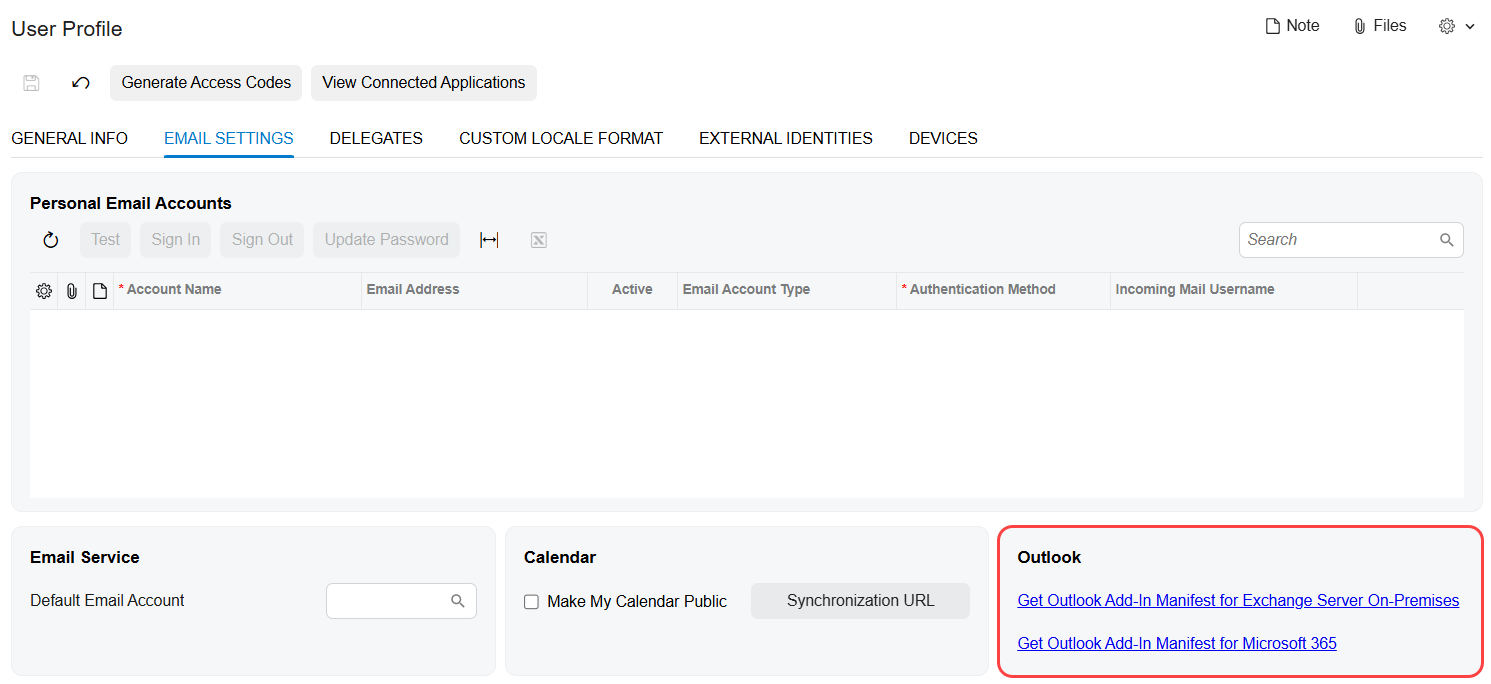
When you download the Microsoft 365 manifest, it comes prefilled with all the necessary
Microsoft Entra identifiers—no extra configuration needed. The file is ready for deployment
and saved as OutlookAddinManifestMicrosoft365.xml.
Secure Access to Outlook Data by Using Entra Tokens
The Acumatica add-in for Outlook now uses Microsoft Entra access tokens to securely retrieve everything you rely on, including:
- Email body content
- Attachments
- Metadata
Your workflow stays the same—you’ll still log emails, create CRM records, and save documents as usual—but now with greater security and reliability.
Continued Support for Exchange Server On-Premises
If you're using Exchange Server on-premises, the Acumatica add-in for Outlook will continue functioning with Exchange identity tokens. No changes are required unless you migrate to Microsoft 365.
Setup for the Add-in to Use the New Authentication Model
To set up the add-in to use the new authentication model with Microsoft 365:
- Register your MYOB Acumatica instance in Microsoft Entra.
- Configure an OpenID provider in MYOB Acumatica.
- Ensure that users download and deploy the correct manifest on the User Profile (SM203010) form.
Key Takeaways
- Microsoft deprecated Exchange identity tokens on February 17, 2025. Starting in MYOB Acumatica 2025.2.1, the Acumatica add-in for Outlook supports the new authentication model.
- The new OpenID Connect-based sign-in supports Microsoft Entra and enables seamless SSO.
- No need for identity mapping rules—users link their accounts on the first sign-in.
- Admins can control Outlook add-in authentication for each provider by using a new check box on the OpenID Providers (SM303020) form.
- Separate manifests support Microsoft 365 and Exchange on-premises environments.
- Exchange Server on-premises remains fully supported and requires no changes.
Learn More
For more information about the configuration and use of the Acumatica add-in for Outlook, see Using the Acumatica Add-In for Outlook.