
Manufacturing: Expanded Use of Warehouse Locations in Production Workflows
In many manufacturing environments, only certain inventory should be available for specific types of transactions, which often means placing restrictions on warehouse locations. With MYOB Acumatica 2025.2.1, you can now use warehouse locations for production activities even when they are restricted from sales or purchase receipts. This gives you greater control over inventory policies—without slowing down manufacturing.
Whether you're working with prototypes, staging inventory, or handling returns for disassembly, you can now isolate materials in production-only zones while issuing and receiving them for production.
Highlights
- Enforce inventory restrictions without adding manual workarounds
- Prevent the misuse of sensitive or specialized stock
- Maintain a clear separation between production and other workflows
Use Any Location in Production Workflows
On the Locations tab of the Warehouses (IN204000) form, you select the Production Allowed check box (shown below) for each warehouse location you intend to use in production-related workflows—such as issuing materials or receiving finished goods. This setting applies even if the location is restricted from sales or purchase receipts.
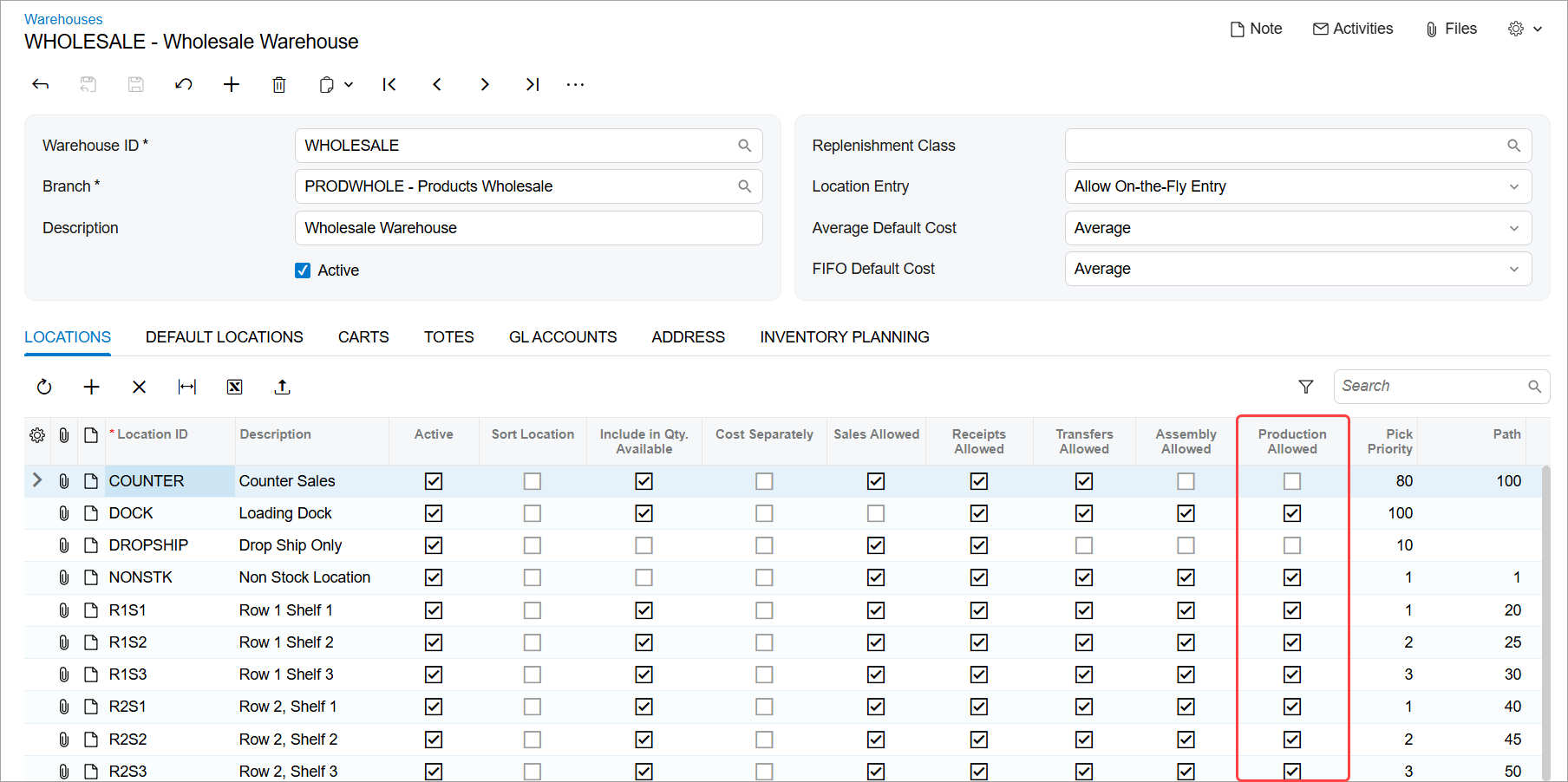
Version 2025.2.1 also provides key enhancements to complement this functionality:
- On manufacturing forms, lookup tables with warehouse locations include only locations with the Production Allowed check box selected, regardless of the locations’ sales or receipt restrictions.
- Material issues and backflush processes now consider only locations with the selected Production Allowed and Include in Qty. Available check boxes when issuing materials.
- On-hand and available quantity calculations on the Critical Materials (AM401000) and Select Materials to Release (AM300020) forms now include all locations allowed for production.
How This Benefits You
- Keep prototype and disassembled parts isolated: Use locations that restrict sales or purchasing to protect experimental or repurposed inventory, while still allowing it to flow through production.
- Stage materials in production-only zones: Avoid hard allocations by using staging locations that are excluded from sales fulfillment but available for internal use.
- Eliminate configuration friction: You no longer need to allow sales or receipts for a location just to make it eligible for production.
- Reduce confusion: Ensure locations allowed for production are always available when reporting production quantities or issuing materials—without requiring extra settings.