
Manufacturing: Streamlined Cost Rollups
Manufacturing profitability depends on accurate, timely cost rollups. Whether you're updating costs for hundreds of bills of material (BOMs) at once or fine-tuning a single component, you need tools that give you control, transparency, and speed.
MYOB Acumatica 2025.2.1 delivers a reimagined cost rollup experience that eliminates confusion, reduces manual effort, and puts you in control of your cost management process. We’ve separated cost calculation from cost updates, giving you a clear and flexible way to generate, analyze, and schedule rollups across your manufacturing environment.
Here's a closer look at how these changes improve your workflow.
Generate Cost Rollups Your Way
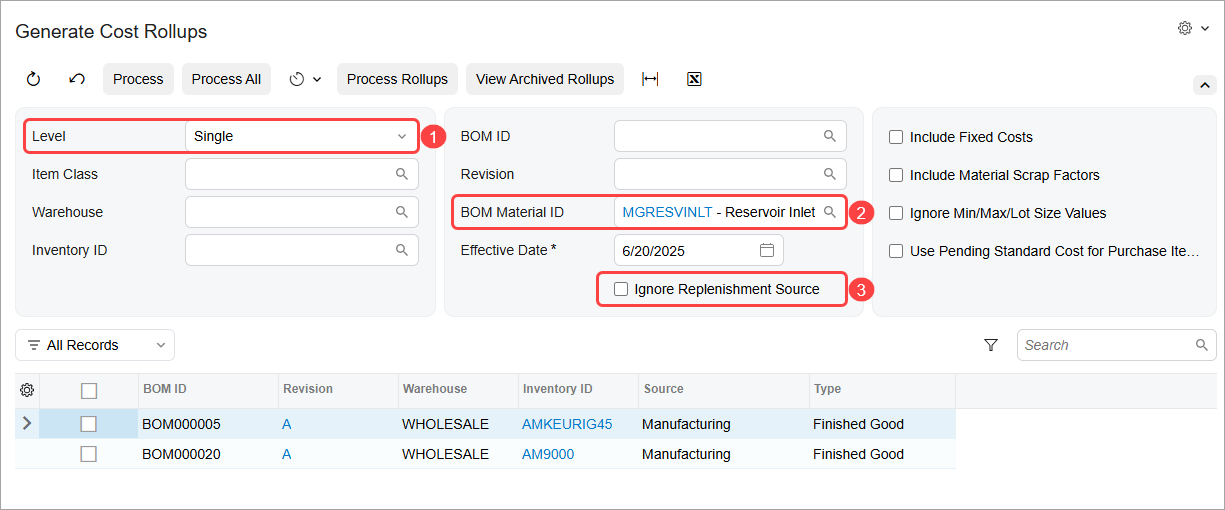
With the new Generate Cost Rollups (AM518000) form, you can take full control over the cost rollup process for active BOMs, generating rollup results without immediately updating any costs in the system. By using this form (shown below), you can:
- Generate cost rollups safely: See rollup results before you apply any changes to live data.
- Target individual BOMs or filter them by item class, warehouse, or revision: Focus only on the most relevant items.
- Perform multilevel or single-level cost rollups: Set Level (Item 1 in the screenshot below) to Multi to calculate costs starting from the lowest-level subassemblies, or to Single to calculate costs for only the selected BOMs.
- Save time when a component’s cost changes: Select the component in the BOM Material ID box (Item 2) to roll up costs for all related BOMs.
- Exclude BOMs based on the replenishment source: Select the Ignore Replenishment Source check box (Item 3) to process all BOMs, including those with a replenishment source of Purchase or Transfer, or clear it to focus only on manufactured items.
- Monitor processing in real time: View progress and status messages in the Processing pop-up window as rollups are generated, and quickly address any BOM costs with warnings or errors.
Act on Rollup Results with Greater Precision
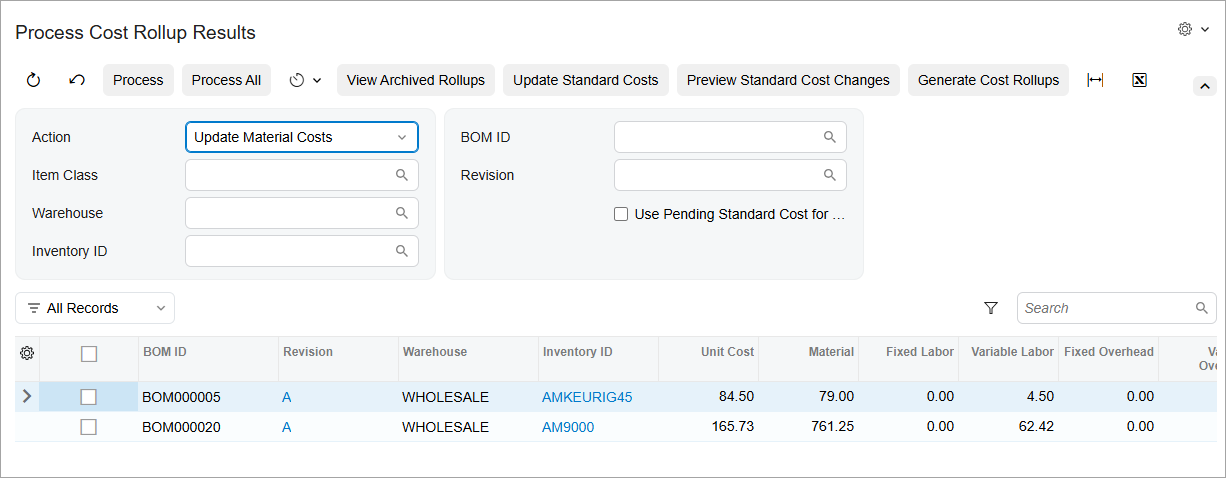
Once rollup results are generated, use the updated Process Cost Rollup Results (AM508000) form, which is shown below, to apply costs with greater confidence and transparency. On this form, you can:
- Choose an action: Update pending costs or material costs, archive rollup data, or apply multiple steps at once.
- Filter and process only the BOMs you need: Apply changes selectively, rather than across all BOMs.
- Process warehouse-specific results: Apply updates to only the locations that require them.
- Get immediate processing feedback: See at a glance whether a record succeeded, failed, or triggered a warning.
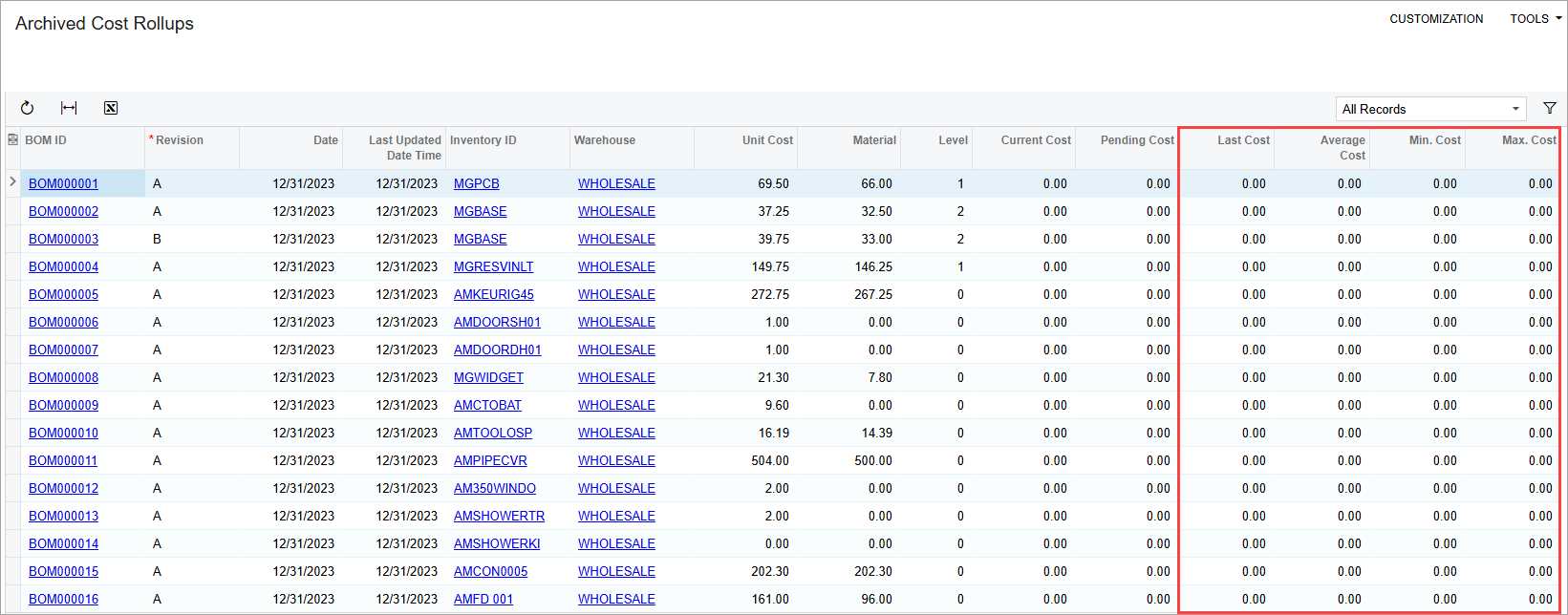
Clicking View Archived Rollups on the form toolbar takes you to the Archived Cost Rollups (AM408000) form. Use this form (shown below) to make data-driven decisions about price and margin changes by comparing rolled-up costs with the last, average, minimum, and maximum values.
Schedule Rollups Like Any Other Process
Need to keep standard costs current without relying on manual reminders? You can now automate both key steps of the BOM cost rollup process by creating standard automation schedules on the Generate Cost Rollups (AM518000) and Process Cost Rollup Results (AM508000) forms. Set up rollups to run nightly, weekly, or as needed—reducing the risk of outdated or inconsistent cost data across your BOMs.
Key Takeaways
- Generate BOM cost rollups without affecting live data
- Filter and process exactly the BOMs you need, including those that use a specific component
- Gain full visibility into warehouse-level costs and replenishment sources
- Review standard processing messages and learn which records succeeded, failed, or raised warnings
- Schedule the automatic processing of rollups to reduce manual effort
- Compare cost history and statistics to evaluate the impact of cost updates over time