
Retail Commerce: Syncing Payment Terms with Shopify
You can now sync payment terms from Shopify with credit terms in MYOB Acumatica 2025.2.1. This makes it easier to keep B2B customer records consistent across both systems. When you sync companies, their payment terms are included, whether you're sending data to Shopify or importing it into MYOB Acumatica. This ensures that your payment terms stay accurate and up to date everywhere. Let's take a look at how to get it set up and start using it.
Configuring Payment Terms in Shopify
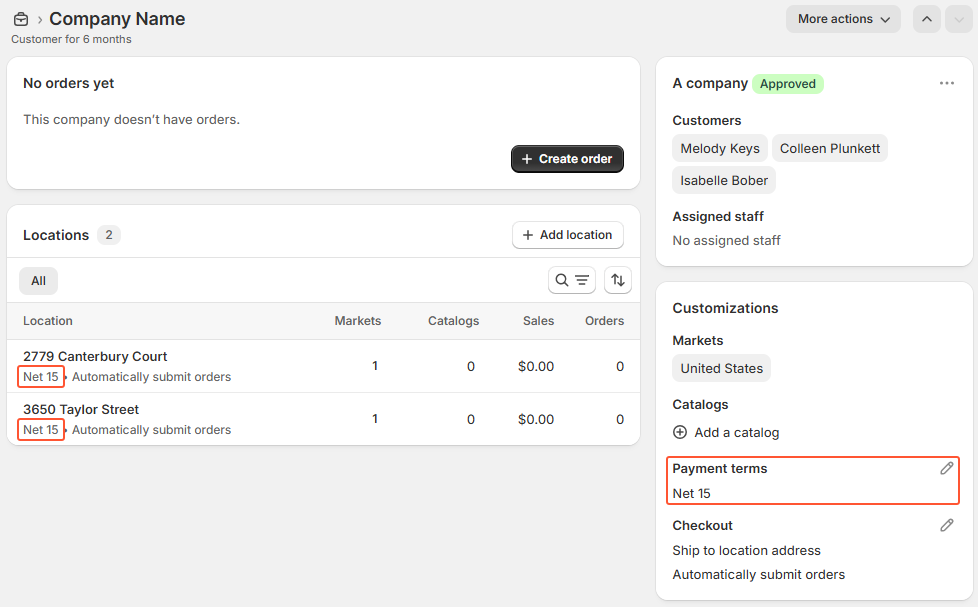
In Shopify, you assign predefined payment terms to company locations in the admin area of the store. On the company page, you select payment terms in the Customizations section, as shown below. By default, the same terms apply to all company locations.
Importing Payment Terms from Shopify
The system imports payment terms from Shopify to MYOB Acumatica during the synchronization of the Company entity. Only customers assigned to the Organization customer category on the General tab of the Customers (AR303000) form are included in the sync.
The connector updates each customer's credit terms on the Financial tab of the Customers form with the company's payment terms from Shopify. But this update occurs only if those terms are mapped in the Payment Terms table on the Customers tab of the Shopify Stores (BC201010) form.
When payment terms are imported: The connector assigns the credit terms mapped to the company's payment terms to the customer in MYOB Acumatica if all company locations in Shopify use the same payment terms. (Locations with no payment terms assigned are ignored.)
When payment terms are skipped: The connector doesn't import payment terms from Shopify if different payment terms are assigned to one or more company locations. Instead, it assigns the imported customer the credit terms defined for the customer class selected on the Customers tab of the Shopify Stores form.
Configuring Credit Terms in MYOB Acumatica
In MYOB Acumatica, you define credit terms on the Credit Terms (CS206500) form. You then assign the needed terms to each customer on the Financial tab of the Customers (AR303000) form.
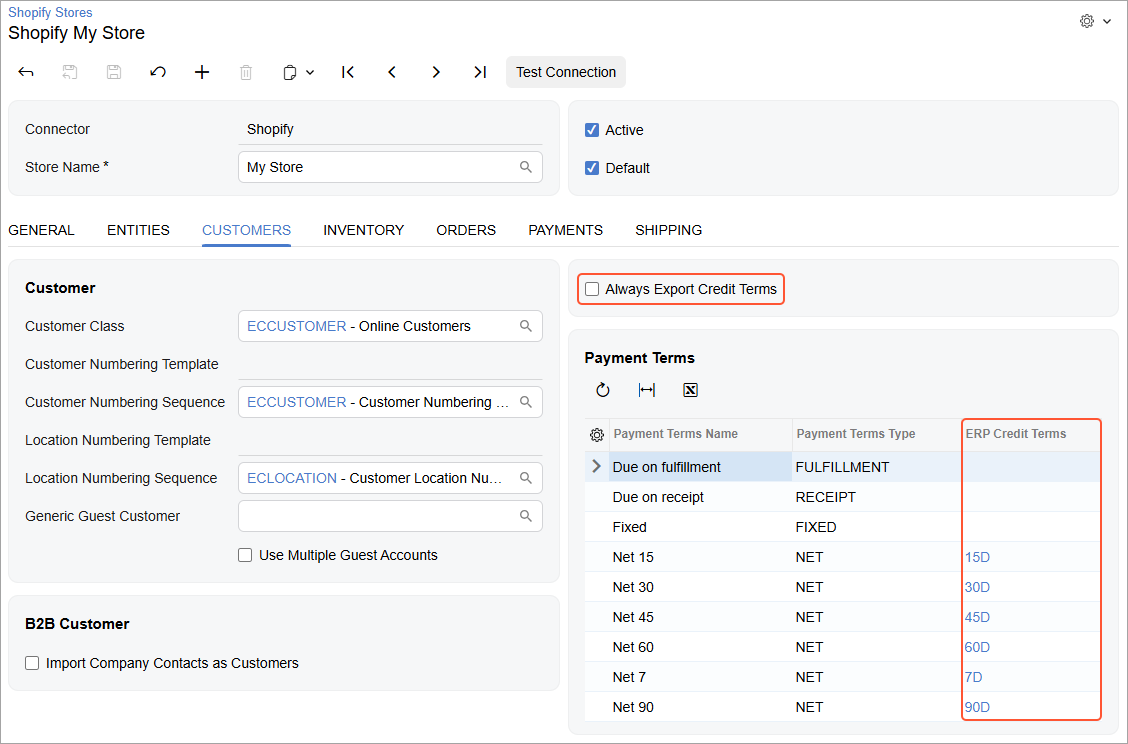
The connector also imports the list of Shopify payment terms into the Payment Terms table on the Customers tab of the Shopify Stores (BC201010) form. In the ERP Credit Terms column, you map credit terms defined in MYOB Acumatica with payment terms from Shopify, as shown below.
If you want MYOB Acumatica to be the main system for managing credit terms, select the Always Export Credit Terms check box. This ensures that during the export, the connector always overrides the payment terms of company locations in Shopify with the credit terms assigned to the corresponding customers in MYOB Acumatica.
Exporting Credit Terms to Shopify
The system exports credit terms from MYOB Acumatica to Shopify when the Company entity is synced. Only customers assigned to the Organization customer category on the General tab of the Customers (AR303000) form are included in the sync.
The system exports credit terms assigned to a customer on the Financial tab of the Customers form only if they're mapped to payment terms in the Payment Terms table on the Customers tab of the Shopify Stores (BC201010) form.
When credit terms are exported: The connector assigns the payment terms mapped to the customer's credit terms to all company locations in Shopify in each of the following cases:
- The Always Export Credit Terms check box is selected on the Customers tab of the Shopify Stores form.
- The customer is being exported for the first time, and no corresponding company exists in Shopify.
- The corresponding company already exists in Shopify, and either no payment terms are specified for any of the company locations or all locations share the same payment terms.
When credit terms are skipped: The connector does not export credit terms if all of the following conditions are met:
- The Always Export Credit Terms check box is cleared on the Customers tab of the Shopify Stores form.
- The corresponding company already exists in Shopify.
- Different payment terms are assigned to one or more company locations.
Key Takeaways
You can now sync payment terms between Shopify and MYOB Acumatica. Whether you're importing companies from Shopify or exporting B2B customers from MYOB Acumatica, the connector keeps payment terms aligned—helping you maintain accurate and consistent B2B records across platforms.