
MYOB IMS Payroll 6.40 release notes
MYOB is pleased to release the MYOB IMS Payroll v6.40 application, which contains legislative changes for the 2019–20 tax year.
These changes include the new Payday Filing facility as well as updated ACC Earner Levy and Student Loan thresholds, and other legislated changes, effective from your first pay with a period ending date on or after 1 April 2019. The new thresholds will be applied automatically.
We’ve also made some enhancements, and addressed known issues, as part of our on-going commitment to providing you with quality payroll software.
Install v6.40 at your earliest convenience.
-
When to install v6.40: You can install this version any time during March, but make sure you do it before you process your first pay period ending on or after 1 April 2019.
-
Before you process your first pays with a payment date of 1 April 2019 or later: Refer to the Tax Year End Procedures March 2019 document as this will be your first pay run in the new tax year. This document will be available along with the notification of the availability of v6.40
-
myIR Portal: if you haven’t done so already ensure you have signed up for / have access to the myIR portal on the IRD’s website.
DESKTOP INSTALLATION
Before you install this version:
-
Close all ‘open’ payroll periods in your payroll companies.
-
Back up each of your payroll companies, via the Tools menu, after closing the last payroll period processed in each company.
-
Close all applications on your PC.
-
Note: Uninstalling an earlier version of IMS Payroll prior to installing this version is not recommended or required as any custom payroll software and modules will need to be reinstalled.
-
If you’re downloading the installer: Double-click the executable file that you download (.exe as contained in the link). You need to install the new version on every computer that has MYOB IMS Payroll installed.
-
IMS PAYROLL CLOUD INSTALLATION
|
1. |
Log in to IMS Payroll Cloud. |
|
2. |
Click the gold 'Upgrade' button that appears at the bottom left of your screen. The 'Upgrade' button will only appear when you click on a company with a Closed status. |
|
3. |
Repeat for each payroll company you manage. |
-
After installing, log in to a payroll company, go to Help > About IMS Payroll Partner and check that the version is Version 6.40 March 2019.
-
If you have any issues, please call us on 0800 600 110.
-
ENHANCEMENTS
-
Payday Filing: Payday filing replaces the filing of the current Employer Monthly Schedule (IR348) and Employer Deduction File (IR345) and is compulsory from 1 April 2019. It requires that all payroll users file electronically to IRD, within two working days of the pay day, their new and departing Employee Details file and EI Returns. For an overview of the payday filing processes\functions within this release, refer to the provided document Payday Filing. This document can be found in the Frequently Asked Questions section of your documentation once this payroll update has been installed.
-
New ACC Earner Levy threshold: The ACC Earner Levy’s maximum threshold will increase from $126,286 to $128,470 and applies from your first pay period with an end date on or after 1 April 2019. This makes $1785.73 the maximum ACC Earner Levy that can be deducted for the 2019–20 tax year. The current Earner Premium Levy rate of 1.39% ($1.39 per $100) is retained for the 2019–20 tax year.
-
New Student Loan threshold: The threshold has increased from $19,448 to $19,760 and is effective from the first pay period ending on or after 1 April 2019. The pay frequency thresholds increases are as follows:
-
Weekly:$374to $380.
-
Fortnightly:$748to $760.
-
4 Weekly:$1,496to $1,520.
-
Monthly$1,621to $1,647.
-
Minimum Wage Rate increases: From 1 April 2019, the following Minimum Wage Rate increases apply:
-
Adult: Increases by $1.20 to $17.70 (currently $16.50 per hour).Start Out and Training: Increases by 96 cents to $14.16 (currently $13.20 per hour).To apply the new rates, go to Tools > Hourly Rate Update.
-
New KiwiSaver Member Contribution Rates: From 1 April 2019, KiwiSaver employees will be able to choose the new rates of 6% and 10% in addition to the existing rates of 3%, 4% and 8%. Additionally, employees 65 years of age and older will be able to opt-in to KiwiSaver.
-
Annual Leave Rate Calculation as at the date leave was taken: The MBIE have clarified how leave rates should be calculated when a period of leave takes place in a previous pay period but is not actually paid until the next or subsequent pay period.
-
For example: A weekly employee Bronwyn takes a day’s Annual Leave on 4 April within the previous pay period ending 7 April, but this is not actually recorded in the payroll until the following pay period for 14 April.
-
To enter this correctly, you must be able to specify the date when the leave was taken – this can be achieved by accessing the Rate Override box for the Annual Leave payment entered.
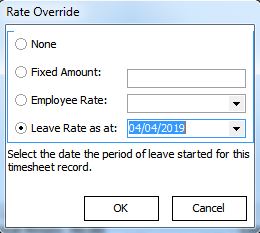
This will then retrieve the holiday pay rate which would have applied if the leave had been entered within the pay period ending 7 April.
The MBIE also state that a period of continuous leave that starts in one pay period and crosses into the next pay period should all be paid at the rate that would’ve applied for the first day of that period of leave.
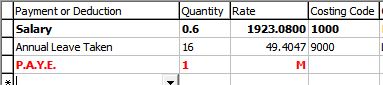
Using the example above, if Bronwyn’s leave started on 4 April and finished on 10 April (5 days of Annual Leave excluding the weekend) then all 5 days of leave should be paid at the rate calculated for 4 April.
For period ending 7 April the Timesheets may look like this:
And for period ending 14 April the Timesheets would look like this:
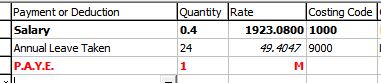
Note that the Annual Leave Taken rate for the 14th has had the Rate Override – Leave Rate As At date specified as 4 April.
-
Windows 10 Compatibility Update: The last feature update for Windows 10 – version 1809 - caused issues for some modules when starting up the payroll or attempting to email payslips. This only affected 32-bit editions of Windows 10.