
MYOB IMS Payroll 6.70 release notes
Introduction
The 6.70 release:
-
Adds compliance tax updates.
-
Improves clarity in the user interface of several screens.
Installing your upgrade
Before installing the desktop upgrade, you must close all Open payroll periods in your payroll companies
To install the desktop upgrade
Before you install the desktop version:
-
Close all Open payroll periods in your payroll companies.
-
Back up each of your payroll companies via the Tools menu.
-
Close all IMS applications on your PC.
Uninstalling an earlier version of IMS Payroll prior to installing this version is not recommended or required, as you’ll need to reinstall any custom payroll software or modules.
If you’re downloading the installer:
-
Double-click the executable file (.exe) that you downloaded.
-
Install the new version on every computer that has MYOB IMS Payroll installed.
To install the IMS Payroll Cloud upgrade
-
Log in to IMS Payroll Cloud.
-
At the bottom left, click the gold Upgrade button.
The Upgrade button only appears after you click on a company with the Closed status.
-
Repeat steps 1–2 for each payroll company you manage.
New Features
Tax Updates
For more information on what to do before you start a pay in the new financial year, see the 2022–2023 tax year end procedures document.
ACC Rates and Thresholds
Changes to ACC apply from your first pay period with an end date on or after 1 April 2022. MYOB IMS Payroll has been updated to incorporate the following changes:
|
Detail |
Current Value |
New Value |
|
ACC earner levy rate |
1.39% |
1.46% |
|
ACC income maximum |
$130,911.00 |
$136,544.00 |
|
Maximum ACC earner levy |
$1,819.66 |
$1,993.54 |
Student Loan Thresholds
This release updates the student loan thresholds for the 2022–2023 financial year. The new thresholds are:
|
Period |
New Value |
|
Annual |
$21,268 |
|
Monthly |
$1,772.33 |
|
4-weekly |
$1,636 |
|
Fortnightly |
$818 |
|
Weekly |
$409 |
Minimum Wage Rate Increase
From 1 April 2022, Wage Rate increases apply. To apply the new rates, go to the Tools menu and choose Hourly Rate Update.
|
Rate |
Current rate |
New rate |
|
Adult |
$20.00 |
$21.20 |
|
Start Out and Training |
$16.00 |
$16.96 |
Enhancements
Renamed Average rate (AWE) and Ordinary rate (OWP)
This release renames some terms:
-
Average rate is now 52 week Rate
-
Ordinary rate is now 4 week Rate
-
Current Rate is now Curr. rate (OWP).
This ensures that the terms IMS Payroll uses are better aligned with the terms defined in the Holidays Act.
Parental Leave Updates
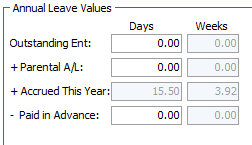
On the Employee Leave > Annual leave tab, the Parental A/L field has been moved, so it’s now above the Accrued This Year field. This is to clarify the order in which annual leave units are used.
If an employee has Parental A/L units, they are used after the Outstanding Ent annual leave values, and before the Accrued This Year values.
Definition of a Week Update
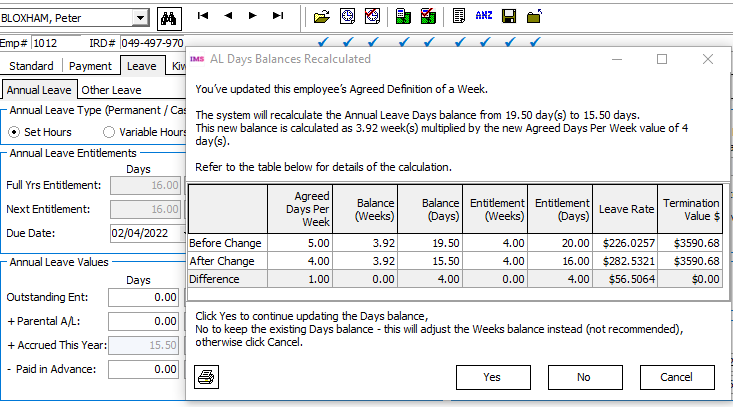
The AL Days Balances Recalculated window now opens when changing the definition of a week for an employee who only has Accrued This Year annual leave units. This lets you review and print the change.
HR/Notes Tab Update
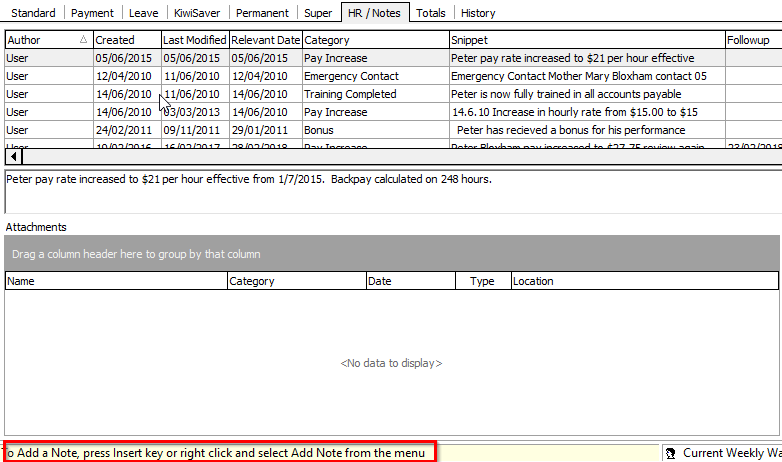
On the Employee > HR / Notes tab, to create a note you need to click inside the table area then press Insert or right click and select Add Note from the menu.
We’ve added instructions on the bottom left of the screen that explain this.
Standard Hours Worked Report Update
To help you decide if an employee has worked the minimum required days or hours to be entitled for sick leave or bereavement leave, this release adds hours and days paid for average daily pay to the Standard Hours Worked report.
Two new Hours and Days columns have been added in a Units Paid for ADP section. Also, the existing Hours, Days, AL In Weeks and LWOP Weeks columns are now grouped in a Units Paid for Holiday Rate section.
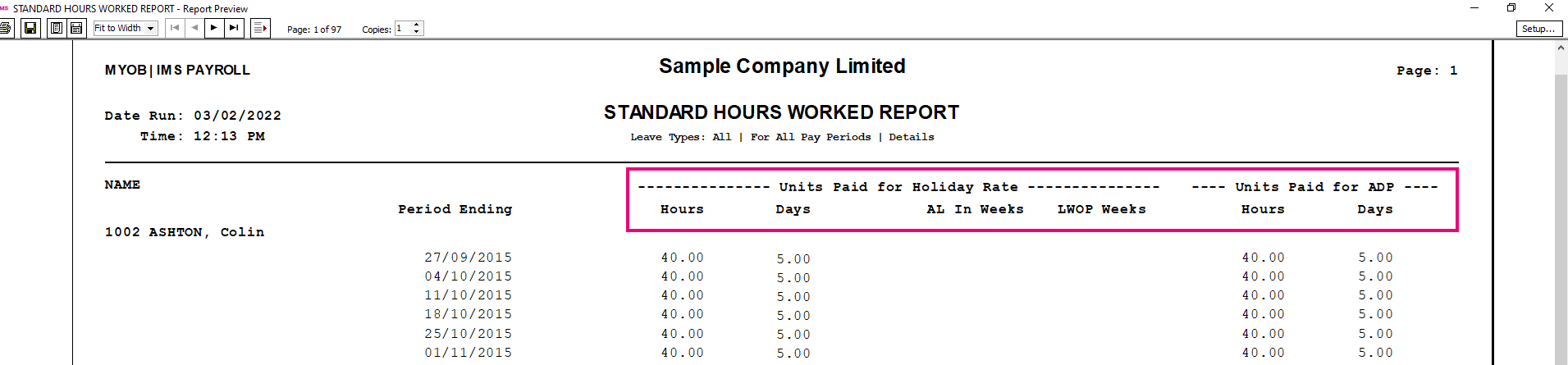
The report sources Units Paid for ADP values from the ADP Hrs and ADP Days columns on an employee’s History > Leave Earnings tab.
For more details about leave eligibility criteria see the New Zealand government’s .