
MYOB IMS Payroll 6.80 release notes
Introduction
What’s new in this release?
The 6.80 release ensures that MYOB IMS Payroll complies with tax updates for the 2023–2024 tax year. It also makes other minor improvements and resolves issues identified in previous releases.
Installing your upgrade
Before installing the desktop upgrade, you must close all Open payroll periods in your payroll companies
To install the desktop upgrade
Before you install the desktop version:
-
Close all Open payroll periods in your payroll companies.
-
Back up each of your payroll companies via the Tools menu.
-
Close all IMS applications on your PC.
Uninstalling an earlier version of IMS Payroll prior to installing this version is not recommended or required, as you’ll need to reinstall any custom payroll software or modules.
If you’re downloading the installer:
-
Double-click the executable file (.exe) that you downloaded.
-
Install the new version on every computer that has MYOB IMS Payroll installed.
To install the IMS Payroll Cloud upgrade
-
Log in to IMS Payroll Cloud.
-
At the bottom left, click the gold Upgrade button.
The Upgrade button only appears after you click on a company with the Closed status.
-
Repeat steps 1–2 for each payroll company you manage.
New Features
Tax updates
This release updates MYOB IMS Payroll to comply with the IRD’s required tax rates and thresholds for the 2023–2024 tax year.
For details on what’s changed and what you need to do, see the .
More secure passwords
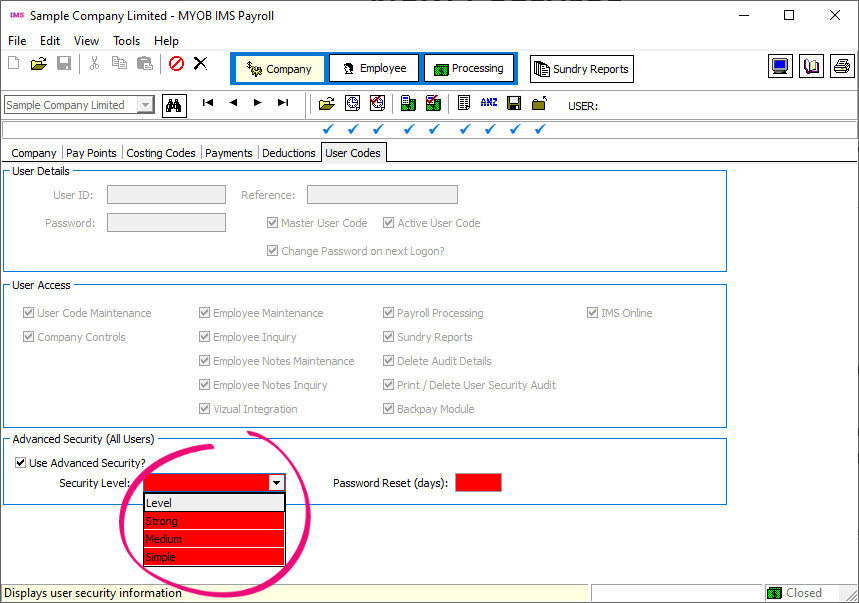
As a master user in MYOB IMS Payroll, you now have three options when for users on the User Codes tab of the Company screen:
The User Codes tab is only available if the User Security? option is selected on the Company tab.
-
Simple passwords must be at least six characters long.
-
Medium passwords must be at least six characters long, containing at least one number and one symbol.
-
Strong passwords must be at least fourteen characters long, containing: at least one upper-case character; at least one lower-case character; at least two numbers or symbols.
Minor improvements
The 6.80 release includes the following minor improvements:
-
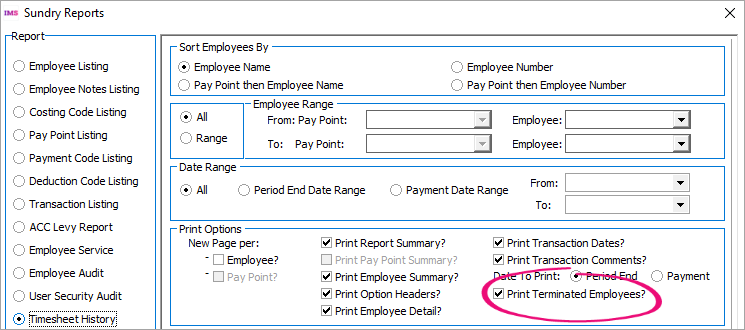
When running the Timesheet History report, the Print Terminated Employees? checkbox lets you choose whether to include terminated employees.
-
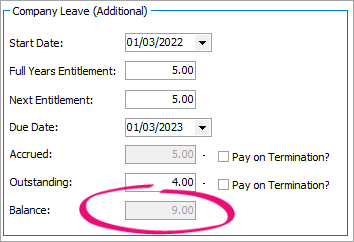
The Company Leave (Additional) section of the Service Leave tab now has a Balance field, so you don’t need to manually calculate an employee’s balance.
-
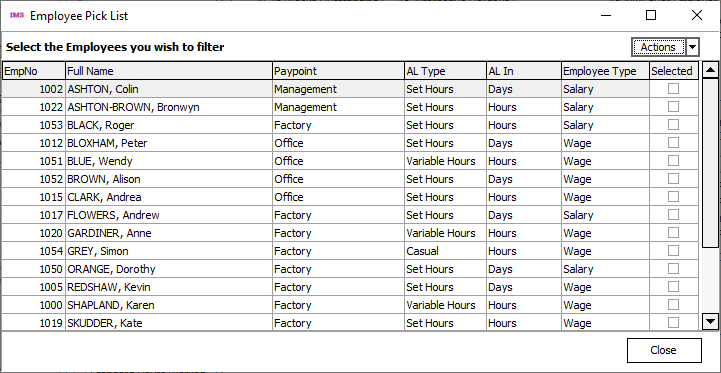
You can now view historical payslips for specific employees. Previously, you could only view historical payslips for a range of employees. On the Sundry Reports screen for Historical Payslips, select Pick List in the Print Range section. This opens the Employee Pick List screen.
-
For employee bank account numbers that start with ‘04’, JP Morgan Chase / Wise is now displayed as the name.
-
Dropdown lists are now automatically in alphabetical order.
-
When backing up a company using MYOB IMS NanoRepair, a warning prevents you from accidentally overwriting an existing backup with the same name.
-
When backing up a company on the 8-Backup tab of the Processing screen, the Backup to field now displays long backup file paths in full.
Resolved Issues
MYOB IMS Payroll and IMS Cloud
|
Issue description |
Resolution |
|
When printing the Dept of Statistics Report as a range of pay points, information was displayed incorrectly. |
This has been resolved. |
|
When logged into MYOB IMS Payroll, errors could occur if you went to File > Open Company to change companies, but then closed the login screen. |
This has been resolved. |
|
When filing an employee information (EI) return to the IRD, the PAYE amount incorrectly excluded tax credits. |
This has been resolved. Tax credits are now included in the PAYE amount. |
|
Using the Employee Import utility to change an employee’s information was incorrectly changing their pay rate from Per Year to Per Pay. |
This has been resolved. |