
MYOB IMS Payroll 6.41 release notes
Introduction
What’s New in this Release?
The release adds support for domestic violence leave (DVL), in compliance with the Domestic Violence—Victims’ Protection Bill. This new law, which comes into effect on 1 April 2019, entitles employees affected by domestic violence to up to ten days of paid domestic violence leave per year, to deal with the effects of domestic violence.
Installing Your Upgrade
Desktop Installation
Before you install this version:
-
Close all “Open” payroll periods in your payroll companies.
-
Back up each of your payroll companies, via the Tools menu, after closing the last payroll period processed in each company.
-
Close all applications on your PC.
Uninstalling an earlier version of IMS Payroll prior to installing this version is not recommended or required as any custom payroll software and modules will need to be reinstalled.
If you’re downloading the installer:
-
Double-click the executable file that you download (.exe as contained in the link).
-
You need to install the new version on every computer that has MYOB IMS Payroll installed.
IMS Payroll Cloud Installation
-
Log in to IMS Payroll Cloud.
-
Click the gold Upgrade button that appears at the bottom left of your screen. The Upgrade button will only appear when you click on a company with the “Closed” status.
-
Repeat for each payroll company you manage.
After installing, log in to a payroll company, go to Help > About IMS Payroll Partner and check that the version is Version March 2019.
If you have any issues, please call us on 0800 600 110.
New Features
Domestic Violence Leave
The Domestic Violence—Victims’ Protection Bill, which comes into effect on 1 April 2019, entitles employees affected by domestic violence to up to ten days of paid domestic violence leave (DVL) per year, to deal with the effects of domestic violence.
Domestic violence leave is accrued and paid like sick leave. As with sick leave, employees are eligible for DVL after they have completed six months’ continuous employment with the employer. Unlike sick leave, however, DVL doesn’t accumulate, i.e. each year, the employee’s DVL balance is reset to ten days.
Setting up Domestic Violence Leave
A “Domestic Special Leave” payment is added automatically when this release is installed:
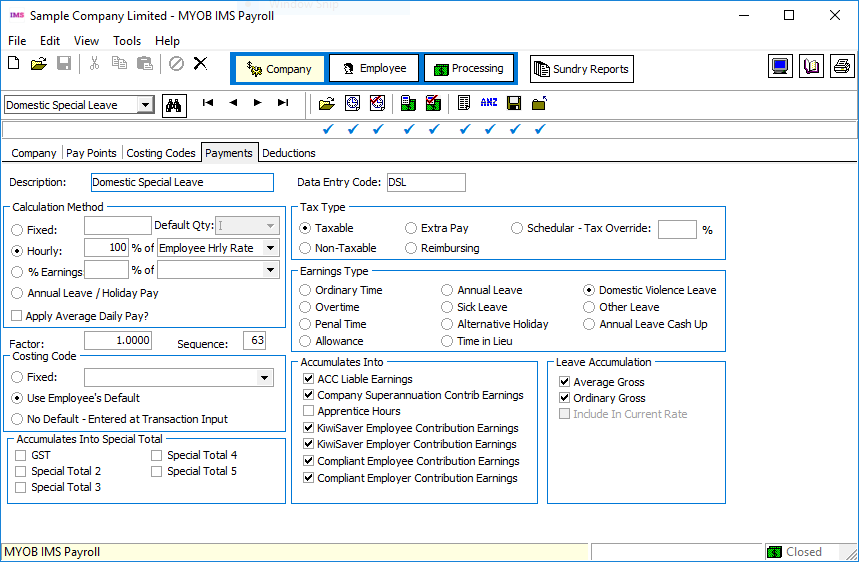
The Tax Type and Earnings Type sections cannot be edited for this payment, but all other details can. In particular, you may want to change the Description and Data Entry Code to preserve employees’ privacy when DVL appears on payslips.
A new DV Leave in Advance? option is available on the Company Information screen:
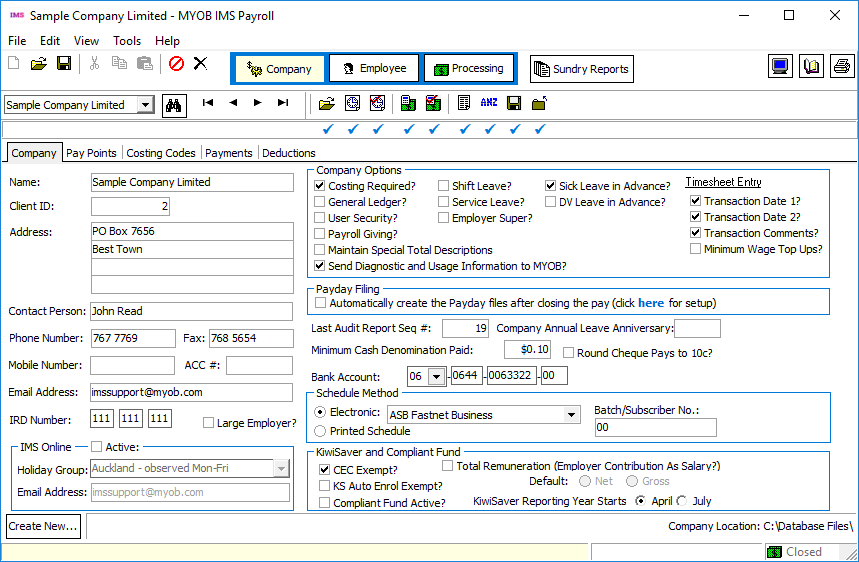
This option works the same as the existing Sick Leave in Advance? option: when it is ticked, DVL can be paid in advance to employees whose DVL balance is not sufficient to cover the leave they are taking. Leave paid in advance will be deducted from the employee’s balance when their Next Entitlement Due Date rolls over.
Employees’ DVL settings, entitlements and balances are now displayed on the Leave tab of the Employee screen:
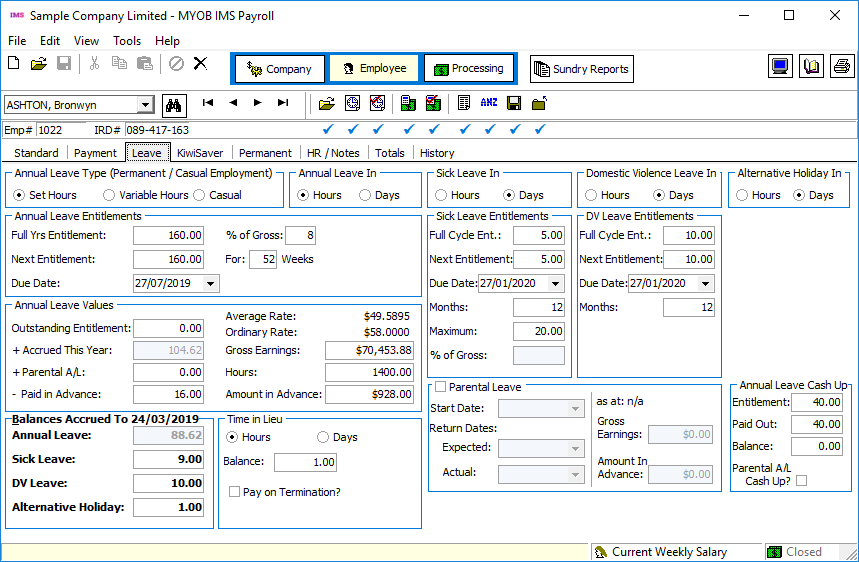
As with sick leave, DVL can be calculated and displayed in Hours or Days.
Processing Domestic Violence Leave
Domestic violence leave is processed in the same way as sick leave. To pay an employee DVL, add a payment with the new Domestic Special Leave type:
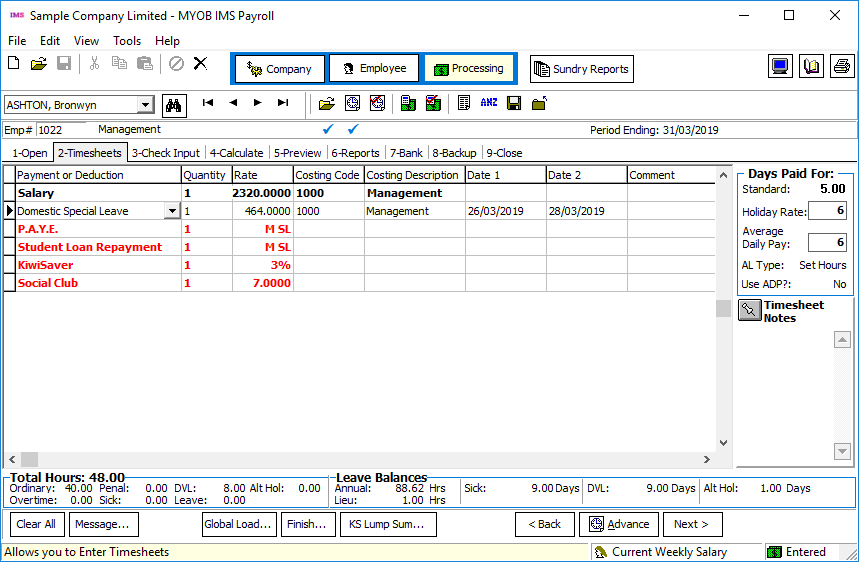
The rate can be overridden, as with other payments.
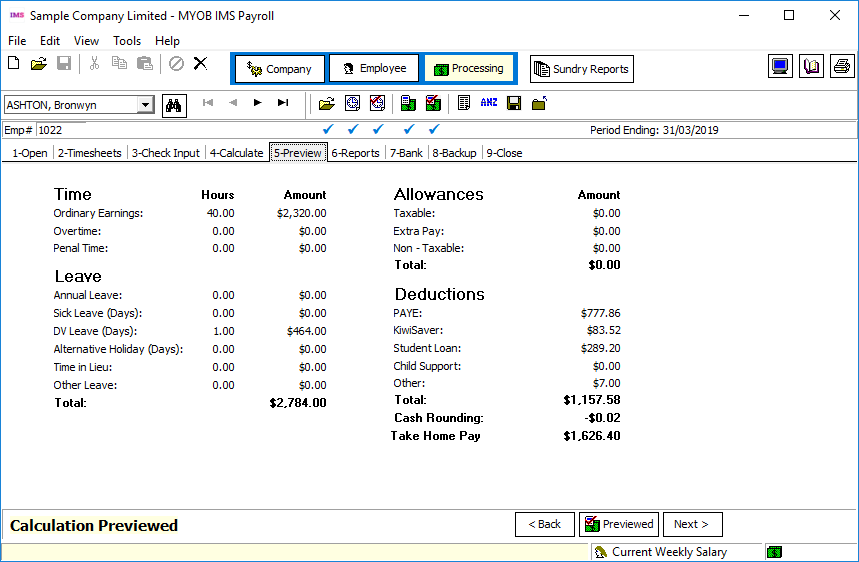
DVL amounts are displayed on the 5-Preview tab:
Reporting on Domestic Violence Leave
Domestic violence leave payments are displayed on employee payslips, and Payslip report options now include a check box for displaying the DVL balance on payslips.
DVL amounts appear next to other leave amounts anywhere that taxable income is reported. The Leave Analysis options for the Pay Period Exceptions report now include DVL as well as sick leave, and fields relating to DVL can be reported on using the Employee Audit report.
 You can report on employees’ DVL entitlements, balances, etc. by clicking the Find button on the Employees screen ( ) and exporting the data to a spreadsheet.
KiwiSaver Updates
KED File Uploads
In-product captions and the IMS Payroll documentation have been updated to clarify when you are required to upload a KiwiSaver Employment Details (KED) electronic file to the IRD:
-
For new employees, you do not need to upload a KED file. The Employment Details (ED) file produced for payday filing covers all the details required by the IRD for new employees.
-
For existing employees that are opting in or out of KiwiSaver, you do still need to upload the KED electronic file.
Over 65 Option Restored
The 6.40 compliance release added the ability for employees over the age of 65 to opt in to KiwiSaver. As part of this update, the 65 Years Old check box was removed from the Pay Period Exceptions report.
This release reinstates the 65 Years Old check box, so that employers can still be notified when employees turn 65 and make the necessary adjustments to Compulsory Employer Contributions for the employee if required.