
MYOB IMS Payroll 7.00 release notes
Introduction
The 7.00 release ensures that MYOB IMS Payroll complies with tax updates for the 2025–2026 tax year. It also makes other minor improvements and resolves issues identified in previous releases.
Installing your upgrade
To install the desktop upgrade
Before installing the desktop upgrade, you must close all Open payroll periods in your payroll companies.
Before you install the desktop version:
-
Close all Open payroll periods in your payroll companies.
-
Back up each of your payroll companies via the Tools menu.
-
Close all IMS applications on your PC.
Uninstalling an earlier version of IMS Payroll prior to installing this version is not recommended or required, as you’ll need to reinstall any custom payroll software or modules.
If you’re downloading the installer:
-
Double-click the executable file (.exe) that you downloaded.
-
Install the new version on every computer that has MYOB IMS Payroll installed.
To install the IMS Payroll Cloud upgrade
-
Log in to IMS Payroll Cloud.
-
At the bottom left, click the gold Upgrade button.
The Upgrade button only appears after you click on a company with the Closed status.
-
Repeat steps 1–2 for each payroll company you manage.
What’s new
Tax updates
For more information on what to do before you start a pay in the new financial year, see the tax year end procedures document.
ACC rates and thresholds
Changes to ACC apply from your first pay period with a payment date on or after 1 April 2025. MYOB IMS Payroll has been updated to incorporate the following changes:
|
Detail |
Current Value |
New Value |
|
ACC earner levy rate |
1.6% |
1.67% |
|
ACC income maximum |
$142,283 |
$152,790 |
|
Maximum ACC earner levy |
$2,276.52 |
$2,551.59 |
ESCT threshold changes
We’ve updated the Employer Superannuation Contribution tax thresholds for the 2025 to 2026 tax year.
|
ESCT rate threshold amount |
2025–2026 threshold |
|
0 - $18,720 |
10.5% |
|
$18,721 - $64,200 |
17.5% |
|
$64,201 - $93,720 |
30% |
|
$93,721 – $216,000 |
33% |
|
$216,001 upwards |
39% |
Extra pay tax threshold changes
We’ve updated the extra payments thresholds which apply from 1 April 2025.
|
Extra pay threshold |
2025–2026 tax rate |
|
$0 - $15,600 |
10.5% |
|
$15,601 - $53,500 |
17.5% |
|
$53,501 - $78,100 |
30% |
|
$78,101 - $180,000 |
33% |
|
$180,001 upwards |
39% |
Taxation of extra pay when employment ends
For termination payments taxed as extra pay, there are new rules for calculating the annualised amount.
If the employee receiving the extra pay isn’t being terminated, the old rules still apply. Base the annualised amount on the PAYE income payments the employee received over the last four weeks.
Here are the new rules:
Use the employee’s PAYE income from the previous two standard pays to get the annualised amount. The annualised amount is then used to determine the tax rate for the extra pay earnings paid in their final pay.
If the employee only has one previous standard pay, use that to get the annualised amount.
If the employee does not have any previous standard pays, manually specify the rate based on an estimate of their projected annual earnings. In this case, the new Terminating Extra Pay Tax Rate window opens at the Check Input step of payroll processing, where you can select the correct rate: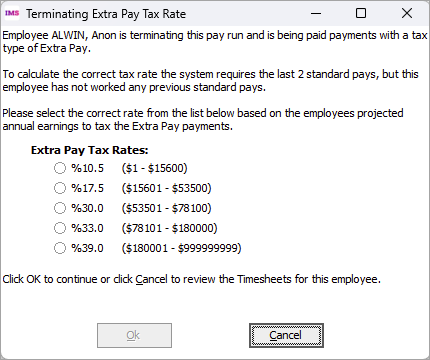
-
After setting the rate, the Extra Pay Tax Rate option on the Pay Period Exceptions report displays Terminated Fixed Rate with the rate you selected.
-

-
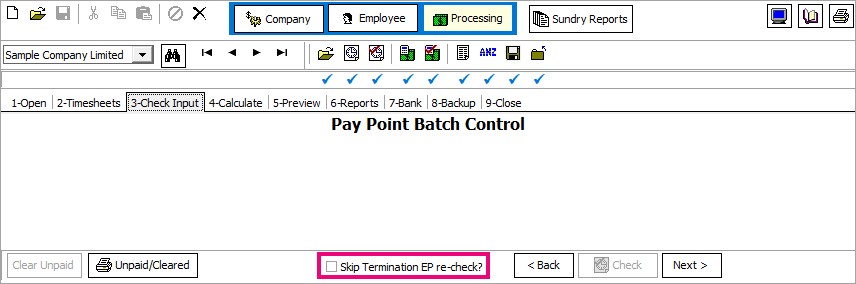
If you make timesheet changes and need to recalculate an employee’s pay after you’ve already manually set their rate, you can prevent the Terminating Extra Pay Tax Rate window opening again by selecting the Skip Termination EP re-check? checkbox.
-
Student loan thresholds
There are no changes to student loan tax for the 2025 to 2026 tax year.
Minimum wage rate increase
From 1 April 2025, Wage Rate increases apply. To apply the new rates, go to the Tools menu and choose Hourly Rate Update.
|
Rate |
Current rate |
New rate |
|
Adult |
$23.15 |
$23.50 |
|
Start Out and Training |
$18.52 |
$18.80 |
Other improvements
-
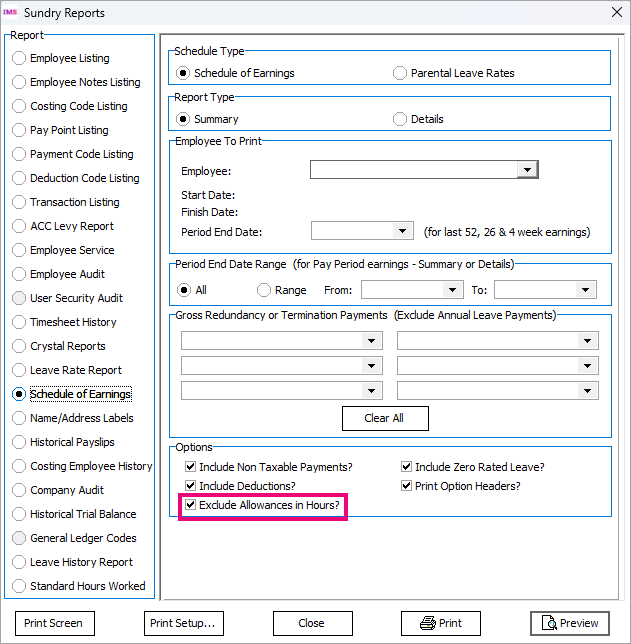
If an allowance was set up with an hourly calculation method, the Schedule of Earnings report shows the quantity of that allowance in hours. You can now exclude these allowances from showing hours on the report by selecting the new Exclude Allowances in Hours? checkbox.
-
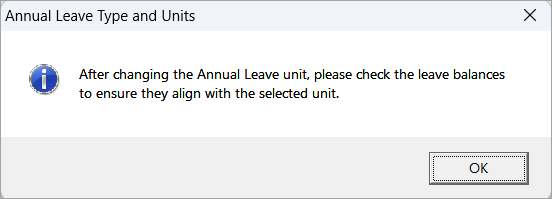
When changing the units used for paying annual leave (e.g. from days to hours or vice versa), you now get a message that reminds you to convert the leave balances if they exist.
-
For employees on parental leave who won’t be returning to work, we’ve made the Final Pay Calculation Report clearer. Now, if the outstanding PL balance is not paid out, the report will display the balance as 0.00. There will also be a message that the final pay is backdated to when the employee started their parental leave.
Resolved issues
The following issues have been resolved in MYOB IMS Payroll Desktop:
-
There were two issues preventing general ledger integration with MYOB AccountRight. First, you might not be able to get past the two-factor authentication (2FA) screen. Second, you might get an error: “The AccountRight Journals were not posted for the date range 06/03/2024 to 06/03/2024 Due to the following issues: Unable to connect your MYOB AccountRight instance. Please check that you have access to your network and that your MYOB AccountRight instance is functioning.”
-
In payslip reports, the Total Hours field was being displayed without any decimals.