
MYOB IMS Payroll 7.20 release notes
Introduction
The 7.20 release makes sure that MYOB IMS Payroll complies with tax and payroll changes for the 2026 to 2027 tax year.
For more information on what to do before you start a pay in the new financial year, see the .
Installing your upgrade
To install the desktop upgrade
Before installing the desktop upgrade, you must close all Open payroll periods in your payroll companies.
Before you install the desktop version:
-
Close all Open payroll periods in your payroll companies.
-
Back up each of your payroll companies via the Tools menu.
-
Close all IMS applications on your PC.
Uninstalling an earlier version of IMS Payroll prior to installing this version is not recommended or required, as you’ll need to reinstall any custom payroll software or modules.
If you’re downloading the installer:
-
Double-click the executable file (.exe) that you downloaded.
-
Install the new version on every computer that has MYOB IMS Payroll installed.
To install the IMS Payroll Cloud upgrade
-
Log in to IMS Payroll Cloud.
-
At the bottom left, click the gold Upgrade button.
The Upgrade button only appears after you click on a company with the Closed status.
-
Repeat steps 1–2 for each payroll company you manage.
What’s new
ACC rates and thresholds
MYOB IMS Payroll will apply the following ACC changes from your first pay period with an end date on or after 1 April 2026:
|
|
2025-26 tax year value |
2026-27 tax year value |
|
ACC earner levy rate |
1.67% |
1.75% |
|
ACC income maximum |
$152,790 |
$156,641 |
|
Maximum ACC earner levy |
$2,551.59 |
$2,741.22 |
Minimum wage increase
From 1 April 2025, wage rate increases apply. To apply the new rates, go to the Tools menu and choose Hourly Rate Update.
|
2025-26 tax year value |
2026-27 tax year value |
|
|
Adult |
$23.50 |
$23.95 |
|
Starting and training |
$18.80 |
$19.16 |
KiwiSaver changes
Increased minimum contribution rate
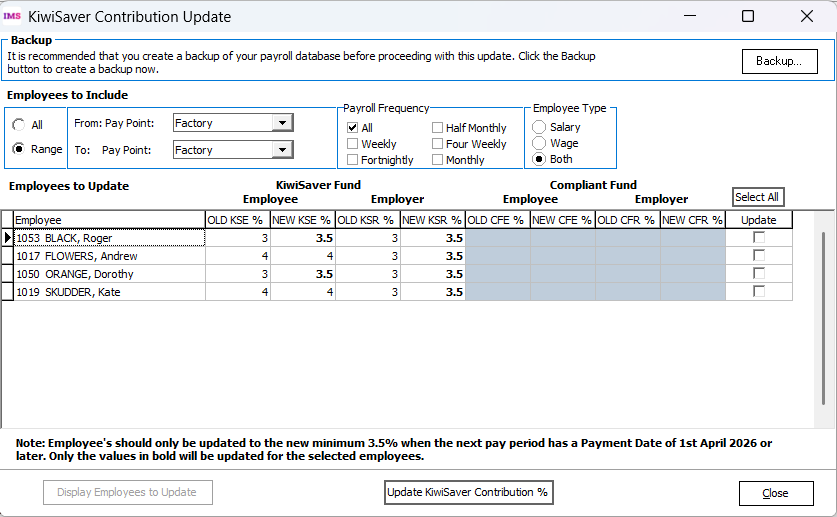
From 1 April 2026, the default minimum contribution rate for both employees and employers will increase from 3% to 3.5%.
To make it easier to update rates for employees, we’ve added the KiwiSaver Contribution Update tool to the Tools menu.
For more information about using the tool to update rates, see the tax year end procedures document.
Temporary rate reductions
From 1 February 2026, employees can apply to Inland Revenue for a temporary rate reduction from 3.5% to 3%, applicable from 1 April 2026.
The rate reduction also applies to employer contributions, allowing them to temporarily contribute 3%.
The rate reduction can be approved for a minimum of three months to a maximum of 12 months. Employees must re-apply to extend it.
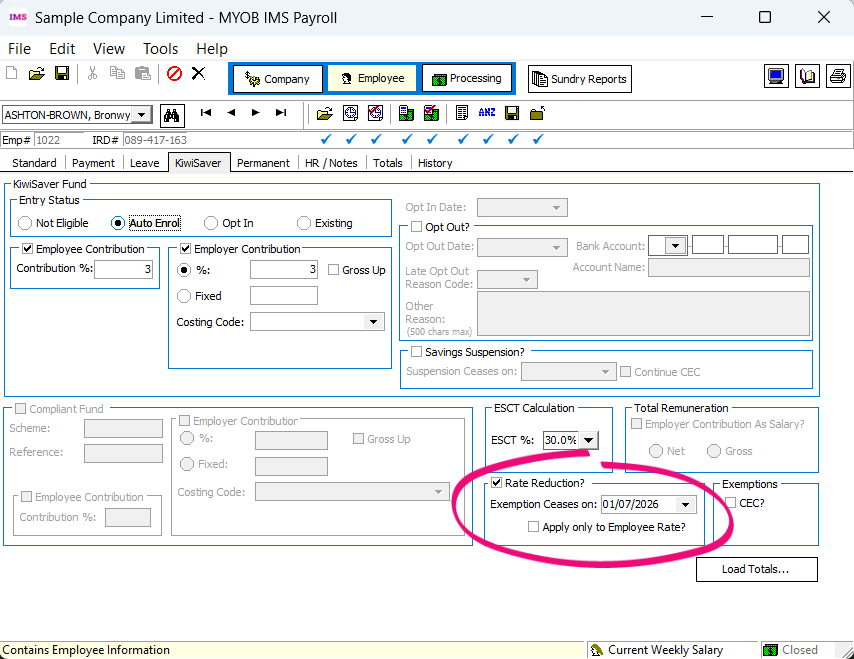
If an employee has received a rate reduction, you can now add it on the Rate Reduction? section on the KiwiSaver tab of the Employee screen.
We’ve also updated reports and employee import and export:
-
When you run the Employee Listing report with full details, including superannuation information, the report now displays the rate reduction settings for each employee in the KiwiSaver section of the report.
-
The employee export options for Employee List and Vizual Personnel have been updated to include the rate reduction fields.
-
The employee import has been modified to include the new rate reduction fields.
Lowered eligibility age for employer contributions
From 1 April 2026, employees aged 16 or 17 who have opted in to KiwiSaver will be eligible for compulsory employer contributions. This doesn’t affect employees aged 16 or 17 who have not opted in to KiwiSaver, as auto-enrolment for KiwiSaver still starts at age 18.