
MYOB IMS Payroll 6.11 release notes
IMS is pleased to enclose the latest release, V6.11, of MYOB IMS Payroll containing enhancements and the addressing of all known issues in line with our commitment to the on-going development of our software packages.
INSTALLATION PROCEDURES:
-
Prerequisites:
Ensure all applications on your PC have been closed prior to performing the following installation procedures.
Un-installing an earlier version of the application prior to installing this version is not recommended or required as any custom payroll software and modules will need to be reinstalled.
If you are currently not utilising v6.10 (despatched November 2016) then please ensure that all ‘Open’ Payroll Periods in your payroll companies have been closed. If you are currently using v6.10 then this release can be installed at any time in your processing cycle.
You have BACKED UP each of your payroll companies, via the ‘Tools’ menu, after closing the last payroll period processed in each company.
-
Electronic Link Installation: Download the executable file (.exe as contained in the link) to your hard drive and run this program on every computer which has the MYOB IMS Payroll application installed.
-
CD Installation: Place the CD in the drive, wait a few seconds and the installation should automatically commence. If you do not have ‘AutoPlay’ enabled browse the CD via ‘My Computer – Explore’ and double click on the file IMSInstaller.exe.
-
Once this version has been installed, and you have logged on to a payroll company, it is recommended that you access ‘Help – About IMS Payroll Partner’ and check
-
that the version stated is ‘Version 6.11 December 2016’.
-
ENHANCEMENTS:
-
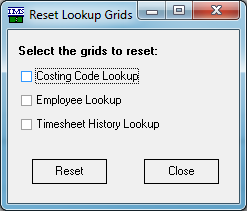 New ‘NanoRepair Maintenance Utility (v1.26) – Reset Lookup Grids’ option. This new option is available in the Utilitie’s Tools Menu and should be utilised if any of the currently available lookup grids (Costing Codes, Employee and/or Timesheet History) appear to have frozen and are nonresponsive.
-
Standard Reports – Costing Summary Report extract: This extract now includes a populated Employer Superannuation Contribution column.
-
General Ledger export formats incorporating Job Costing Codes now include any Employer Contribution Costing Code assigned on the KiwiSaver and/or Employer Super tabs if the associated GL Code is aligned to that Costing Code.
-
ISSUES ADDRESSED:
-
The Hosted Registration Report preview issue, where a blank page may have been displayed, has been addressed.
-
A rounding issue where tax calculated on an ‘Extra Pay’ payment may have been a couple of cents short has been resolved. This issue rarely manifested itself and was due to the Extra Pay annualization process in regards to an employee on a monthly pay frequency.
-
Employee names will no longer be truncated in the ‘Pay Period Exceptions report’ when Medium Font settings are been utilised.
-
General Ledger export: The issue where the ‘Next ’button may not have been available after setting up the Journal Configuration for the MYOB AccountRight interface has been addressed.