
MYOB IMS Payroll 6.90 release notes
Introduction
The 6.90 release ensures that MYOB IMS Payroll complies with tax updates for the 2024–2025 tax year. It also makes other minor improvements and resolves issues identified in previous releases.
Installing your upgrade
To install the desktop upgrade
Before installing the desktop upgrade, you must close all Open payroll periods in your payroll companies.
Before you install the desktop version:
-
Close all Open payroll periods in your payroll companies.
-
Back up each of your payroll companies via the Tools menu.
-
Close all IMS applications on your PC.
Uninstalling an earlier version of IMS Payroll prior to installing this version is not recommended or required, as you’ll need to reinstall any custom payroll software or modules.
If you’re downloading the installer:
-
Double-click the executable file (.exe) that you downloaded.
-
Install the new version on every computer that has MYOB IMS Payroll installed.
To install the IMS Payroll Cloud upgrade
-
Log in to IMS Payroll Cloud.
-
At the bottom left, click the gold Upgrade button.
The Upgrade button only appears after you click on a company with the Closed status.
-
Repeat steps 1–2 for each payroll company you manage.
What’s new
Tax updates
For more information on what to do before you start a pay in the new financial year, see the tax year end procedures document.
ACC rates and thresholds
Changes to ACC apply from your first pay period with an end date on or after 1 April 2024. MYOB IMS Payroll has been updated to incorporate the following changes:
|
Detail |
Current Value |
New Value |
|
ACC earner levy rate |
1.53% |
1.6% |
|
ACC income maximum |
$139,384.00 |
$142,283.00 |
|
Maximum ACC earner levy |
$2,132.57 |
$2,276.52 |
Student loan thresholds
This release updates the student loan thresholds for the 2024–2025 financial year. The new thresholds are:
|
Period |
New Value |
|
Annual |
$24,128 |
|
Monthly |
$2,010.66 |
|
4-weekly |
$1,856 |
|
Fortnightly |
$928 |
|
Weekly |
$464 |
Minimum wage rate increase
From 1 April 2024, Wage Rate increases apply. To apply the new rates, go to the Tools menu and choose Hourly Rate Update.
|
Rate |
Current rate |
New rate |
|
Adult |
$22.70 |
$23.15 |
|
Start Out and Training |
$18.16 |
$18.52 |
Accrued annual leave in weeks on payslips
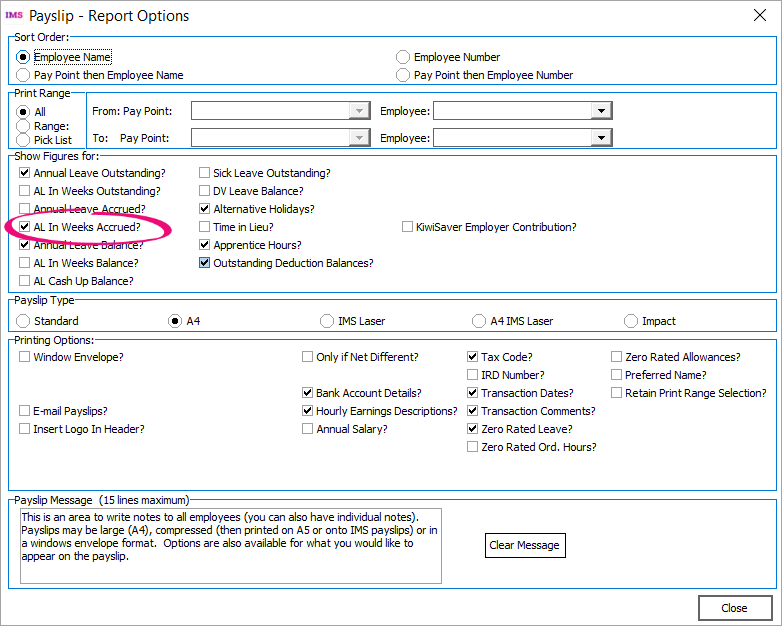
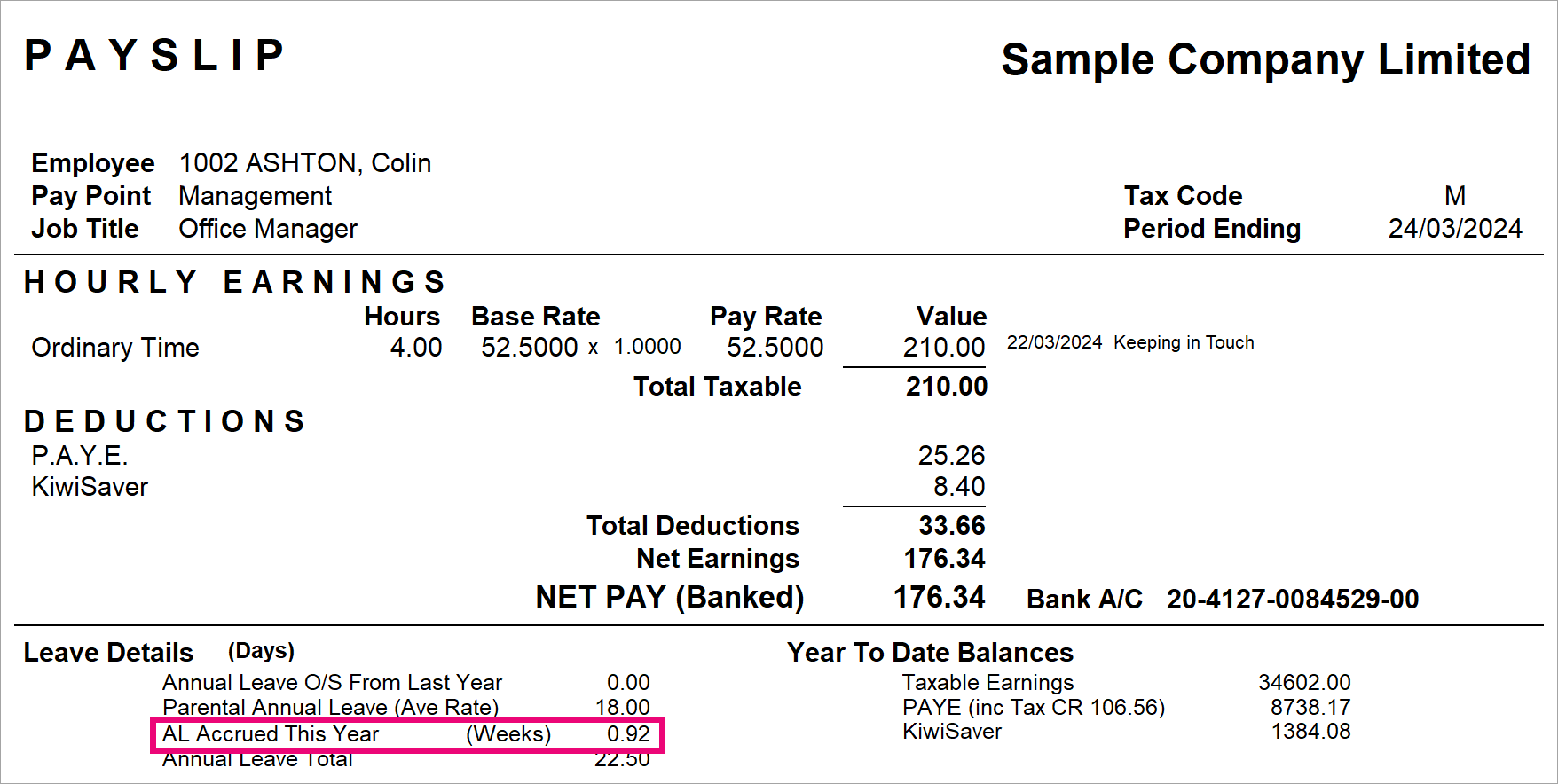
On the Payslip and Historical Payslips reports, you can now display how much annual leave in weeks an employee has accrued. To do so, select the AL In Weeks Accrued? checkbox in the report options.
Here’s an example of how the Payslip report displays the accrued annual leave in weeks.
Resolved issues
-
MYOB IMS Payroll Desktop – When opening the latest version of MYOB IMS Payroll on Windows 7, 8 or 8.1, an error could occur: “Unsupported Windows version ! Chromium requires Windows 10 or later.” Dismissing the error let you use MYOB IMS Payroll, but the Xero Online interface wouldn’t work. This has been resolved.
-
MYOB IMS Payroll Desktop – When entering a backup file name for Nanorepair, ‘Toolkit_’ was being automatically added to the file name, which made the file name invalid. This has been resolved.