MYOB IMS Payroll 6.54 release notes
Introduction
What’s New in this Release?
The release updates the payday filing functions to use the new v2021 format, ensuring that your payday filing remains compliant.
Installing Your Upgrade
Desktop Installation
Before you install this version:
-
Close all “Open” payroll periods in your payroll companies.
-
Back up each of your payroll companies, via the Tools menu, after closing the last payroll period processed in each company.
-
Close all IMS applications on your PC.
Uninstalling an earlier version of IMS Payroll prior to installing this version is not recommended or required as any custom payroll software and modules will need to be reinstalled.
If you’re downloading the installer:
-
Double-click the executable file that you download (.exe as contained in the link).
-
You need to install the new version on every computer that has MYOB IMS Payroll installed.
IMS Payroll Cloud Installation
-
Log in to IMS Payroll Cloud.
-
Click the gold Upgrade button that appears at the bottom left of your screen. The Upgrade button will only appear when you click on a company with the “Closed” status.
-
Repeat for each payroll company you manage.
After installing, log in to a payroll company, go to Help > About IMS Payroll Partner and check that the version is Version May 2020.
If you have any issues, please call us on 0800 600 110.
New Features
Payday Filing Updates
This release updates MYOB IMS Payroll to produce files for payday filing in the new v2021 format. This includes the EI Return file and the Employment Details (ED) file.
Updates to KiwiSaver
The Employee Details (ED) file now includes information on employees starting and finishing/opting out of KiwiSaver. The KiwiSaver information included in payday filing has been expanded to include information on employees who opt out of KiwiSaver after the normal opt out period.
Employees can opt out of KiwiSaver between the ends of the second and eighth weeks of their employment (i.e. between days 14 and 56)—see for more information.
To opt out after the end of this period, a reason for the late opt out must be accepted by the IRD Commissioner before the opt out is effected. New fields have been added to the Employee Information > KiwiSaver tab to capture this information:
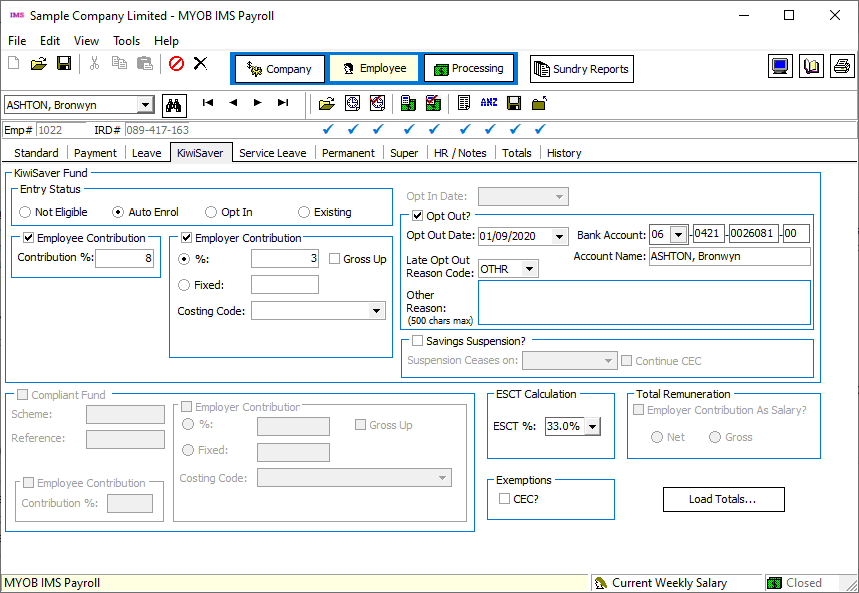
The Late Opt Out Reason Code dropdown contains a list of possible reasons and their codes, as well as an “OTHR” option, if the reason is not covered by any of the other codes. When “OTHR” is selected, you must enter the reason into the Other Reason field.
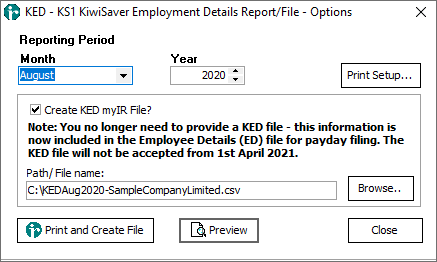
Because KiwiSaver information is now included in the ED file, it is no longer necessary to produce and send the KS1 KiwiSaver Employment Details (KED) file. You can still produce a KED file from IMS Payroll and send it to the IRD for now, but the KED file will not be accepted from 1 April 2021. A note has been added to the KED window to indicate this: