
MYOB IMS Payroll 6.30 release notes
MYOB is pleased to release the MYOB IMS Payroll v6.30 application, which contains legislative changes for the 2018–19 tax year.
The changes include new ACC Earner Levy and Student Loan thresholds as well as other legislated changes, effective from your first pay with a period ending date on or after 1 April 2018. The new thresholds will be applied automatically.
We’ve also made some enhancements, and addressed known issues, as part of our on-going commitment to providing you with quality payroll software.
Install v6.30 at your earliest convenience.
-
When to install v6.30: If you file your IR348 electronically and don’t require an IR348 Approved version of the EMS report you can install this version any time during March, but make sure you do it before you process your first pay period ending on or after 1 April 2018. If you do require an IR348 Approved version of the EMS report then you have two options: you can either refrain from installing this release until all pays for March have been closed and the IR348 Approved EMS report generated OR you can register with myIR on the IRD website and start filing your IR348’s electronically. Registering with myIR will need to be actioned prior to the end of April anyway as the IRD are no longer accepting the IR348 Approved EMS report from April onwards. Refer to the C-Series EMS Returns discontinued paragraph in the Enhancements section below for more details.
-
Before you process your first pays with a payment date of 1 April 2018 or later: Refer to the Tax Year End Procedures March 2018 document as this will be your first pay run in the new tax year. This document will be available along with the notification of the availability of v6.30
DESKTOP INSTALLATION
Before you install this version:
-
Close all ‘open’ payroll periods in your payroll companies.
-
Back up each of your payroll companies, via the Tools menu, after closing the last payroll period processed in each company.
-
Close all applications on your PC.
-
Note: Uninstalling an earlier version of IMS Payroll prior to installing this version is not recommended or required as any custom payroll software and modules will need to be reinstalled.
-
If you’re downloading the installer: Double-click the executable file that you download (.exe as contained in the link). You need to install the new version on every computer that has MYOB IMS Payroll installed.
-
IMS PAYROLL CLOUD INSTALLATION
|
1. |
Log in to IMS Payroll Cloud. |
|
2. |
Click the gold 'Upgrade' button that appears at the bottom left of your screen. The 'Upgrade' button will only appear when you click on a company with a Closed status. |
|
3. |
Repeat for each payroll company you manage. |
-
After installing, log in to a payroll company, go to Help > About IMS Payroll Partner and check that the version is Version 6.30 March 2018.
-
If you have any issues, please call us on 0800 600 110.
-
ENHANCEMENTS
-
New ACC Earner Levy threshold: The ACC Earner Levy’s maximum threshold will increase from $124,053 to $126,286, and applies from your first pay period with an end date on or after 1 April 2018. This makes $1755.37 the maximum ACC Earner Levy that can be deducted for the 2018–19 tax year. The current Earner Premium Levy rate of 1.39% ($1.39 per $100) is retained for the 2018–19 tax year.
-
New Student Loan threshold: The threshold has increased from $19,136 to $19,448 and is effective from the first pay period ending on or after 1 April 2018. The pay frequency thresholds increases are as follows:
-
Weekly:$368to $374.
-
Fortnightly:$736to $748.
-
4 Weekly:$1,472to $1,496.
-
Monthly$1,594.66to $1,620.66.
-
Minimum Wage Rate increases: From 1 April 2018, the following Minimum Wage Rate increases apply:
-
Adult: Increases by 75 cents to $16.50 (currently $15.75 per hour).Start Out and Training: Increases by 60 cents to $13.20 (currently $12.60 per hour).To apply the new rates, go to Tools > Hourly Rate Update.
-
‘NSW’ Taxcode – repeal of flat rate: The implementation of the flat rate at 10.5% for the Extra Pay (EP) calculation of lump sum payments expires at the end of March 2018.
-
From 1 April 2018 the standard PAYE calculation for Extra Pay payments will apply where the tax rate is determined by annualising the employee’s last 4 week earnings.
-
C-Series EMS Returns discontinued / IR-File rebranded as myIR: The IRD are no longer accepting printed EMS reports (IR348). The former IRD Approved option has been retitled ‘Old IRD Style’ with warnings put in place to inform that this report can now only be used for your internal records. This also affects the IR-File Consolidation report for the EMS.
-
Users should note that for record keeping purposes the same information is held on the Listing option and requires fewer pages to generate the same detail.
-
Also, all references to IR Filing have been changed to myIR. All user should now be filing their IR348’s via the myIR function/login on the IRD website from this link:
-
Note: Users who require the IRD Approved EMS (IR348) generated for the month of March should not install this release until all pays for March have been completed and the IR348 Approved report generated.
-
Westpac new branch range: Westpac now accept bank accounts with a branch range of 7350 to 7399. Any bank account which falls outside of the acceptable branch ranges for each bank will continue to produce a warning message indicating that it may not be a valid bank account.
-
Background Colour and Text Font Changes: In order to enhance the appearance of the product and make screens and text easier to view we changed the background colour of all screens to white and set the font to ‘Tahoma’.
-
Deduction Priority, Attachment Orders and Protected Net Earnings: The Inland Revenue Department have now clearly defined the order in which IRD related deductions should be processed:
-
Child Support
-
Other Attachment Orders
-
ACC Levy
-
Student Loan Repayments
-
KiwiSaver Employee Contributions
-
Other Voluntary Deductions
-
We have changed the priority order of the default IRD related deductions to suit this order.
-
Previously, ‘Other Attachment Orders’ (e.g. Tax Arrears, Parentage Test Costs, Social Security Debts, Court Fines, etc) were prioritised amongst ‘Other Voluntary Deductions’ (user defined deductions).
-
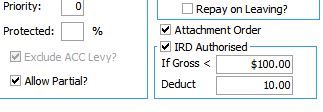
In order to ensure Attachment Order type deductions are now processed in the correct order we have introduced a new Checkbox to the Deductions tab of Company Controls titled ‘Attachment Order’.
-
As we allow users to define their own IRD related attachment order type deductions we have included a new check box on the Deductions tab of Company Controls titled ‘Attachment Order’: insert screen shot here
-
Ticking this box will enable this deduction to be processed prior to Student Loan Repayments and KiwiSaver where an employee has one (or both) of these other deduction types.
-
After upgrading to this version of payroll we strongly recommend you review the list of user defined deductions you have already set up within the system – if any of these are classified as Attachment Orders then please tick this box.
-
The IRD Authorised checkbox can be used in conjunction with the Attachment Order indicator but this will depend on the nature of the Attachment Order.
-
Protected Net Earnings: The purpose of the clarification on deduction order has been made to allow Protected Net Earnings to be calculated more accurately where other IRD related deductions are present and where one or more attachment order type deductions with Protected Earnings Percentages (or amounts) exist.
-
Where an Attachment Order has a specified Protected Net Earnings percentage associated with it the IRD has stipulated that Protected Net Earnings is to be calculated on net earnings after tax excluding ACC Earner Levy.
-
Multiple Protected Net Earnings Attachment Order deductions must also be calculated in such a manner as to not exceed the lesser amount of protected earnings specified across all Attachment Orders with Protected Earnings. For example, if an employee has Child Support at 60% protected and Court Fines at 70% protected then the sum of the two deduction amounts cannot exceed 60% of the employee’s net pay after tax (excluding ACC).
-
Note: User defined deductions which do not have the Attachment Order flag ticked and have a specified protected earnings percentage (or amount) will continue to have their protected net earnings calculated on the remaining net pay after all IRD deductions have been deducted from the net total.
-
For more details on Deduction Priority, Attachment Orders and Protected Net Earnings please refer to the document Protected Net Earnings on Other Attachment Orders in the Frequently Asked Questions section of the documentation.
-
ISSUES ADDRESSED:
-
The default printer should now be picked up by the payroll when running through a remote desktop (RDP / Terminal Services) session onto a Microsoft Windows Server 2016 server instance.
-
The Find utility for employees (accessed via the binoculars button) now correctly displays leave accrual and balance fields.
-
The Range Selectors in various report options screens will now keep the correct range selection when selecting by Costing Code or Pay Point.
-
People Inc Module – a number of small fixes have been implemented in this add-on module: The SDR Expiry date in payroll will no longer get overwritten when manually set, KiwiSaver CEC Exempt employee’s will no longer produce misleading warning messages on the Integration Audit report, KiwiSaver Costing Codes will no longer cause misleading warning messages on the Integration Audit report.
-
When processing employees with a WT tax code (such as non-resident entertainers) who don’t have an IRD number in the system – the message which appears during the Check Input stage of the pay cycle indicating that the Tax Rate must be 45% can be bypassed for those special scenario’s where the 45% no declaration rate does not apply.