
MYOB IMS Payroll 6.20 release notes
MYOB is pleased to release the MYOB IMS Payroll v6.20 application, which contains legislative changes for the 2017–18 tax year.
The changes include new ACC Earner Levy and Student Loan thresholds, effective from your first pay with a period ending date on or after 1 April 2017. The new thresholds will be applied automatically.
We’ve also made some enhancements, and addressed known issues, as part of our on-going commitment to providing you with quality payroll software.
Install v6.20 at your earliest convenience.
-
When to install v6.20: You can install this version any time during March, but make sure you do it before you process your first pay period ending on or after 1 April 2017.
-
Before you process your first pays with a payment date of 1 April 2017 or later: Refer to the Tax Year End Procedures March 2017 document as this will be your first pay run in the new tax year. This document will be available along with the notification of the availability of v6.20
DESKTOP INSTALLATION
Before you install this version:
-
Close all ‘open’ payroll periods in your payroll companies.
-
Back up each of your payroll companies, via the Tools menu, after closing the last payroll period processed in each company.
-
Close all applications on your PC.
-
Note: Uninstalling an earlier version of IMS Payroll prior to installing this version is not recommended or required as any custom payroll software and modules will need to be reinstalled.
-
If you’re downloading the installer: Double-click the executable file that you download (.exe as contained in the link). You need to install the new version on every computer that has MYOB IMS Payroll installed.
-
If you have a CD: Insert the CD, wait a few seconds and installation will automatically commence. If you don’t have ‘AutoPlay’ enabled, you’ll need to browse the CD via ‘My Computer’ and double-click IMSInstaller.exe.
-
IMS PAYROLL CLOUD INSTALLATION
|
1. |
Log in to IMS Payroll Cloud. |
|
2. |
Click the gold 'Upgrade' button that appears at the bottom left of your screen. The 'Upgrade' button will only appear when you click on a company with a Closed status. |
|
3. |
Repeat for each payroll company you manage. |
-
After installing, log on to a payroll company, go to Help > About IMS Payroll Partner and check that the version is Version 6.20 March 2017.
-
If you have any issues, please call us on 0800 600 110.
-
ENHANCEMENTS
-
New ACC Earner Levy threshold: The ACC Earner Levy’s maximum threshold will increase from $122,063 to $124,053, and applies from your first pay period with an end date on or after 1 April 2017. This makes $1724.33 the maximum ACC Earner Levy that can be deducted for the 2017–18 tax year. The current Earner Premium Levy rate of 1.39% ($1.39 per $100) is retained for the 2017–18 tax year.
-
New Student Loan threshold: The threshold has increased from $19,084 to $19,136 and is effective from the first pay period ending on or after 1 April 2017. The pay frequency thresholds increases are as follows:
-
Weekly: $367 to $368.
-
Fortnightly: $734 to $736.
-
4 Weekly: $1,468 to $1,472.
-
Monthly: $1,590.33 to $1,594.66.
-
Minimum Wage Rate increases: From 1 April 2017, the following Minimum Wage Rate increases apply:Adult: Increases by 50 cents to $15.75 (currently $15.25 per hour).Start Out and Training: Increases by 40 cents to $12.60 (currently $12.20 per hour).To apply the new rates, go to Tools > Hourly Rate Update.
-
Scheduler Payment Deduction Changes: The following changes will apply for pay period payment dates on or after 1 April 2017:Contractors (including companies) hired by labour-hire firms under a labour-hire agreement have been added as a scheduler payment type.Persons wanting to voluntarily have tax deducted from their contractor income have been added as a new scheduler payment type. Voluntary scheduler payments have a standard rate of 20 cents per dollar of payment.Most contractors can elect their own withholding tax rate, subject to a minimum of 10 cents per dollar of the payment.The no-notification rate (no IRD Number declared) as applicable for the WT tax code has been standardised at 45 cents per dollar of payment. The Commissioner may require a specific tax rate to be deducted from payments made to a contractor.A new tax rate notification form will cover all scheduler payments, and the existing IR330 form will be amended to remove scheduler payments.
-
Updated branding: MYOB IMS Payroll’s screens, reports, online help and supporting documentation have been updated with new logos and headers.
-
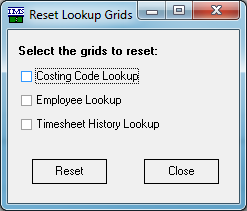
New ‘NanoRepair Maintenance Utility (v1.26) – Reset Lookup Grids’ option. This new option is available in the Utilities’ Tools Menu and should be utilised if any of the currently available lookup grids (Costing Codes, Employee and/or Timesheet History) appear to have frozen and are nonresponsive.
-
-
Standard Reports – Costing Summary Report extract: This extract now includes a populated Employer Superannuation Contribution column.
-
General Ledger export formats incorporating Job Costing Codes now include any Employer Contribution Costing Code assigned on the KiwiSaver and/or Employer Super tabs if the associated GL Code is aligned to that Costing Code.
-
ISSUES ADDRESSED:
-
The Hosted Registration Report preview issue, where a blank page may have been displayed, has been addressed.
-
A rounding issue where tax calculated on an ‘Extra Pay’ payment may have been a couple of cents short has been resolved. This issue rarely manifested itself and was due to the Extra Pay annualization process in regards to an employee on a monthly pay frequency.
-
Employee names will no longer be truncated in the ‘Pay Period Exceptions report’ when Medium Font settings are being utilised.
-
General Ledger export: The issue where the ‘Next ’button may not have been available after setting up the Journal Configuration for the MYOB AccountRight interface has been addressed.
-
The A4 Payslip format now prints the post-calculation Annual Leave balances correctly when the employee’s anniversary date coincides with the Pay Period Ending Date.
-
The ‘Annual Leave - Next Entitlement’ field may not have been populated correctly when entering a new employee in conjunction with a Company Anniversary date.
-
The ‘Sundry Reports – Schedule of Earnings’ report options are now retained / reset correctly when navigating from the ‘Parental Leave Rates’ report option.