
MYOB IMS Payroll 7.30 release notes
Installing your upgrade
We do not recommend uninstalling an earlier version of IMS Payroll prior to installing this version, as you would need to reinstall any custom payroll software or modules.
To upgrade MYOB IMS Payroll on desktop:
-
Close all Open payroll periods in your payroll companies.
-
Back up each of your payroll companies via the Tools menu.
-
Close all IMS applications on your PC.
-
Download the executable installer file (.exe) from MYOB's upgrade communications.
-
Double-click the installer file that you downloaded.
-
Install the new version on every computer that has MYOB IMS Payroll installed.
-
Log in to IMS Payroll Cloud.
-
At the bottom left, click the gold Upgrade button, which only appears after you click on a company with the Closed status.
-
Repeat steps 1–2 for each payroll company you manage.
Clearer leave anniversary for final pay
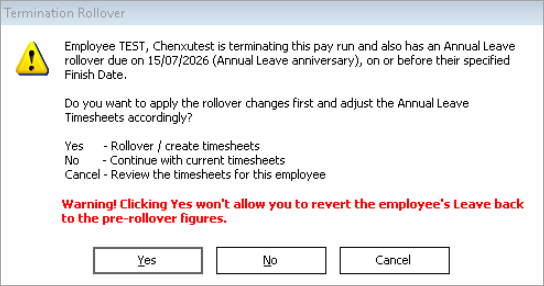
When you terminate an employee, the annual leave rollover message now includes the employee’s anniversary date. This makes it clearer which leave anniversary the rollover relates to when you complete final pay.
Apply payslip message to all payroll companies
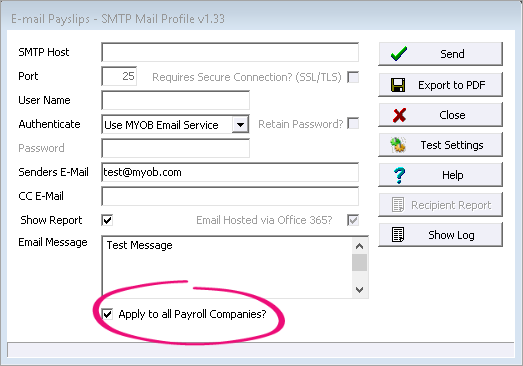
When you set a payslip email message, you can use the new Apply to all Payroll Companies? checkbox to choose whether the message applies to all payroll companies or only the company you’re signed into. The checkbox is selected by default. You can deselect it if you want a different message for each company.
Company Audit – See when a payment was deactivated
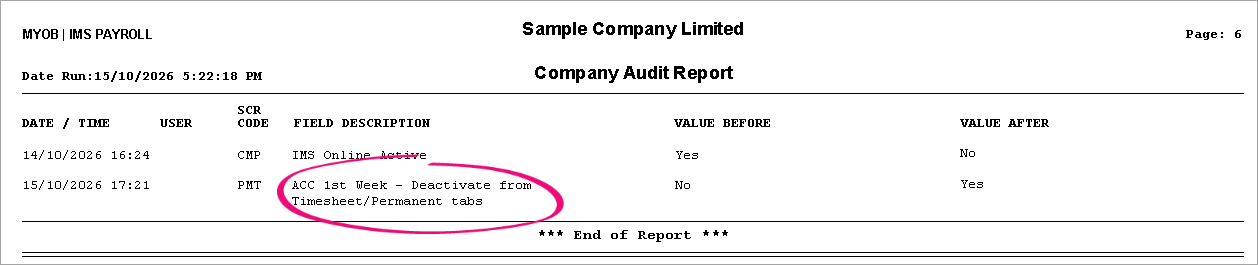
If you make a change to the Deactivate from Timesheet/Permanent tabs checkbox on the Company > Payments tab, your change is now recorded in the Company Audit report. This lets you see when a payment was deactivated from a timesheet or permanent entry.
Employee Payroll Summary – Net pay included in full extract
When you export a data file extract for the Employee Payroll Summary report with report type set to Full Report, the extract now includes Net pay. Previously, net pay was included in the summary extract but not consistently in the full extract.

Avoid accidental voluntary KiwiSaver contributions
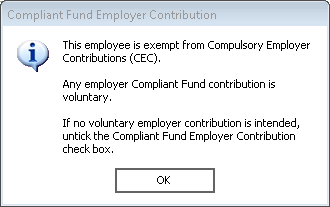
If you add an employer contribution to an exempt employee (the CEC? checkbox is selected on the Employee > KiwiSaver tab), a pop-up message now reminds you that contributions are voluntary for that employee.
Resolved issues
- Timesheet history was only being purged for active employees, so terminated employees could keep history longer than the retention period. For example, timesheet history older than 99 months was kept even if Keep Last was set to 99.
-
The Final Pay Calculation report could show that holiday pay owing had been overridden in timesheets even if it had not.
-
After correcting a pay, the Costing Employee History report could show incorrect employer super amounts.
-
On the Costing Employee History report, filtering by employee payment date was not returning data.
-
When Include $ Values? was selected but Include Zero Balances was not, the Sundry Leave History report still listed employees with zero balances.
-
When you switched the file delimiter on Leave History and other sundry extracts, the export path did not update.
-
Tax Reckoner wasn’t showing the correct KiwiSaver percentages, including 3.5%.
-
The Leave Rate report wasn’t showing the correct current daily rate.
-
The Timesheet History data extract showed the internal employee ID instead of employee number.
-
A per year salary that included cents was rounded to the nearest dollar.
-
Employee names with special characters or longer formats weren’t displaying correctly on payslips.
-
In IMS Cloud, the first toolkit backup after adding a new company was failing.
-
Creating an Employment Information (EI) file to a server or network drive path could fail in some setups.