
MYOB IMS Payroll 6.70 release notes
Introduction
The original 6.65 release:
-
Adds a new report, called Standard Hours Worked.
-
Updates the Leave History and Costing Employee History reports.
-
Updates the relative hours feature.
-
Resolves issues identified in previous releases.
Additionally, the new 6.65.0.3972 release:
-
Adds the option to fully recalculate a pay.
-
Resolves a timesheet calculation issue.
Installing your upgrade
Before installing the desktop upgrade, you must close all Open payroll periods in your payroll companies
To install the desktop upgrade
Before you install the desktop version:
-
Close all Open payroll periods in your payroll companies.
-
Back up each of your payroll companies via the Tools menu.
-
Close all IMS applications on your PC.
Uninstalling an earlier version of IMS Payroll prior to installing this version is not recommended or required, as you’ll need to reinstall any custom payroll software or modules.
If you’re downloading the installer:
-
Double-click the executable file (.exe) that you downloaded.
-
Install the new version on every computer that has MYOB IMS Payroll installed.
To install the IMS Payroll Cloud upgrade
-
Log in to IMS Payroll Cloud.
-
At the bottom left, click the gold Upgrade button.
The Upgrade button only appears after you click on a company with the Closed status.
-
Repeat steps 1–2 for each payroll company you manage.
New Features
Tax Updates
ACC Updates
Standard Hours Worked report
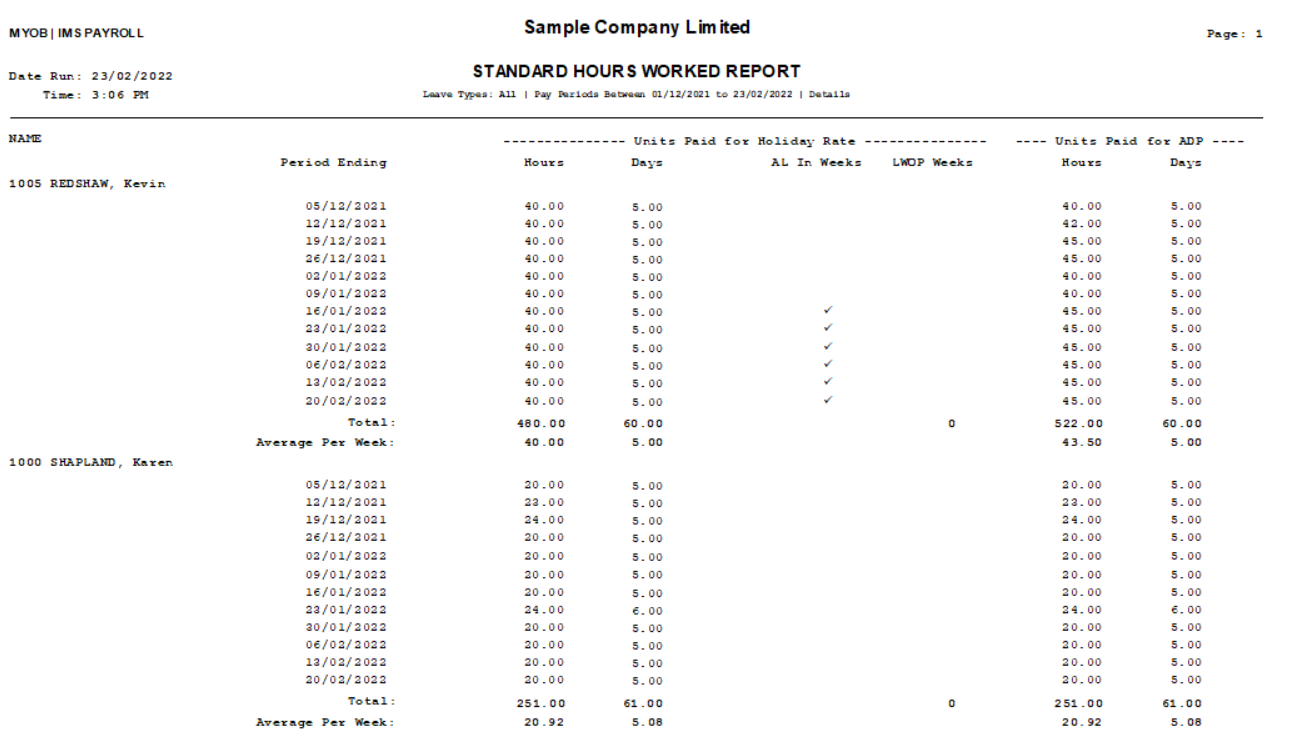
This release adds to the report called Standard Hours Worked two more columns with units paid for Average Daily Pay rate calculation (known as ADP Hours/Days), which is useful for reviewing hours worked by employees. It shows how many hours employees worked within a date range, including total hours and average hours per week. The report sources its Hours and Days values from the ADP Hrs and ADP Days columns on an employee’s History > Leave Earnings tab.
If an employee’s pay frequency isn’t weekly, the report also shows average hours per period.
You can also use the report to help you decide if they are eligible for paid Sick or Bereavement leave.
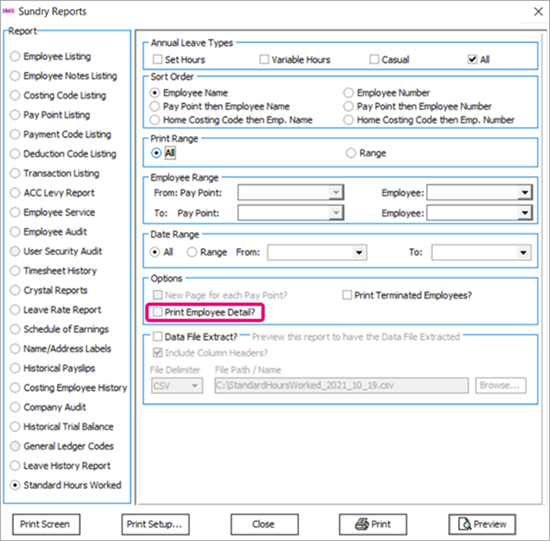
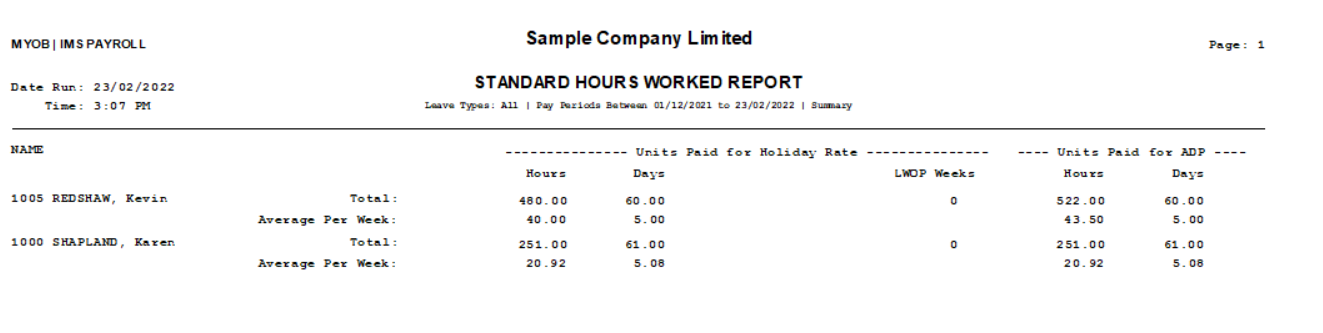
If you select the Print Employee Detail? option, the report includes each employee's hours for every week. If you don't select the option, then the report displays a summary of each employee's hours.
For example, here’s a report preview of the Details view.
And here’s a report preview of the Summary view.
Resolved Issues
The following table details the issues addressed in this release.
MYOB IMS Payroll
|
Problem ID |
Description |
|
- |
When previewing the Timesheet History report multiple times, it could display the wrong Tax Credit figure for payroll giving. This has been resolved. |
|
- |
There was an issue when using the Leave History Import feature. In MYOB IMS Payroll, on an employee's History tab, the Hours/Week and Days/Week columns are displayed in that order. But in an import file, the order of these columns was swapped. This has been resolved. The order of columns in an import file now matches the order on the History tab. |
|
- |
In the Employee Listing report preview, if the Print Payment & Deduction Totals? option was selected, an error would occur when saving the report as a Microsoft Excel file: "Range check error." This has been resolved. |
|
- |
When running the Pay Period Exceptions report, if the Hourly Rate option was selected, an error would occur: "Timesheet:Field 'LeaveRateAsAtDate not found". This has been resolved. |
|
- |
We’ve fixed the error that was happening during the General Ledger file export when Xero Online is used. |