
MYOB Acumatica Integration with Gmail: System Requirements
Before you set up the integration with Gmail, make sure that your system environment meets the requirements described in this topic.
System Requirements
You can use the MYOB for Gmail add-on if your MYOB Acumatica instance version is 2020 R2 or later.
The MYOB Acumatica instance should be a live website hosted over HTTPS. If you want to install the Gmail integration on a local MYOB Acumatica site, follow the steps to set up your system environment described in MYOB Acumatica Integration with Gmail: Using a Local MYOB Acumatica Site for Gmail Integration.
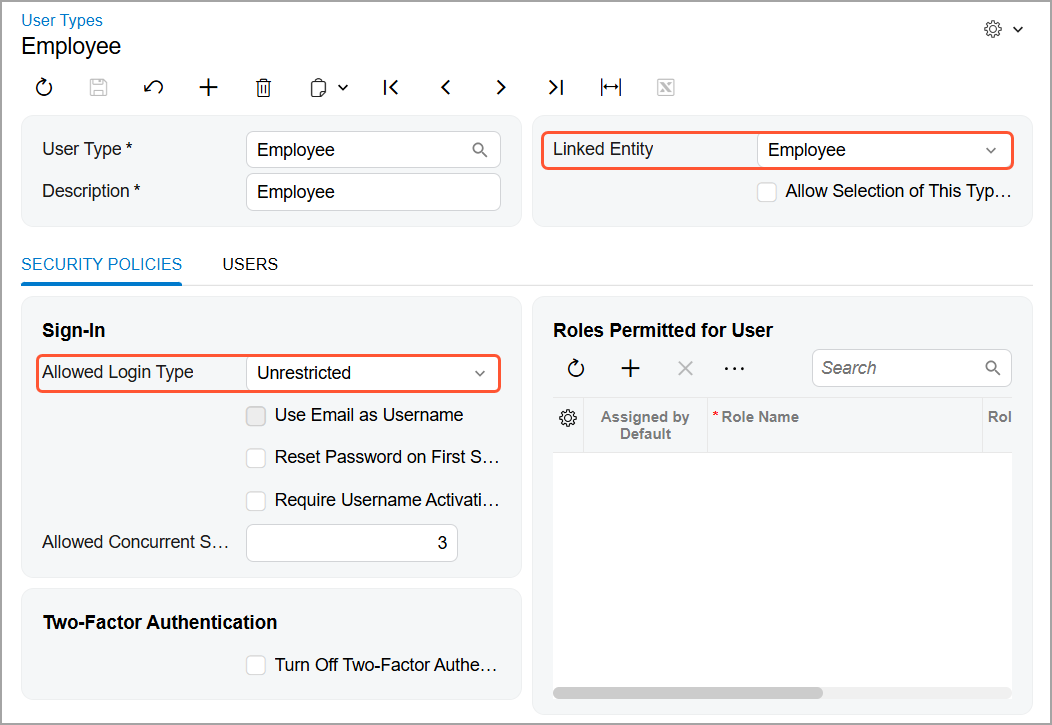
The user account on the Users (SM201010) form must have a user type with the following settings specified on the User Types (EP202500) form:
- Linked Entity: Employee
- Allowed Login Type: Unrestricted
Access Rights
To work with records in MYOB Acumatica by using the Gmail add-on, the user must have sufficient access rights to view existing records and create new records.
At least the View Only access right is required for the following forms:
- Attributes (CS205000)
- Business Account Classes (CR208000)
- Case Classes (CR206000)
- Contact Classes (CR205000)
- Countries/States (CS204000)
- Customer Management Preferences (CR101000)
- Customer Contracts (CT301000)
- Enable/Disable Features (CS100000)
- Lead Classes (CR207000)
- Opportunity Classes (CR209000)
At least Edit access right is required for the following data entry forms:
- Business Accounts (CR303000)
- Cases (CR306000)
- Contacts (CR302000)
- Email Activity (CR306015)
- Leads (CR301000)
- Opportunities (CR304000)
You can assign the required access rights by using the following forms:
- Access Rights by Role (SM201025)
- Access Rights by Screen (SM201020)
- Access Rights by User (SM201055)