
Updating KiwiSaver Rates
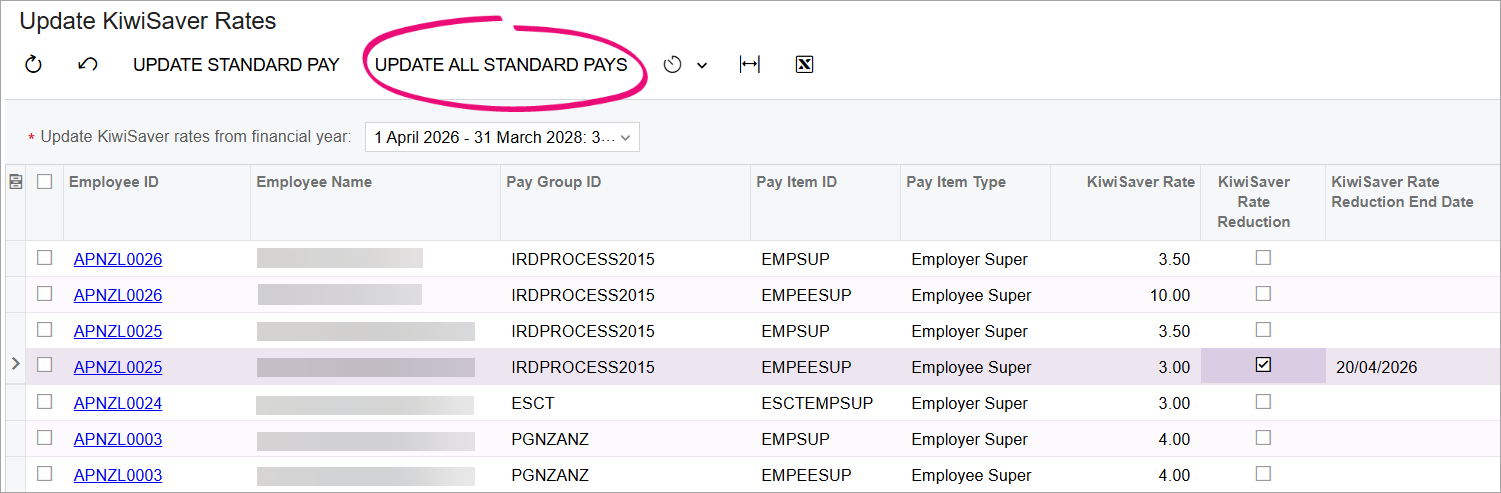
There are times when Inland Revenue (IR) might change the minimum KiwiSaver rate. You can use the Update KiwiSaver Rate form (MPPP2321) form to update employee standard pays in bulk to reflect the changed minimum rate. This won't update the rate for employees who contribute more than the minimum rate.
You can also update employees' Kiwisaver rates invidually in their standard pay by
updating the Amount($) field against the Kiwisaver pay items.
Note:
If any
employees have a rate lower than the minimum (and they haven't received an
exemption from IR), you won't be able to include them in pay runs until you
update their rate.
Updating all standard pays
- Go to the Update KiwiSaver Rate form.
- From the Update KiwiSaver rates from financial year dropdown, select the rate you want to apply.
- On the toolbar, click Update All Standard Pays.
Updating a single employee's standard pay
- Go to the Update KiwiSaver Rate form.
- From the Update KiwiSaver rates from financial year dropdown, select the rate you want to apply.
- Select the employee whose standard pay you want to update.
- On the toolbar, click Update Standard Pay.