
Projected Annual Leave
IMS Online displays annual leave balances as at the last closed pay. The balance can be controlled within Business Rules to determine whether accrued leave is included in the balance.
Each leave request stands alone and refers to the annual leave balance at the time of creating the request.
What is projected annual leave used for?
Projected Leave is used to estimate an employee’s Annual Leave balance at a future date.
Projected annual leave takes into account any future approved and unapproved leave requests.
Future leave is defined as any leave request occurring after the last closed pay date in the payroll system.
Benefits of projected annual leave
The benefits of projected leave are:
-
employees and managers may need to ascertain what an employee’s leave balance will be at a future date
For example, an employee may not have a sufficient annual leave balance now but would like to take some leave in the future. This functionality lets them find out what their annual leave balance would be in the future at the time they would like to take the leave
-
accurate warning messages will appear in the leave planner
For example, an employee’s leave balance may be insufficient at the time of creating the leave request, however there will be enough leave accrued at the date they wish to take the leave. Therefore, warnings will not display about defaulting to leave without pay.
-
It is expected the Administrator will recalculate leave requests on a regular basis to ensure warnings remain up to date.
-
Note that even without projected leave, leave will always be paid correctly based on current balances, once the import file is created.
Where do projected annual leave balances appear in TimeFiler?
Projected Leave appears on the Leave Request page near the leave balances:

Projected leave does not display on timesheets.
Viewing projected annual leave
On the Leave Planner, click on the future date the leave balance is to be projected to (for example in below screenshot, employee has clicked on 31 July 2014)
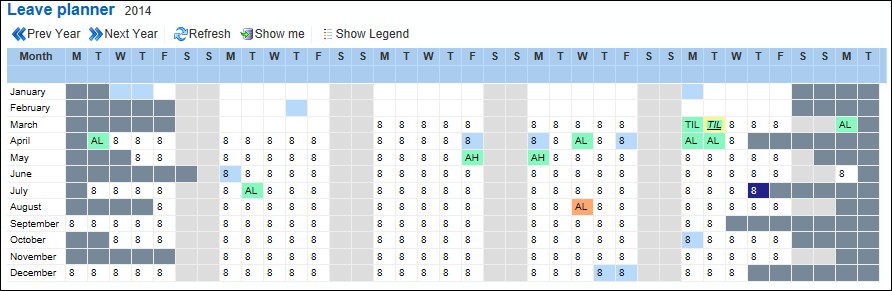
The projected annual leave balance will calculate and appear in the bottom section of the screen where the leave balances are displayed

Why do projected annual leave balances not display sometimes?
Projected leave balances will only display if the user has clicked a future date on the leave planner.
Projected leave balances will not display historically i.e. you cannot look back in time, only into the future.
What is included in the projected leave calculation?
Projected annual leave is made up of four components to ascertain the future balance:

-
Total annual leave balance (both outstanding and accrued leave) as at last closed pay
-
Estimated accrual from last closed pay to the projected date selected
-
Any future leave requests that have been approved (including those after projected date)
-
Any future leave requests entered that have not yet been approved (including those after projected date)
In the above example, the projected balance is calculated as:
Total annual leave balance 17 days
Plus: Estimated accrual +4.38 days
Less : 1 day future leave request approved -1 day
Less: 1 day future leave request not yet approved -1 day
Equals: Projected annual leave balance =19.38 days
Note, if annual leave is in a quantity of hours, as opposed to days, the same process as above occurs, with the start and finish balances, accrual and future leave requests displaying in hours.
Order customisation
Please complete the IMS Online Customisation order form to install projected leave functionality.
Standard costs will usually apply, but this may vary depending on any complexities you may have, such as:
-
if your organisation has off-set dates e.g. PE is 31/07/2014 which includes leave up to the end of June only.