
Send Leave Reminders
Prior to creating timesheets, Administrators may send an email to remind employees and managers to attend to outstanding Leave requests.
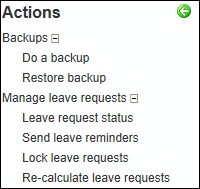
To send leave reminder emails, select Send leave reminders on the Actions tab page:
Select the pay period and the applicable date range. Leave reminders would generally be sent to people who have leave requests that are submitted (but not approved) and un-submitted (not sent to manager for approval). There is the option to send it to people who have approved leave requests should your organization choose to do so.
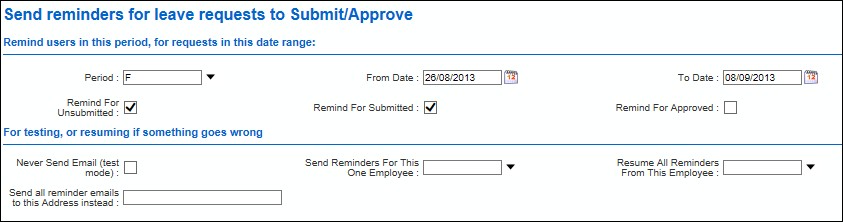
Click Start.
Employees with unapproved leave requests will receive an email asking them to attend to them.

Managers with employees who have unapproved leave requests will receive an email asking them to attend to these.

Problem Solving
There is the ability to test leave reminders or to resume them at a certain point.

|
Field |
Explanation |
|---|---|
|
Never Send Email (test mode): |
Ticking this box means no emails will be sent out to employees |
|
Send Reminders For This One Employee: |
You are able to select one particular employee to send a Leave Reminder email to |
|
Resume All Reminders From This Employee: |
If, during the process of sending leave reminders, your system crashes, you are able to resume leave reminders from the point they stopped. This saves having to re-run them from the beginning and employees receiving multiple emails |
|
Send all reminder emails to this Address instead: |
To test all leave reminder emails are working you could have them sent to one email address, rather than sending them out to the employees |