Intercompany Purchases and Returns: Intercompany Drop-Ship Purchase
In MYOB Acumatica, companies within the same tenant can collaborate to fulfill customer orders through intercompany drop-ship purchases. This functionality allows a purchasing company to cover shortages by ordering goods from a selling company, with the items shipped directly to the external customer.
Applicable Scenarios
You may need to drop-ship goods through another company in the same tenant if one of the following conditions is met:
- Your company has a shortage of the requested goods.
- Another company is geographically closer to your customer, and drop shipping would reduce the shipping cost.
Processing an Intercompany Drop-Ship Purchase
In MYOB Acumatica, an intercompany drop-ship purchase order is typically processed as follows:
- Purchasing Company: The sales manager does the following:
- Creates a sales order for the external customer on the Sales Orders (SO301000) form.
- Adds a line with the required items.
- Selects the Mark for PO check box in the line, indicating that the order line was marked for purchasing, and selects Drop-Ship as the PO Source.
The purchasing manager of the same company does the following:
- Clicks Create Purchase Orders on the More menu of the Sales Orders form.
- Generates a purchase order with the selling company as the vendor on the Create Purchase Orders (PO505000) form.
- Removes the purchase order from hold on the Purchase Orders (PO301000) form.
- Selling company: As soon as the purchase order is assigned the Open
status, the manager of the selling company does the following:
- Opens the Generate Intercompany Sales Orders (SO504000) form and generates
a sales order for the purchase order.
On the Addresses tab of the Sales Orders form, the system inserts the address of the external customer into the new sales order.
- Creates a shipment for the intercompany sales order.
- Confirms the shipment when the external customer receives the goods from warehouse of the selling company.
- Opens the Generate Intercompany Sales Orders (SO504000) form and generates
a sales order for the purchase order.
- Purchasing company: On confirmation of the shipment to the external customer, the
purchasing manager does the following:
- Opens the Generate Intercompany Purchase Receipts (PO504000) form and generates a purchase receipt for this shipment.
- Releases this purchase receipt on the Purchase Receipts (PO302000) form.
The sales manager of the same company prepares an invoice for the external customer on the Invoices (SO303000) form.
- Selling company: The sales manager does the following:
- Prepares a sales invoice for the purchasing company based on the intercompany sales order on the Sales Orders form.
- Releases a sales invoice on the Invoices form.
The AR invoice becomes available on the Invoices and Memos (AR301000) form.
- Purchasing company: As soon as the AR invoice is available, the accountant does
the following:
- Opens the Generate Intercompany Documents (AP503500) form and generates an AP bill based on this invoice.
- Releases the AP bill on the Bills and Adjustments (AP301000) form.
At this point, the intercompany drop-ship purchase is completed.
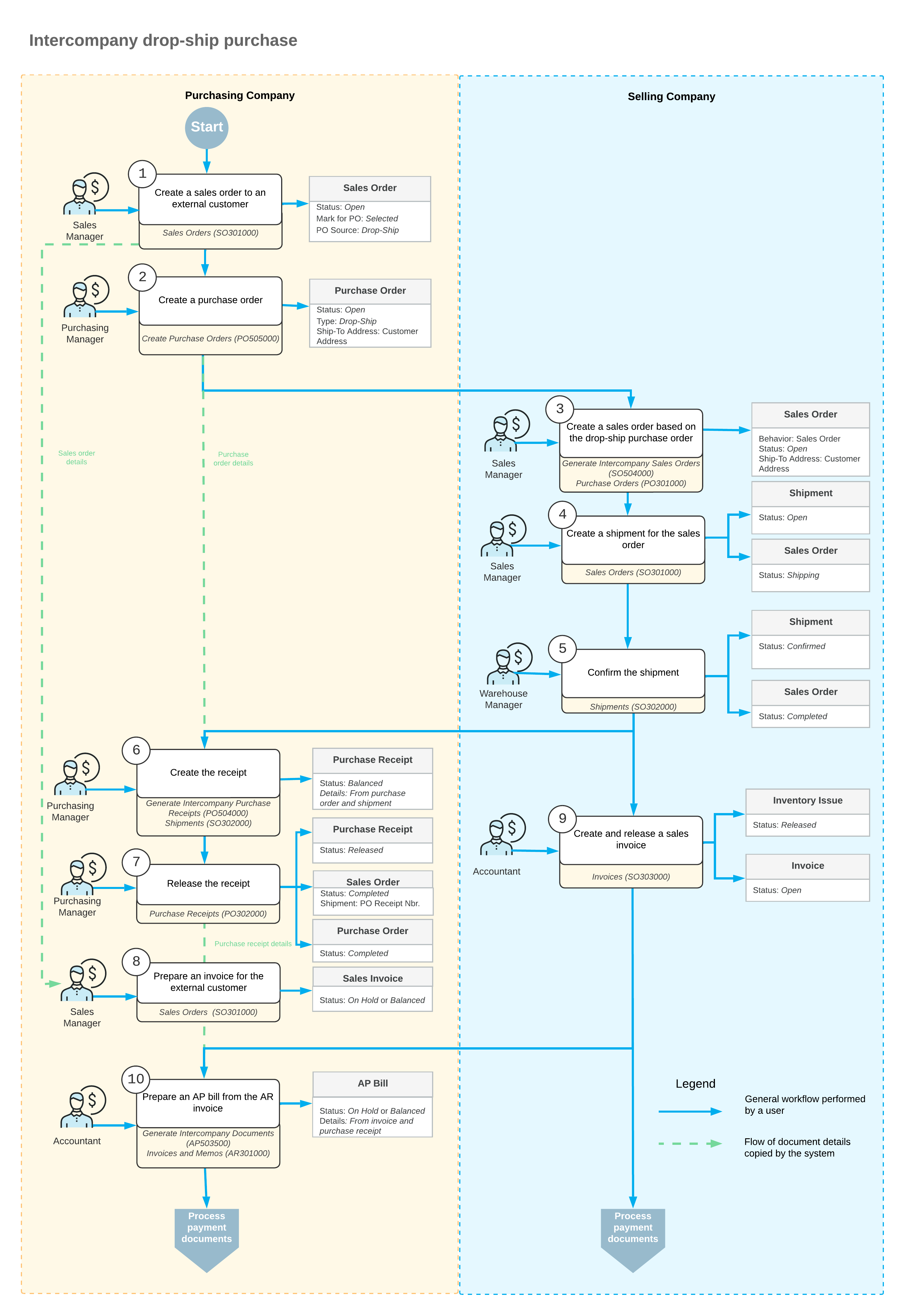
Workflow of the Intercompany Drop-Ship Purchase
For an intercompany drop-ship purchase between the branches of two different companies, the typical process involves the actions and generated documents shown in the following diagram.