
AP Prepayment Invoices: Balance Reports
How Prepayment Invoices Are Reflected in Reports
The following reports may include prepayment invoices:
- AP Balance by GL Account (AP632000)
- AP Balance by Vendor (AP632500)
- AP Balance by Vendor MC (AP633000)
These reports reflect released prepayment invoices throughout their lifecycle until they’re closed. As a result, the vendor totals in the reports match the related GL totals.
How Prepayment Invoices Appear in the Reports
In the AP balance reports, a prepayment invoice is shown twice—once under the AP account and once under the prepayment account used on this invoice. This approach ensures that the vendor balances shown in the reports match the related GL totals.
The document type (Doc. Type column) of a prepayment invoice is Prepmt. Invoice.
How to Interpret Amounts and Signs
The reports apply consistent sign logic so you can interpret balances correctly. In rows for prepayment invoices, the values in the Amount and Balance columns are shown as follows:
- Under the AP account: The prepayment invoice amount posted to the AP
account is shown as a positive value. When the invoice is released, the amount
is posted to the AP account and appears in the Amount
column. Therefore, even if no payments have been applied yet, the prepayment
invoice still appears in the table for the AP account.
The Balance for this line changes as payments or prepayments are applied to the prepayment invoice.
- Under the prepayment account: The prepayment invoice amount posted to the
prepayment account is shown as a negative value because it represents a vendor
deposit.
The Balance represents the remaining unused portion of the prepayment in that account. When the prepayment is fully applied, the balance in the table for the prepayment account becomes 0.00.
Because the same prepayment invoice appears under both accounts, you’ll typically see a positive amount on the AP account line and a negative amount on the prepayment account line.
Example: The Same Prepayment Invoice Under Both Accounts
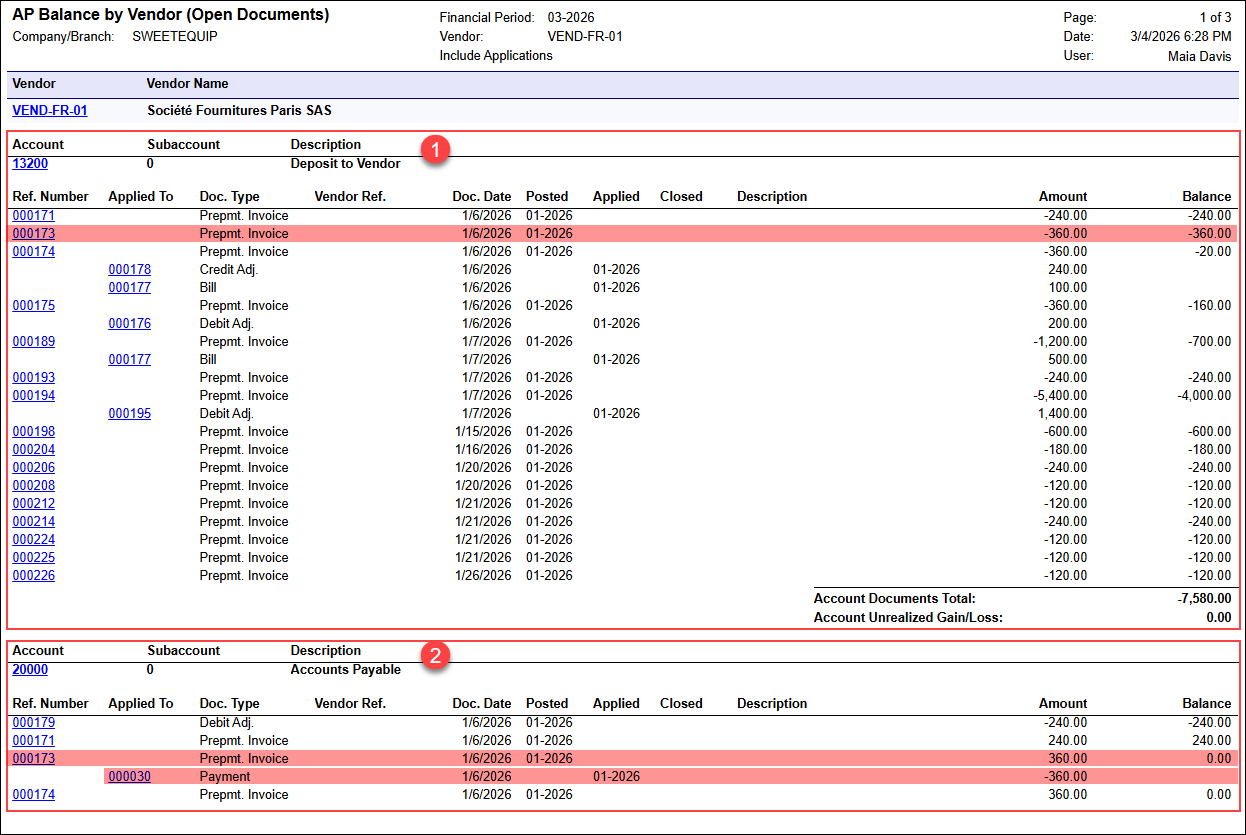
The screenshot below shows the same prepayment invoice (000173) under two accounts in the AP Balance by Vendor (AP632500) report, with opposite signs that reflect the invoice’s role in the corresponding account.
You can see the following tables in the report:
- Prepayment account table (Item 1 below): This table shows document data
for the 13200 (Deposit to Vendor) account, with negative values
shown for prepayment invoices. For example, prepayment invoice 000173 is
listed with a negative amount (–360.00). This amount represents the
vendor deposit recorded in the prepayment account.
Because the same value is shown in the Amount and Balance columns, the prepayment has not been used yet—that is, the prepayment invoice hasn’t been applied to any AP bill.
- AP account table (Item 2): This table shows data for the 20000 (Accounts Payable) account, with positive values shown for the same prepayment invoices. For example, prepayment invoice 000173 appears again with a positive amount (360.00). The Balance for this line is 0.00, which indicates that the prepayment invoice has been fully settled. The applied payment is shown in the line directly under the prepayment invoice line (see below).
Write-Offs of Unpaid Prepayment Invoice Balances
If an unpaid prepayment invoice balance is written off with a debit adjustment, the reports display the debit adjustment row with different signs depending on the account:
- AP account line: Shown as a negative value (with a minus sign)
- Prepayment account line: Shown as a positive value