
Correcting Reported Qualifying Earnings
If you have completed pay runs where incorrect qualifying earnings (QE) have been
reported to STP, you can fix them on the Pay
Item Liabilities form (MPPP1025).
Note:
This page is only about fixing
qualifying earnings. For incorrect super guarantee (L) values, you must make pay adjustments to align them with the
superannuation payout for those pay runs.
There are a few reasons your reported QE might be incorrect:
- Pays were processed for the 2026–27 financial year before upgrading to a version that supports Payday Super.
- Pay items were incorrectly set up for QE liability.
- Your company recently migrated to MYOB Acumatica — Payroll from another payroll system.
For information from the Australian Taxation Office (ATO) about correcting QE, visit the ATO website.
Update QE Liability for Pay History
- Go to the the Pay Item Liabilities form (MPPP1025).
- For the pay item you need to correct, select or deselect the Liable for Qualifying Earnings (QE) checkbox.
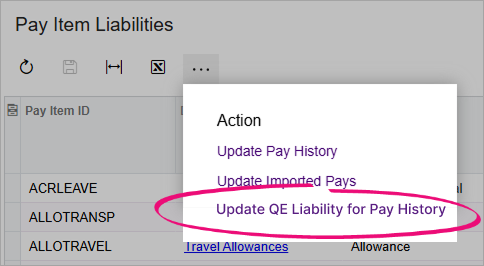
- On the form toolbar, click the three dots icon (...) and choose
Update QE Liability for Pay History.
- In the Apply to Completed Current Pay(s) forms, enter a date range.
The start date must be on or after 1 July 2026. The pay item liability will
be updated for all completed pays in that date range.
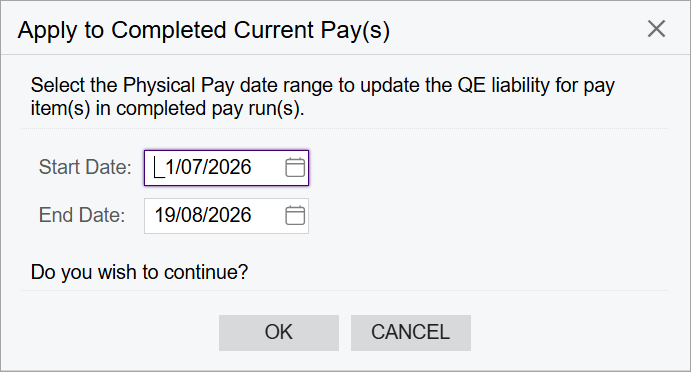
- Click OK to update the pay history. The next time you submit a pay
event or update event (including terminated employee finalisations), the
corrected QE values will be included in the STP report and submitted to the
ATO.Note:If you want to check the updated configuration, you can check the Liable for Superannuation (SG) and Liable for Qualifying Earnings (QE) columns on the STP Transaction Data report (MPPP4063).