Payroll: Multi-Company Pay Super Available to Everyone
We've made multi-company Pay Super available to everyone, so all companies in a single tenant take advantage of MYOB's free superannuation clearing house service.
Registering an SMSF Separately for Each Company
Each company in an MYOB Acumatica tenant can now register the same self-managed super fund (SMSF) with Pay Super, instead of a single registration being shared across all companies. This makes it easier to ensure the SMSF is registered with the right companies and reduces the risk of payments being left out when you create a super batch.
Here are some changes you'll see to support this improvement:
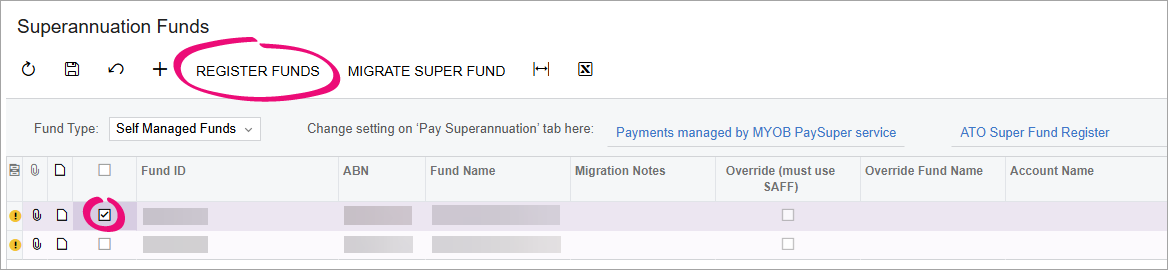
- On the Superannuation Funds form
(MPPP2152), warnings help you identify which SMSFs are not registered with the
company you're currently signed into. To register an SMSF, select it in the new
checkbox column and click the new Register Funds action, which has
replaced the Register previously saved funds action. We've also added a
Company column to the employees table.
- On the Create Superannuation Batch form (MPPP5005), warnings let you know if a contribution will be excluded from the batch because the SMSF is not registered.
Automatically Sync Company Preferences When Creating Superannuation Batch
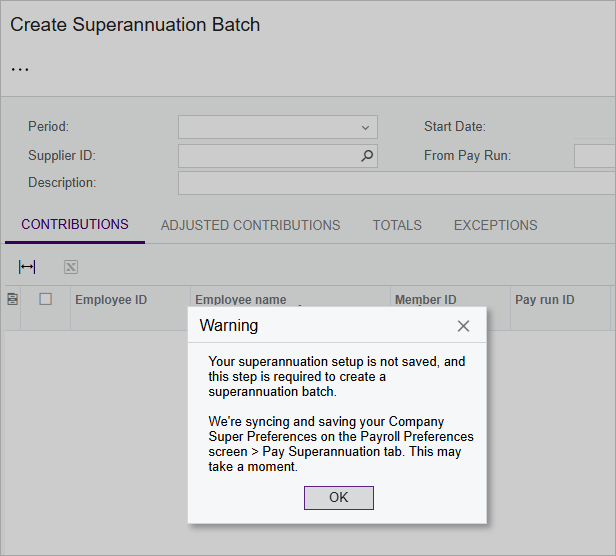
In version 2025.2.3, we added the ability to sync superannuation payment preferences across all your companies. Syncing company preferences is a mandatory step in setting up multi-company Pay Super.
Now, if you go to the Create Superannuation Batch form (MPPP5005) without having manually synced your company preferences, you get a clearer warning and your company preferences are automatically synced. This only happens the first time you go to the form after upgrading. You don't need to sync company preferences every time you create a batch.