
Time Target Interface Overview
Introduction
The Time Target Leave Extract utility extracts a leave details file containing one line per employee with the following fields:
|
EmployeeID |
FullName |
FirstNames |
|
Surname |
PostalAddress1 |
PostalAddress2 |
|
PostalAddress3 |
PostalAddress4 |
HomePhone |
|
Gender |
Occupation |
Department |
|
CostCentre |
CostCentreName |
StartDate |
|
FinishDate |
Terminated |
Reinstated |
|
SalaryType |
HourlyRate1 |
HourlyRate2 |
|
HourlyRate3 |
HourlyRate4 |
HourlyRate5 |
|
PayPeriodRate |
PayrollFrequency |
HoursPerDay |
|
HoursPerPeriod |
ALType |
SickFullEntitlement |
|
SickMaximum |
Apprentice |
BirthDate |
|
Student |
EmpNo |
EmailAddress |
|
AnnualRecordingMethod |
SickRecordingMethod |
LieuRecordingMethod |
|
LeaveAccruedTo |
ALOutstanding |
SKBalance |
|
LieuBalance |
Running the Utility
Once the Time Track Leave Export utility has been installed, open it by selecting Tools menu > Files Export > Time Target Leave Extract in MYOB IMS Payroll Partner.
You can only use the Time Track Leave Extract window if the payroll company is in the “Closed” state.
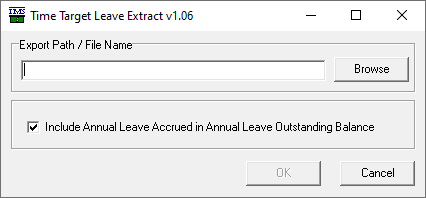
Enter the location and name of the file to be generated. The file name should have a suffix of ‘.csv’.
Indicate whether employee’s Accrued Annual Leave balances should be included in the Annual Leave Outstanding column (ALOutstanding).
Click the OK button to generate the extract file.