Managing Annual Holidays in Weeks
Introduction
The complexity of the Holidays Act is well understood, and issues of implementation are an ongoing challenge for businesses across New Zealand.
One of the most challenging areas of the Act to manage is keeping accurate balances of Annual Holidays entitlement when your employees have varied working patterns or change their working hours; this is because Annual Holiday entitlement is provided by the Act in weeks and most of us think about and manage our work and holidays in days and hours. To manage Annual Holidays for your employees you need to ensure you have an agreement with them on what a working week means (i.e how many days or hours), this must genuinely reflect their working pattern at the time of any holidays taken.
It is important that where you use hours or days to determine Annual Holiday entitlements for your employees, you are able to demonstrate how those days or hours translate into the equivalent of 4 weeks Annual Holidays. It is also important that you adjust the balance for any change in your employees work pattern. Again, this entitlement to holidays needs to genuinely reflect their working pattern at the time of any Annual Holidays taken.
The latest release of MYOB includes an update which requires a review of your payroll system process and/or employee set up, and evaluation of your compliance with the Holidays Act.
The purpose of this document is to provide an overview of the software updates to the system to:
-
help you demonstrate your employees’ Annual Holidays entitlement in weeks and;
-
to automate the recalculation of Annual Holidays balances held in days or hours if your employee changes their working pattern.
This update applies to all employers as any change in your employee’s working hours or days needs to be carefully considered.
Disclaimer: This document provides guidance on how to manage leave entitlements within our product. We recommend that you read the MBIE document “Holidays Act 2003: Guidance on annual holidays, domestic violence, leave, bereavement leave, alternative holidays, public holidays and sick leave” to understand how to meet your obligations as an employer under the Holidays Act 2003. If you have further questions or are in doubt, it is best to seek legal advice to ensure you are meeting your obligations.
MBIE Guidance:
Background
The Holidays Act 2003 provides all employees 4 weeks Annual Holidays after 12 months’ continuous employment. Ensuring that your employees receive their full entitlement each year is an important part of your obligations under the Act.
It is common practice to manage entitlements as an accruing bucket of leave in days or hours, this means that your employees are earning a time portion of Annual Holidays when you pay them based on the agreed definition of a week you have with them. When employees take holidays, the balance is reduced by the number of hours or days they are taking. It is okay to manage Annual Holidays in this way so long as when an employee’s work patterns change, the existing holiday entitlements that are held in days or hours are adjusted to reflect the employee’s new work pattern, and you are able to demonstrate how they translate into the equivalent of 4 weeks Annual Holidays per year.
The example below might help to explain the calculation or further detail please refer to the example on page 32 of the MBIE Holidays Act guidance document:
The changes in this release aim to assist employers by converting Annual Holidays hours and days into the equivalent portion of 4 weeks and maintaining accurate entitlements by providing options to automatically recalculate leave balances when a work pattern changes.
What is changing
Prior to this change, MYOB IMS Payroll users needed to manually calculate and adjust balances held in hours or days when an employee’s work pattern changed. In the system, the “Hours worked per period” was used to calculate the Annual Holidays entitlements. If an employees’ “Hours worked per period” was modified, a manual recalculation of entitled leave balances was required to the “Outstanding Entitlement” field.
For example:
-
Bob worked 20 hours per week and his annual leave entitlement was 80 hours (i.e. 4 weeks x 20 hours)
-
At the time of a change in work hours he had 60 hours of his entitlement remaining. This can be calculated as 3 weeks (60 hrs / 20 hours = 3 weeks).
-
Bobs work hours increase to 30 hours per week. To ensure that Bob still has 3 weeks of leave available Bobs entitled balance needs to be increased to 90 hours (3 weeks x 30 hours)
-
If no adjustments were made Bob would lose 1 week of leave as 60 hours of leave would only equate to 2 weeks at 30 hours per week.
-
The value held in the “Outstanding Entitlement” field would need to be manually overridden to 90 hours to ensure that Bob still has 3 weeks of leave available.
The changes in this release will:
-
record an Agreed Definition of a Week for each employee (the number of days and hours that have been agreed on as the basis for an employee’s Annual Holiday entitlement). This field is used to manage entitlements and calculate rates for the payment of holidays.
-
display a “Weeks” value alongside the leave balances held in Hours or Days
-
automate the recalculation of an employee’s leave balances when their work pattern changes.
Preparing for the change
There are business processes and decisions outside of the product that you need to complete prior to implementing the product changes. If you are unclear of your obligations, you should seek guidance from MBIE or your employment relations advisor.
-
You need to ensure that what genuinely represents a working week for your employees is very clear and/or agreed with them and that your employment agreements state this. This will be loaded to the system to provide holiday entitlement and demonstration of the balance in weeks. For more information on determining and agreeing with your employees whether holidays will be taken in days or hours, see the worked example on page 34 of the MBIE guidance.
-
You will need to check your employees current balance because when the new features are enabled, an employee’s current Annual Holidays balance, shown in days or hours, will be used to calculate the equivalent balance in weeks, based on the agreed definition of a week. It is therefore important to ensure that the starting balance is accurate otherwise the calculation into weeks will be incorrect. Once the feature is enabled any future changes to the Agreed Definition of a Week, will trigger a recalculation which will adjust the balance in hours or days, but keep the weeks value the same.
-
Before implementing these changes, you need to consider how you have previously treated Annual Holiday balances when your employee’s working patterns have changed. If you have not made a manual adjustment to their balance at the time, it is possible that their current balances are higher or lower than they should be. You can use the Employee Audit report to identify if and when an employee’s Annual Leave entitlements and values have been changed in the past. MBIE’s current guidance is that if your employees’ hours or days have increased, you are required to recalculate to increase the balance but where the hours or days have decreased, you need to be cautious about decreasing the balance. As stated in the MBIE Guidance:
“If the employee’s hours decrease, recalculating will be compliant with the Act, but could give rise to other issues, such as a claim for breach of contract, if the employer has not been recalculating previously. In this situation, it is recommended that legal advice is sought.”
-
If you have not manually calculated balances in the past as described in this document, you will need to retrospectively review and adjust balances before activating these new features. You should consider whether the following scenarios may have occurred for any employees:
-
An employees’ work pattern may have changed (e.g. hours worked increased or decreased) and no changes were made to “Hours worked per period” field at the time. You may be able to identify this by reporting on Actual hours worked and comparing it to the Leave entitlements over the same period. You will need to then manually calculate what they would have been entitled to over that period and adjust the balance in the “Outstanding Entitlement” field in line with point 3 above.
-
An employees’ work pattern may have changed and while the “Hours worked per period” field was updated, no changes were made to the employees “Outstanding Entitlement” field. You can use the Employee Audit report to identify these changes and in this case, they would have begun to accrue the correct entitlement from the change date so the adjustment will apply to the outstanding balance they had at the time.
We understand that this can be a complex process to work through and we recommend that you seek advice if you are unsure of the accuracy of your employees’ entitlements.
For your employees with varied hours or days of work, it is also important to consider the impact on payment of leave depending on an agreement of hours or days as detailed in page 34 of the MBIE guidance and to make your employees aware that the payment for less than a week of holidays might not match exactly what they would have worked that day.
After the change
Once you have enabled the ability to record each employee’s Agreed Definition of a Week you will need to ensure that definition is maintained and updated as required. For example, when an employee moves from part time to full time hours or days or vice versa, you should review this setting to ensure it is updated with the new hours or days.
We also recommend regularly reviewing the employee’s actual hours relative to the Agreed Definition of a Week to ensure it is still a true representation of the agreed week. Where variances occur, this may prompt discussion and further agreement with your employee and potentially an update to the Agreed Definition of a Week and values stored in the software.
You can review employees’ historic annual holiday rate values on the History > Leave Earnings tab of the Employee Information screen. If the values recorded in the H/Rate fields were fluctuating in the previous 52 weeks, this will the explain any differences between the new and old rates.
Software Changes
MYOB has made the following updates to the product, which become active once the Calculate Annual Leave in Weeks option is enabled for an employee.
Note: The Calculate Annual Leave in Weeks option is only available for Set Hours users.
If an employee’s Agreed Definition of a Week values change at any time, this will cause their hourly or daily Annual Holidays balance and entitlement to be recalculated to match the new Agreed Definition of a Week. Options for how employees’ balances will be affected are available under Change of Agreed Weekly Hours/Days Behaviour on the Company Information tab:
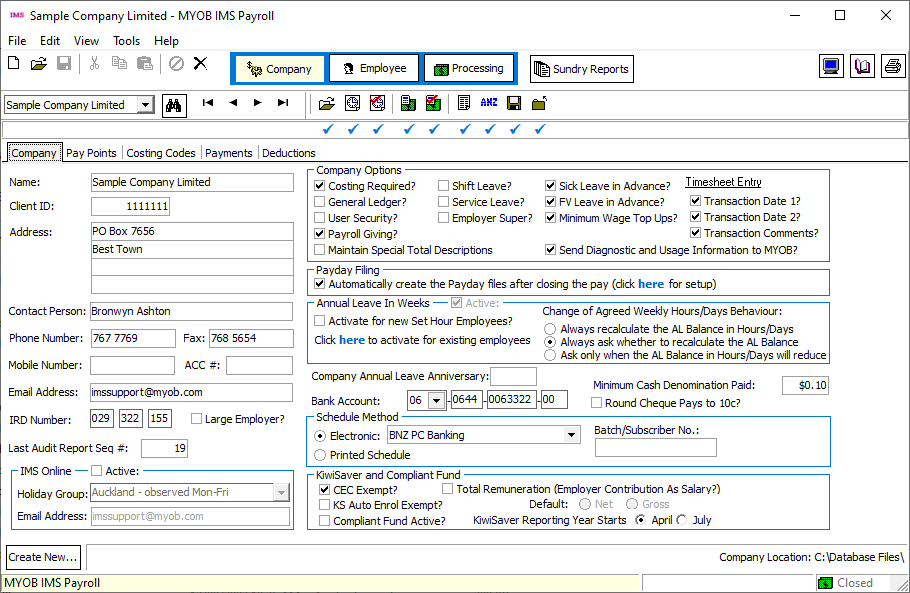
Selecting Always recalculate the AL Balance in Hours/Days means that when an employee’s Agreed Definition of a Week changes, their hourly/daily Annual Holidays balance will be recalculated automatically. An information window appears, showing the new balances and entitlements in weeks as well as in days/hours:
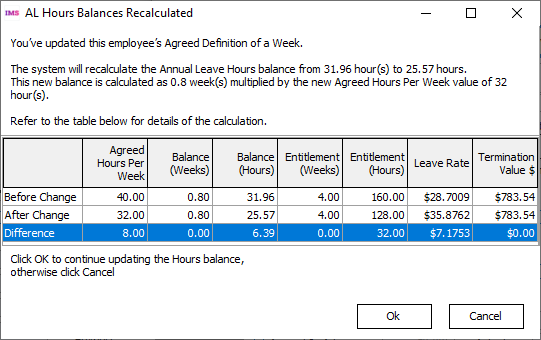
(The user has the option of clicking Cancel at this point if they do not want to make the changes to the Agreed Definition of a Week—the new balance and entitlement values are not applied until the user clicks OK.)
Selecting Always ask whether to recalculate the AL Balance means that the following message window appears when an employee’s Agreed Definition of a Week changes:
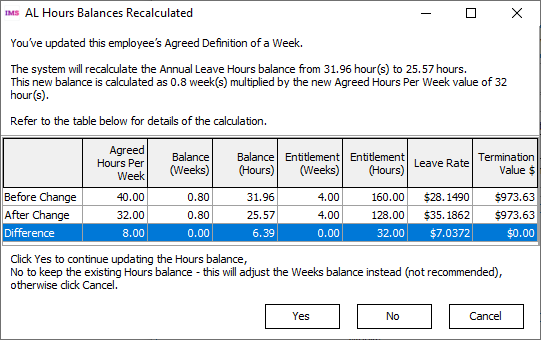
This window has the following options:
-
Yes – The employee’s hourly/daily balance and entitlement will be recalculated as displayed on the window.
-
No – The hourly/daily balance will remain the same and the employee’s weekly balance and entitlement will not be recalculated. (This is not recommended.)
-
Cancel – The change to the employee’s Agreed Definition of a Week is not saved.
Selecting Ask only when the AL Balance on Hours/Days will reduce means that the user is only asked if they want to update or keep the hours/days values if the change to the Agreed Definition of a Week would result in a reduction of the employee’s hour/daily balance and entitlement. If the change means the employee’s hourly/daily values would stay the same or increase, the system will behave the same as when the Always recalculate the AL Balance in Hours/Days option is selected. (This is the default.)
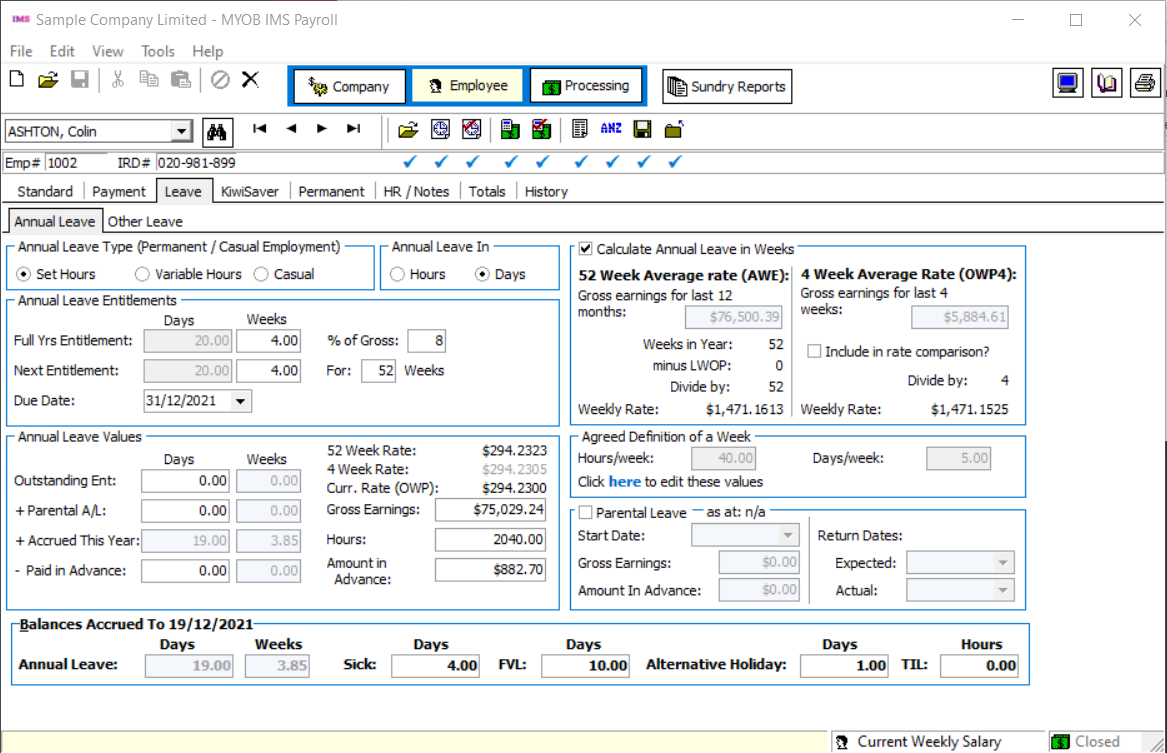
The Employee Information > Leave > Annual Leave tab is updated as follows when Annual Leave in Weeks is enabled:
-
The settings in the Calculate Annual Leave in Weeks and Agreed Definition of a Week sections become active.
-
A Weeks column appears next to the Annual Leave entitlement and balance units on this tab, showing the units in weeks as well as hours/days.
-
The Average Weekly Earnings (AWE) and Ordinary Weekly Pay (OWP) rates for the employee use the new Agreed Definition of a Week values to calculate a daily or hourly rate.
Weekly balances are also displayed for Annual Leave Cash Ups on the Leave > Other Leave tab, and for Service Leave on the Service Leave tab.