Annual Holidays Rate Formulas
Introduction
The complexity of the Holidays Act 2003 is well understood, and issues of implementation are an ongoing challenge for businesses across New Zealand. MYOB is committed to helping employers meet their obligations under the Act.
The latest release of MYOB includes an update which requires a review of your payroll system process, and/or employee set up and evaluation of your compliance with the Holidays Act. This document provides an overview of the software updates to the system and what you should consider before implementing any changes.
This update will apply to you if you have employees who have ever worked outside of their agreed hours or days of work and you have not been manually updating the Standard number of Days/Hours worked in the Timesheet field “Days/Hours paid for Holiday Rate”.
Disclaimer: This document provides guidance on how to manage leave entitlements within our product. We recommend that you read the MBIE document “Holidays Act 2003: Guidance on annual holidays, domestic violence, leave, bereavement leave, alternative holidays, public holidays and sick leave” to understand how to meet your obligations as an employer under the Holidays Act 2003. If you have further questions or are in doubt, it is best to seek legal advice to ensure you are meeting your obligations.
MBIE Website:
Key Terms
Annual holiday entitlement
Also known as annual leave, this is an employee’s legal right to not less than four weeks of annual holidays each year after working for an employer for 12 months.
Gross earnings (‘GE’)
Gross earnings for the purpose of calculating the Leave rates include or exclude payments according to section 14 of the Act. In IMS this can be achieved by setting the right options under the Payment, Leave accumulation section.
Average weekly earnings (‘AWE’)
AWE is 1/52 of the employee’s gross earnings for the 52 weeks before the end of the last pay period before the annual holiday.
Leave without pay (‘LWOP’)
An employee’s unpaid absence, taken while staying employed.
Ordinary weekly pay (‘OWP’)
Referred in IMS as “Current Rate”, this is the amount an employee is normally/usually paid each week.
OWP 4-week average (‘OWP/4’)
Referred in IMS as “Ordinary Rate”, this is the amount an employee would be paid if it is impracticable to calculate OWP.
Background
Payment for Annual Holidays is to be paid at the greater of your employee’s Ordinary Weekly Pay (OWP) i.e. what they would have been paid had they been at work, or their Average Weekly Earnings (AWE) for the previous 12 months.
The formula for AWE uses your employees Gross Earnings from the last 52 weeks and divides it by 52 to determine a weekly value. If your employee is taking less than a week, the weekly value is then divided by their agreed hours or days to come to an accurate rate to pay. In order for this to be accurate, you need to ensure that what genuinely represents a working week (i.e. the number of days or hours) for your employees is very clear and/or agreed with them and that your employment agreements state this. This needs to be loaded to the system and kept up to date so when it is used by the calculations, you are confident you will come to an accurate rate of pay. For more information on determining and agreeing with your employees what is genuinely a working week for them please refer to the
Section 8 of The Holidays Act 2003 details the payment for OWP and provides a formula to be used where you are unable to determine what the ordinary pay for your employee is. This is generally when your employee works variable hours or days or they have regular payments such as overtime, commissions or lodgings. The formula takes their Gross Earnings from the last 4 weeks and divides by 4 to determine a value.
What is changing
Prior to this change hourly or daily rates for AWE and the OWP 4-week average formula were calculated in MYOB IMS Payroll by dividing the Gross Earnings for the relevant period by the number of hours or days as recorded over the same period in the Employee History Leave Earnings tab in the column H/Rate Hours or H/Rate Days. The result of this is that employees’ holidays rates may not account for the current working week you have agreed with your employees. Our recommendation has been to consistently record, on the Timesheet Entry screen, the Days Paid For: Holiday Rate, which should be the same as the Days Paid For: Standard. This would then derive an accurate rate. However, if the field Holiday Rate was incorrectly set during each pay run, it could affect the calculated rate.
The changes in this release mean that AWE and the OWP 4-week average formula are now automatically calculated by dividing the Gross Earnings for the relevant period by the number of weeks over the same period. An Hourly or Daily value is then derived from the Weekly value by dividing by the Hours or Days stored in the new “Agreed Definition of a Week” field. It is important that this field is accurate and kept up to date.
IMS Payroll has previously made an automatic comparison of 3 rates: Average Weekly Earnings, Ordinary Rate (4 week average aka OWP/4) and Current rate. With the adoption of the changes in this release it will be optional to include the Ordinary Rate (4 week) in the comparison. This provides flexibility to not include this rate when it is clear that the current rate represents what is Ordinary.
Note: Employees who are paid monthly or half-monthly may have more than 4 weeks Gross earnings included in the calculation of OWP (4 week average). This is because a Monthly salary can include more than 4 calendar weeks. However the Act requires that a divisor of 4 be used for the Ordinary Weekly Pay Average formula. This can result in an increased rate for some employees.
Preparing for the change
As the holidays calculation in MYOB IMS will use the new “Agreed Definition of a Week” field in an employee’s record, you will need to review this field and ensure it is accurate and up to date. Again, you must ensure that what genuinely represents a working week (i.e. the number of days or hours) for your employees is very clear and/or agreed with them and that your employment agreements state this. For more information on determining and agreeing with your employees what is genuinely a working week for them please refer to the
You should review which employee’s Ordinary Weekly Earnings may be unclear and require the use of the Ordinary Weekly Earnings 4 Week average calculation. For those employees ensure the option to “Include in rate comparison “ is ticked.
You should also review previous holiday payments for any employees who have ever worked outside of their agreed hours/days of work. Based on the previous leave calculation used by MYOB IMS Payroll, if you haven’t manually updated the Timesheet field “Days/Hours paid for Holiday Rate”, there may be a risk of incorrect payment of leave, either underpayment or overpayment. Reviewing this is complex and we recommend you engage your accountant or your employment relations advisor prior to conducting this review if you think you have employees who may be affected.
You can review the Rates and the Days or Hours used for the Rate by printing the “Sundry>Leave Rate– Detailed” report.
After the change
If you adopt the new “Calculate Annual Leave in Weeks” feature the software will begin to use the new rate calculations. Note that this feature is available for employees that have the Annual Leave as “Set Hours”. In most situations we expect the new rates to be the same as the old. However, if in the process of adopting these new features you have also updated the work pattern stored in the new “Agreed Definition of a Week” to use different values to what was previously recorded in the Timesheet in “Days paid for: Holiday Rate ” field there will be a difference in rate.
If you want to compare the new rate calculations to the old rates we recommend that before enabling the “Calculate Annual Leave in Weeks” option on an employee, that you backup your data and print the “Sundry>Leave Rate– Detailed” report which will display the rates as they were calculated. After enabling the new options, you can reprint this report and compare the rates.
Once the new rates are in use it is important to continue to maintain the values in the “Agreed Definition of a Week” as these values are used to derive the correct Hourly or Daily values for an employee.
Software Changes
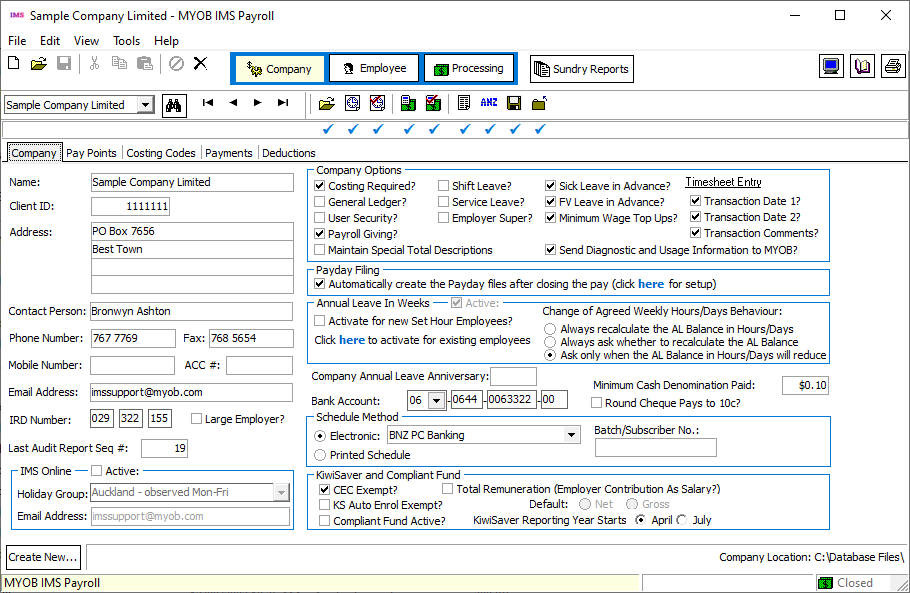
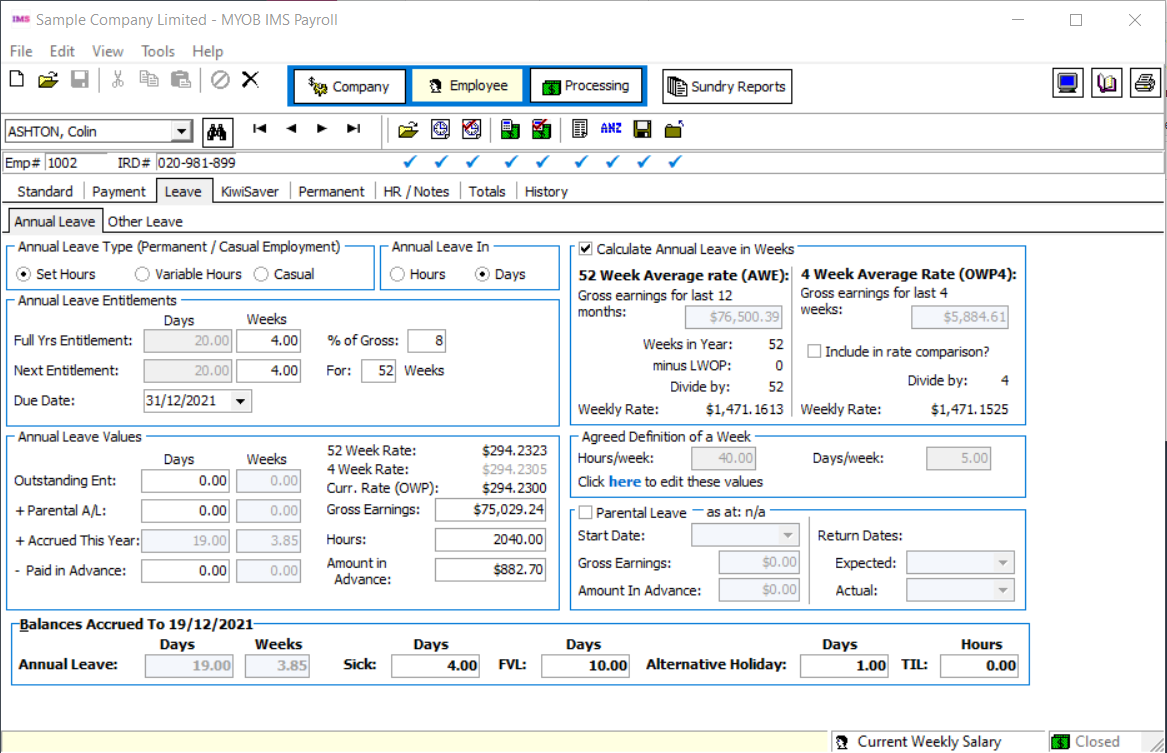
MYOB has made the following updates to the product. New calculations will automatically be used when the Annual Leave in Weeks company setting is enabled and when an employee’s Calculate Annual leave in Weeks option is ticked.
Example:
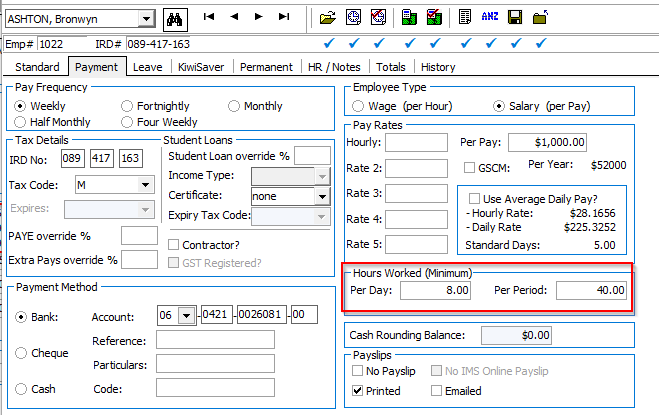
Before activating “Calculate Annual Leave in Weeks” option, employee Ashton Bronwyn is configured in the Payment tab with 40 Hours or 5 Days Worked (Minimum) per period.
On every pay run processed for this employee, the number of Days recorded in the Days paid for: Holiday rate were 5. The Days and Hours recorded for Holiday rate can be reviewed under Employee> History > Leave earnings under the columns H/Rate Hrs and H/Rate Days as in the screenshot below.
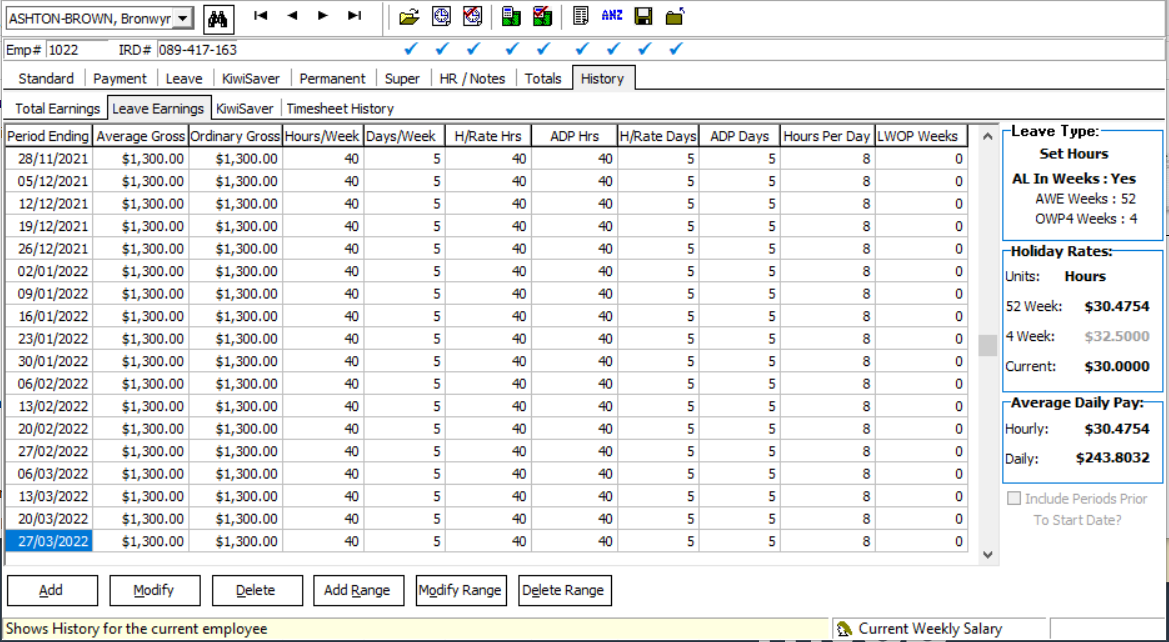
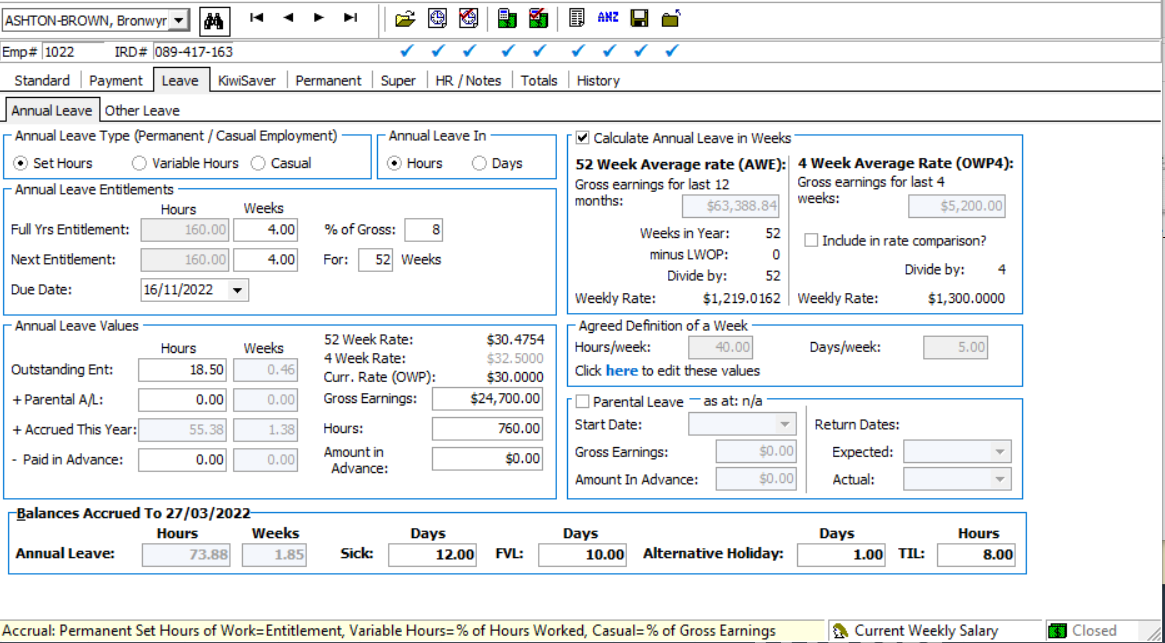
The Annual Leave rates for employee Ashton Bronwyn are calculated as:
Hourly 52 Week Rate: Gross earnings earned by the employee over the last 52 weeks divided by the sum of the hours worked during the 52 weeks;
Hourly 4 Week Rate: Gross earnings earned by the employee over the last 4 weeks divided by the sum of the hours worked during the 4 weeks;
The report Leave Rate – Detailed will display all the required information used to
calculate the Annual leave rates.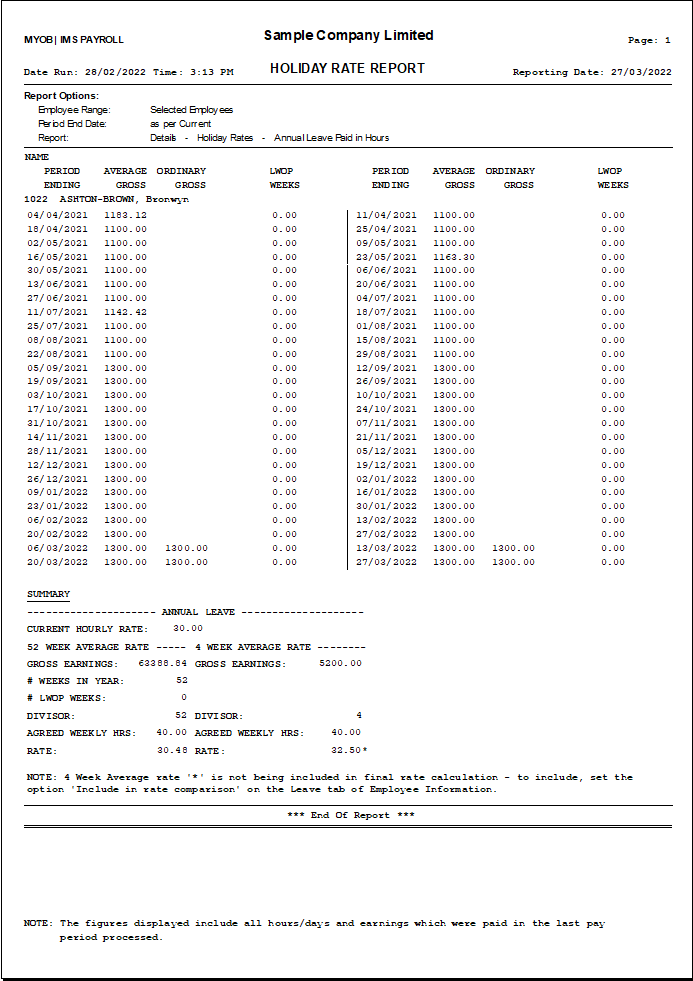
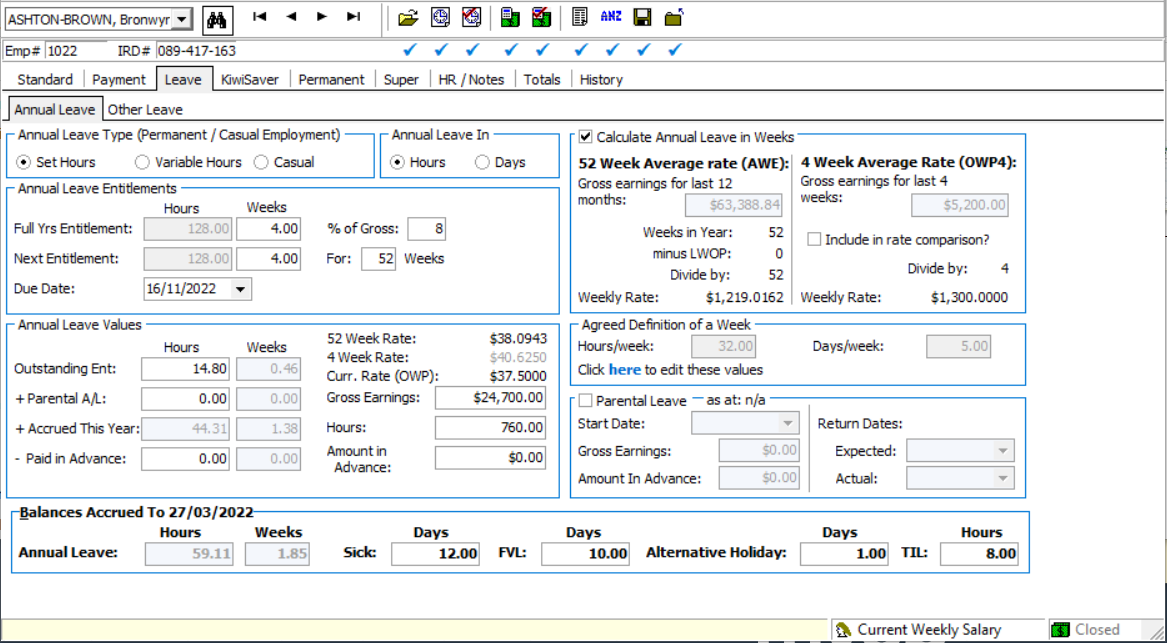
After activating “Calculate Annual Leave in Weeks” option, the new Annual Leave rates for employee Ashton Bronwyn are calculated as:
52 Week Average Rate(AWE): Gross earnings earned by the employee over the last 52 weeks divided by 52 weeks;
4 Week Average Rate(OWP4): Gross earnings earned by the employee over the last 4 weeks divided by 4 weeks;
The Hourly Annual Leave rates are then derived based on the Agreed Definition of a Week:
Hourly Average rate = Weekly Average Rate divided by Hours per week
Hourly Ordinary rate = Weekly Ordinary Rate divided by Hours per week
Also the Leave rate –Detailed will describe how the rates are calculated:
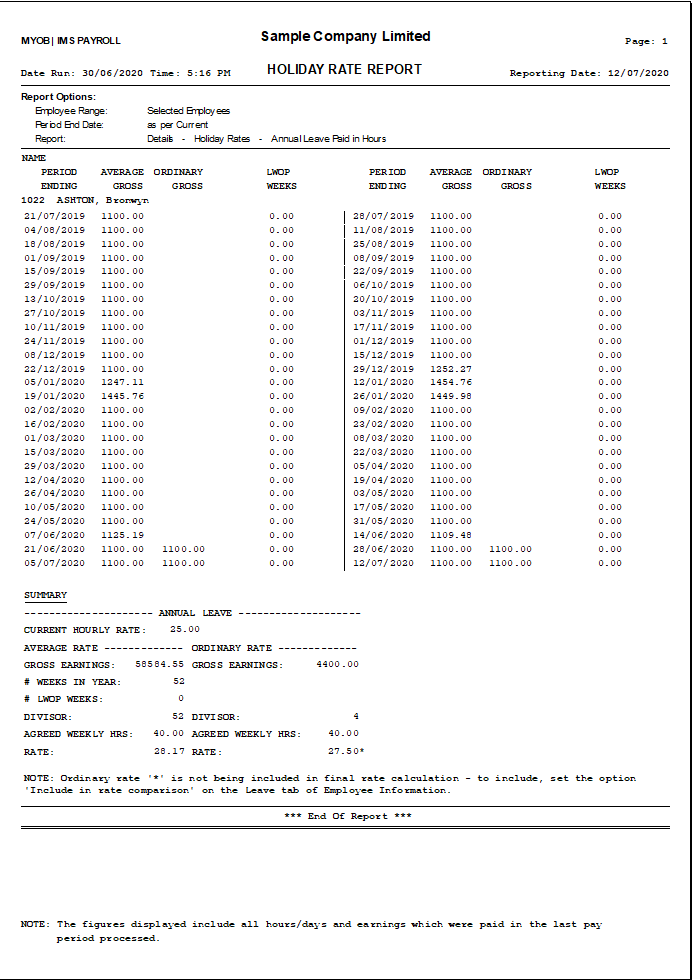
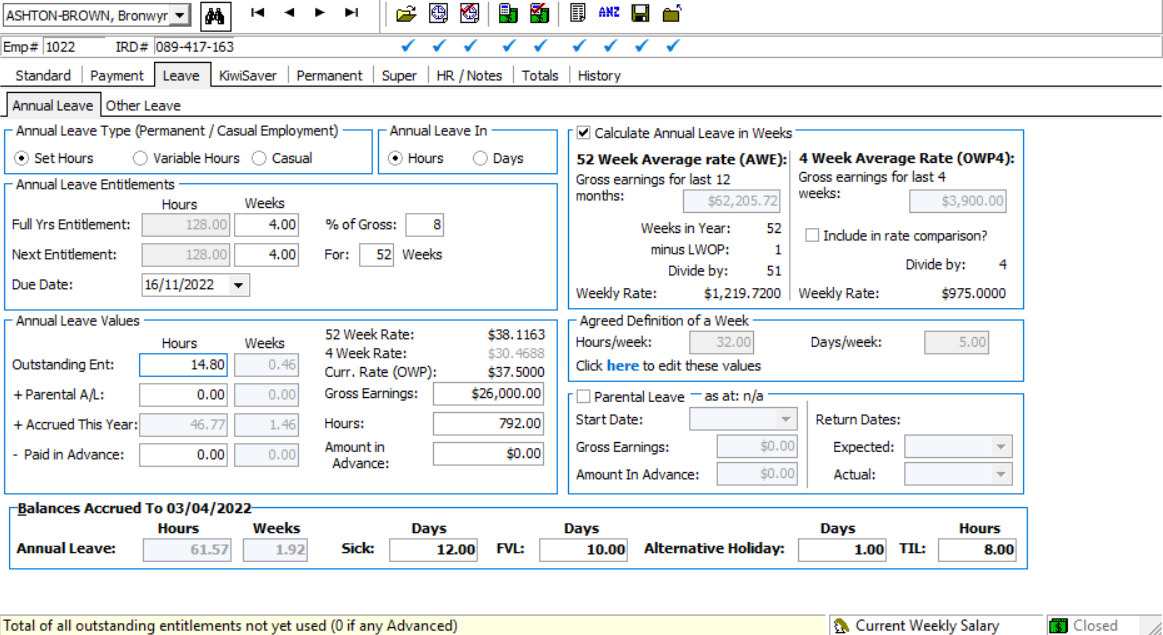
In case the Agreed Definition of a Week for Ashton Bronwyn will be reduced from 40 Hours per week to 32 Hours per week, the changes in the rates calculation will be as follows:
-
Weekly Average and Ordinary rates will still be the same,
-
 Hourly Average and
Ordinary rates will increase.
The employee Ashton Bronwyn is taking LWOP for 2 consecutive weeks and has agreed that the AWE divisor will be reduced for any future Annual Leave taken.
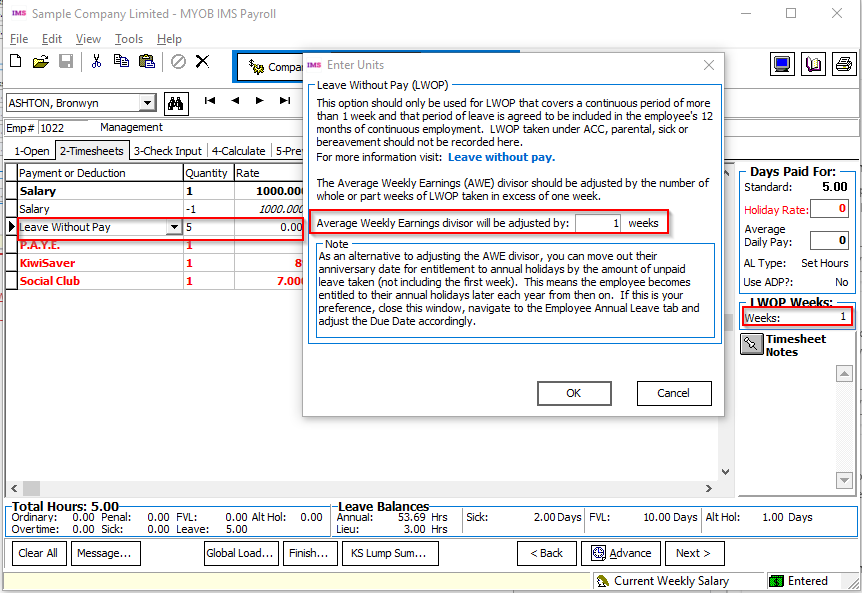
After closing the pay, the AWE rate will have the divisor reduced with 1 week as in the screenshot below: