
Integrating with Accredo Saturn
Integrating with Accredo Saturn
To export the IMS Payroll General Ledger to Accredo Saturn using the General Ledger Export window, you will need to first ensure that the Accredo Branch and Department codes (maximum of four characters each) have been appended to the end of each General Ledger code you have declared in the payroll company, separated by a delimiter, which cannot be a period ( . ). The Branch Code should be declared prior to the Department Code.
If no Branch and/or Department codes are entered, the Accredo Saturn Import will assign the default Branch and Department codes as held in the Accredo Saturn system.
General Ledger codes are held on the Company Controls > General Ledger, Deductions and ‘Costing Code tabs, and also on the Employee Information > KiwiSaver and Super tabs.
An example of a correctly formatted General Ledger code would be:
1995.000:HO:SAL
where:
-
1995.000 is the Accredo General Ledger Code
-
HO is the Branch Code
-
SAL is the Department Code
-
the colon character ( : ) is your chosen delimiter
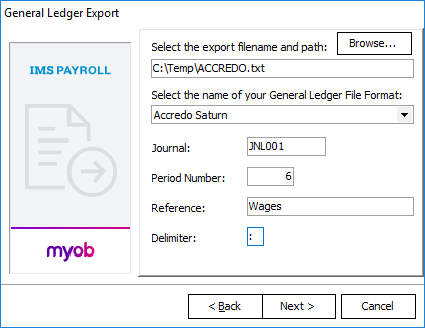
When generating the Accredo Saturn export file, you will need to specify your chosen delimiter so that the Branch and Department codes can be identified and included on the export records:
You must be utilising v3.5.8.909 (or later) of the Accredo Saturn software in order to be able to import Branches and Departments.