Payslip Logo
Payslip Logo
This document outlines the image requirements for the logo image on payslips with the “A4” and "A4 IMS Laser” formats. Select a logo image for payslips by clicking the Browse button next to Image File on the Payslip – Report Options window.
Image Format
MYOB IMS Payroll supports bitmap images (BMP) only for payslip logos—not jpegs or any other image format.
Bitmap files are raw uncompressed data files containing image data, which have the suffix .BMP.
If you already have an image or logo in an image format other than bitmap, you may be able to convert this to a bitmap format by first opening the file in an image editing application like Microsoft Paint, then selecting the Save As... option, and choosing to save the image in the BMP format. This will create a new version of the image file in the required format.
Image Size
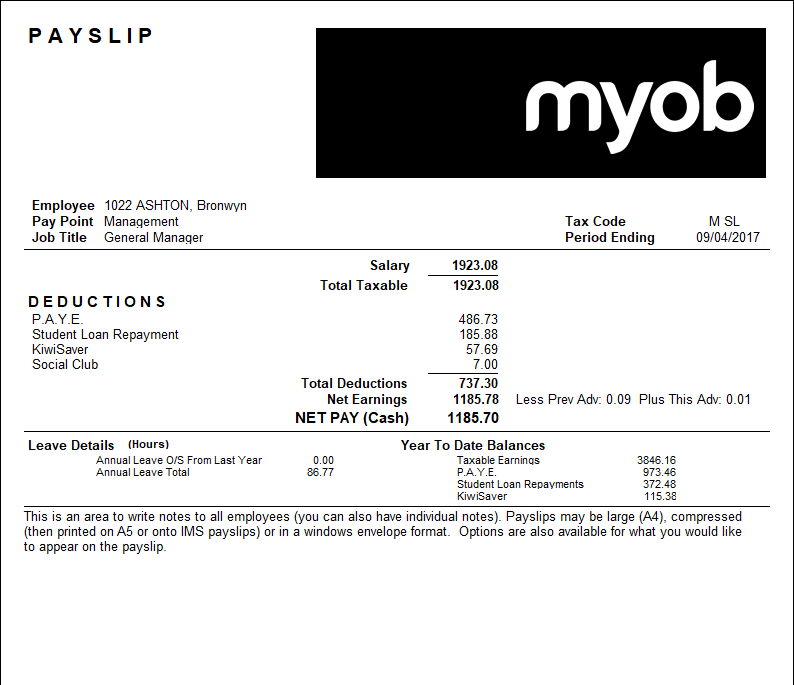
The payslip logo has a fixed size of 450 pixels wide by 150 pixels high, and will appear at the top right-hand corner of the payslip header. When selected, the logo will replace the company name on the payslip.
Images that are a different size from 450 × 150 can be used, but they will be either stretched or shrunk to fit into the area provided for the bitmap. This can have a negative effect on the quality of the image by making the image appear blurry or distorted, e.g. if a square image is stretched to fit the rectangular dimensions.
When requesting a logo from your logo provider (whether that is somebody in your organisation or from a third-party organisation) make sure you specify the 450 × 150 image dimensions and also specify if the logo should be left-aligned, right-aligned or centred within the 450 × 150 area, as in the following examples:
|
|
|
|
|
Left aligned |
Centred |
Right aligned |



These logos have a black background to illustrate the location of the logo inside the 450 × 150 rectangle, but logos can have any background colour—if you don’t want a background colour to appear behind the logo, leave the background white.
Below is a sample payslip with the right-aligned logo inserted: