
Attachment Orders
An Attachment Order is a legal authority from various government agencies that directs the employer to deduct funds from their employee’s pay. Attachment orders will cover such payments as:
-
Child Support
-
Student Loan arrears
-
IRD tax arrears
-
WINZ deductions
-
Court deductions
Child Support and Student Loan Arrears come as part of the standard IMS Payroll; you will have to create IRD, WINZ or Court Deductions.
Creating an Attachment Order
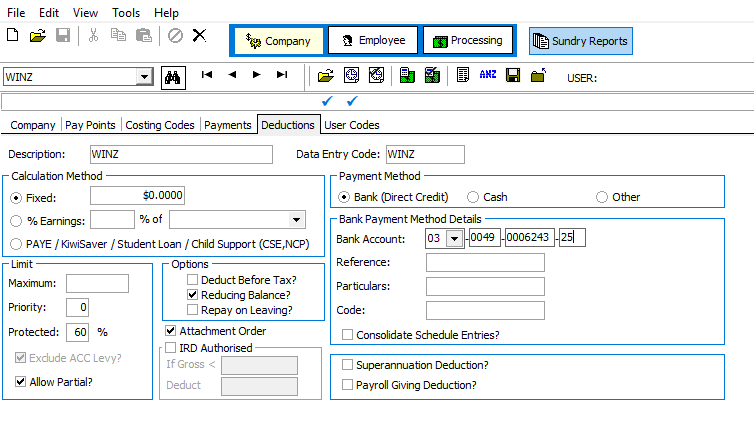
Go to the Company tab then Deductions. Click the New Record button in the toolbar at the top of the screen ( ) to create a new deduction record, then fill in the details as follows:
|
Detail |
Value |
Notes |
|
Description |
Enter the name of the government department. |
|
|
Data Entry Code |
This should default in. |
|
|
Calculation Method |
Select Fixed and leave $0.0000 in the dollars field. |
Actual dollars will be entered against the employee’s Permanent tab. |
|
Payment Method |
Select the payment option you’ll be using. |
If you create a bank file for your employee pays, select Bank and enter the Bank Account provided. If you manually pay your employees, select Other as you will have to manually pay the Attachment Order as well. |
|
Options |
Tick Reducing Balance? |
Ticking this will keep a track of the total owed and cease the deduction when this is reached. |
|
Attachment Order Limit |
Tick Attachment Order. Enter 60 in the Protected field. |
This places all attachment orders in a pool and ensures the 60% protected earnings limit is applied correctly. Details of how the protected earnings are calculated are detailed later in this document. |
Below is an example of a WINZ deduction. IRD and Court Deductions will be filled in the same way, except the bank account supplied will be different.
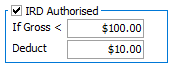
Attachment Orders received from the IRD will also have the IRD authorised area filled out as below:
Assigning an Attachment Order to an Employee
Go to the employee’s Permanent tab. In the first available blank line select the Attachment order.
Enter a Quantity of 1 and enter the amount to be deducted per pay period in the Rate column. When you press the Enter key, an additional screen will pop up.
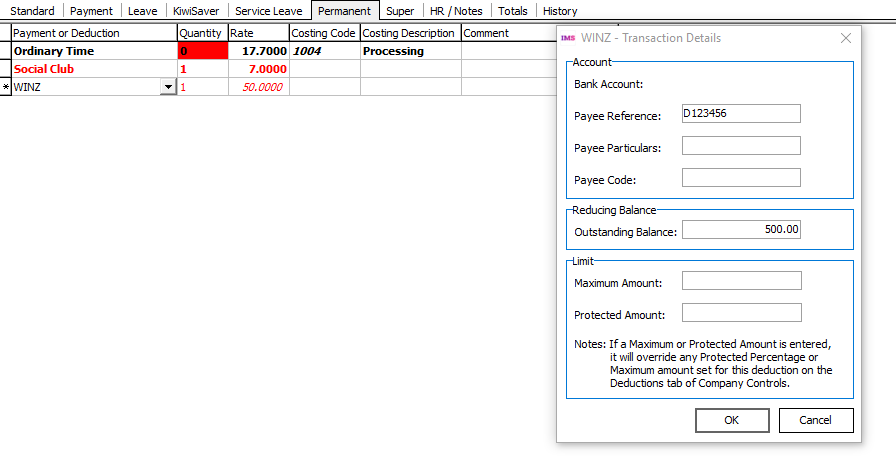
Enter the Reference Number and/or Particulars provided. Enter the Outstanding Balance then click OK.
Protected Net Earnings
The IRD have clarified the calculation rules of Protected Net Earnings. To ensure that employees have enough money to cover their living expenses, they are entitled to keep 60% of their Net Pay after Tax and Statutory Deductions. Statutory Deductions are deductions that are required by IRD, such as Child Support and Court Fines. They do not cover voluntary deductions, e.g. Union Fees, student loan repayments, KiwiSaver deductions, Insurances and superannuation.
These calculation rules normally apply when your employee receives less pay than usual for some reason. In this case, you’ll need to make sure the combined total of the Statutory Deductions is lowered to 40% of their new net pay.
If you are instructed to make deductions for child support or District Court attachment orders, the combined total of these deductions must not be more than 40% of the employee’s net pay.
If you deduct less than the full amount, you don’t make up the difference in future pays—this amount will be settled directly between Inland Revenue and the employee.
Example
Given an employee has a weekly Net Pay of $800. Assuming his weekly Child Support Deductions are $300, the calculations for Protected Net Earnings under two different scenarios are as follows:
|
|
Scenario 1: Normal Weekly Pay |
Scenario 2: Reduced Weekly Pay |
|
Gross Pay |
$970.36 |
$778.14 |
|
PAYE (M Code) |
$170.36 |
$128.14 |
|
Calculate Net Pay |
$800 |
$650 |
|
Calculate Max Statutory Deductions |
($800 × 0.40) = $320 |
($650 × 0.40) = $260 |
|
Calculate Child Support |
$300 |
$260 |
Deduction Ranking
Deductions are taken in a certain order to ensure that priority deductions are taken first and to determine whether a full or partial deduction is taken.
PAYE is always taken before any further deductions are considered.
Further ranks are as follows:
-
Child Support - ALWAYS Priority One*
-
Attachment Orders*
-
ACC Levy
-
Student Loan repayments
-
KiwiSaver Employee contributions
-
Other Voluntary deductions
*Covered by Protected Net Earnings
Employees with Multiple PNE Deductions
Essentially, when an employee has multiple deductions, the amount deducted is determined by their total PNE. If they have earned less than usual for any reason, or if they are on a low income, it’s likely that the lower ranked deductions won’t be paid in full.
The following example shows the workflow where multiple deductions are in play.
Joe Bloggs has a weekly net pay of $800 and the following deductions:
-
Child Support of $100
-
Court Fines of $250
-
Union Fees of $123
This is how his deductions will be calculated:
|
|
Scenario 1: Normal Weekly Pay |
|
Calculate Net Pay |
$800 |
|
Calculate Max Statutory Deductions |
$800 × 0.40 = $320 |
|
Calculate Child Support |
Given $320 > $100 Child Support = $100 |
|
Calculate Court Fines (statutory deduction) |
Given ($320 - 100) < $250 Court Fines = ($320 - $100) = $220 |
|
Calculate Union Fees (NOT a statutory deduction) |
$123 |
|
Calculate Total Deduction Amount |
$100 + $220 + 123 = $443 |
Managing Other Attachment Orders
Various changes have been made to manage this process in IMS Payroll.
Attachment Order Setting for Deductions
In order to ensure Attachment Order type deductions are processed in the correct order, IMS Payroll includes a checkbox on the Company > Deductions tab of Company Controls labelled Attachment Order:
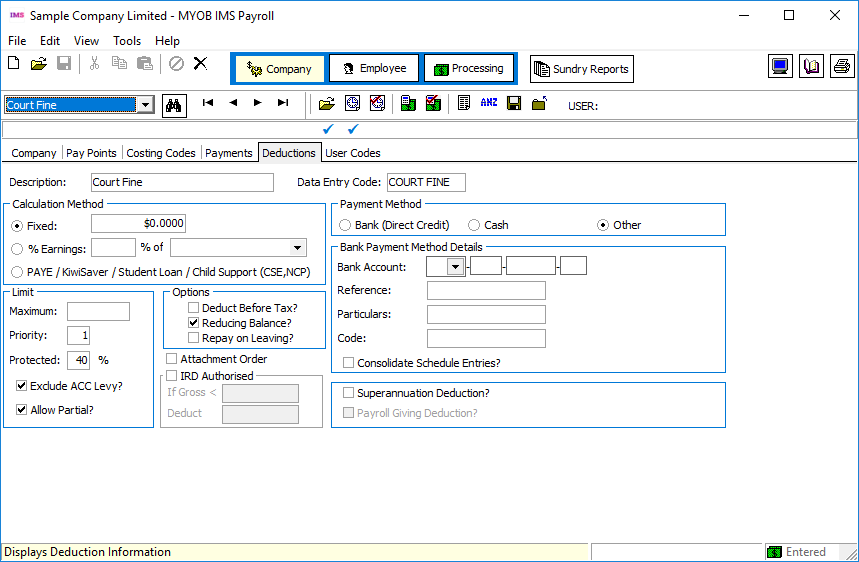
Ticking this box enables the deduction to be processed before Student Loan Repayments and KiwiSaver where an employee has one (or both) of these other deduction types.
After upgrading to IMS Payroll 6.30, we strongly recommend you review the list of user-defined deductions you have already set up—if any of these are classified as Attachment Orders, tick this box.
Deductions Processed in the Order Set on Timesheets
Check all of Employees Permanent transactions and set the correct priority to the deductions that are classified as Attachment Orders. Rank deductions based on discussion with the employee.
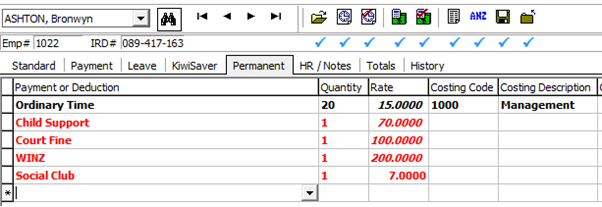
In this example, when the payroll is processed the deductions will be calculated as follows:
-
First, max deduction for Child Support of $70
-
Second, max deduction for Court Fine of $36.54
-
Third, deduct NO WINZ
To easily find out the list of existing employees that have Child Support and/or Attachment orders defined in the Permanent Transaction, run the Sundry Report > Transaction Listing report.
Treatment of Non-Attachment Order Deductions
User-defined deductions that do not have the Attachment Order flag ticked and have a specified protected earnings percentage (or amount) will continue to have their protected net earnings calculated on the remaining net pay after all IRD deductions have been deducted from the net total (including Student Loan, Employee KiwiSaver Contributions).
Treatment of Multiple Attachment Order Deductions
Multiple Protected Net Earnings Attachment Order deductions must also be calculated in such a manner as to not exceed the lesser amount of protected earnings specified across all Attachment Orders with Protected Earnings, e.g. if an employee has Child Support at 60% protected and Court Fines at 60% protected, then the sum of the two deduction amounts cannot exceed 60% of the employee’s net pay after tax (excluding ACC).
Your Obligations
-
Deduct Child Support and Court Fine payments from an employee’s wages if you are instructed to do so by either Inland Revenue or Ministry of Justice.
-
Continue making the deductions until they, not the employee, instruct you to stop.
-
Make sure you never deduct more than 40% of an employee’s net pay for these payments.