
Target Equipment: General Information
In this lesson, you will learn how to work with target equipment in MYOB Acumatica. Target equipment refers to items that your company tracks for maintenance, service, or warranty purposes. This includes equipment sold directly to customers and equipment purchased from third parties but serviced by your company.
Learning Objectives
In this lesson, you will learn how to do the following:
- Create a sales order and an invoice to record the sale of a stock item. On release of the invoice related to the sales order, the system automatically creates a target equipment record.
- Create a piece of target equipment manually.
- Create an appointment for services performed on the customer's target equipment.
Applicable Scenarios
You create target equipment in the following scenarios:
- A customer requests to purchase equipment along with installation services, with plans for ongoing regular maintenance services on this equipment.
- Your company needs to service equipment that was originally purchased from a third party, requiring the entry of the equipment record in MYOB Acumatica to enable tracking, scheduling, and servicing.
Target Equipment Creation
You can create target equipment in the following ways:
- By selling a stock item with the Model Equipment equipment class, which causes the system to create the corresponding target equipment record on the Equipment (FS205000) form. The record is created when you release the invoice associated with this sale on the Invoices (SO303000) form.
- By creating a target equipment record directly on the Equipment form (when your company plans to provide services for equipment purchased by a customer from another company).
- By modifying the item class of the stock items that you have already sold to indicate that these stock items will now be handled as model equipment, and then converting these stock items into target equipment on the Create Equipment for Sold Items (FS500900) form.
Workflow of Sales Order Processing
The diagram illustrates the end-to-end workflow for selling model equipment through a sales order. As a result of this process, when the sales invoice is released, the system automatically creates the corresponding target equipment for the sold stock item on the Equipment (FS205000) form.
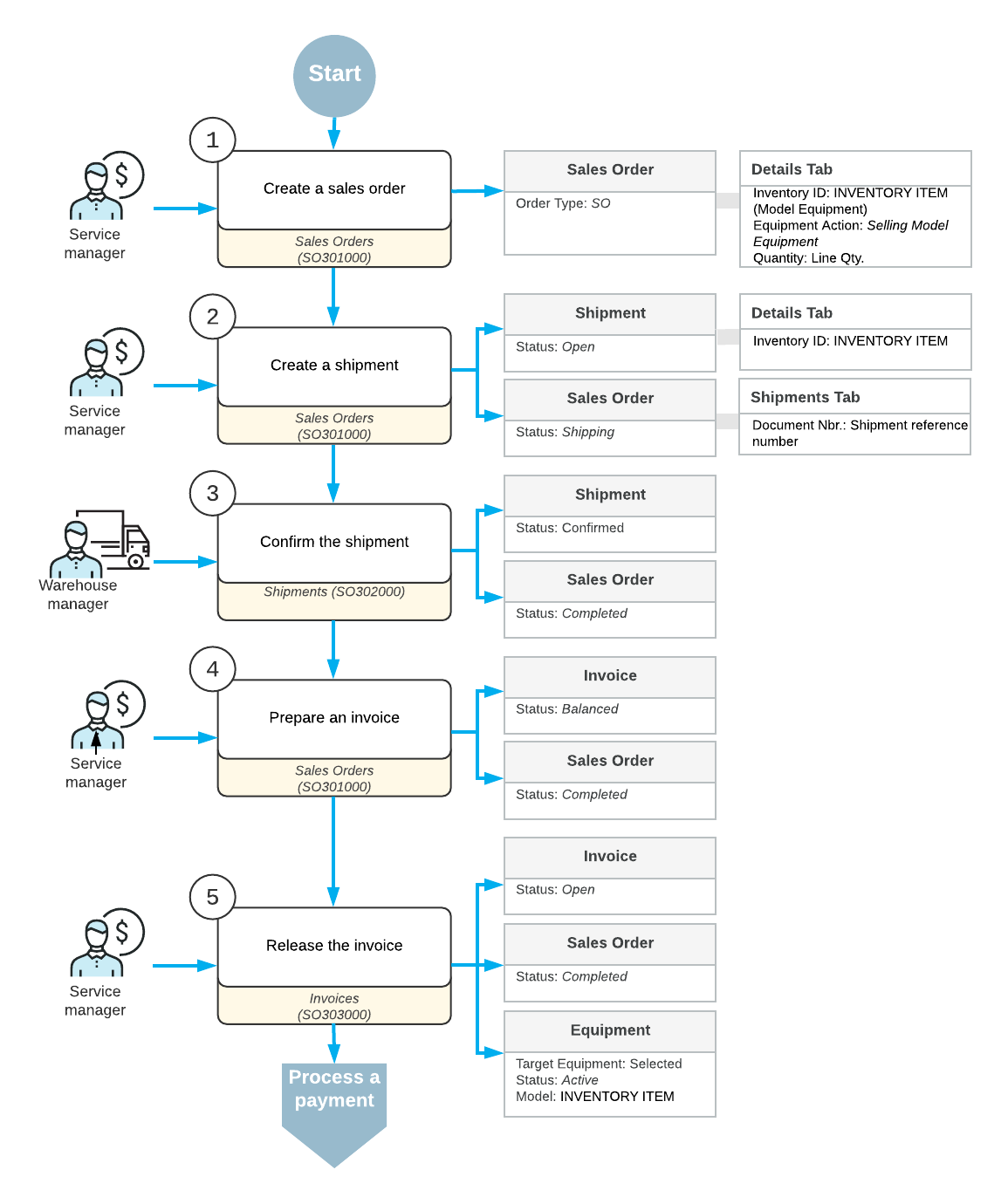
The service manager initiates the process by creating a sales order for the model equipment on the Sales Orders (SO301000) form. In the sales order, they specify the inventory item, select the Selling Model Equipment action, and enter the required item quantity.
Then, they create a shipment from the sales order on the Sales Orders form. The shipment is assigned the Open status, and the sales order status changes to Shipping.
The warehouse manager confirms the shipment on the Shipments (SO302000) form to finalize the shipment and move the sales order to the Completed status. The shipment status changes to Confirmed.
After the shipment is confirmed, the service manager prepares an invoice on the Shipments form and then releases it on the Invoices (SO303000) form.
When the sale is finalized, the system automatically generates a corresponding target equipment record on the Equipment (FS205000) form.