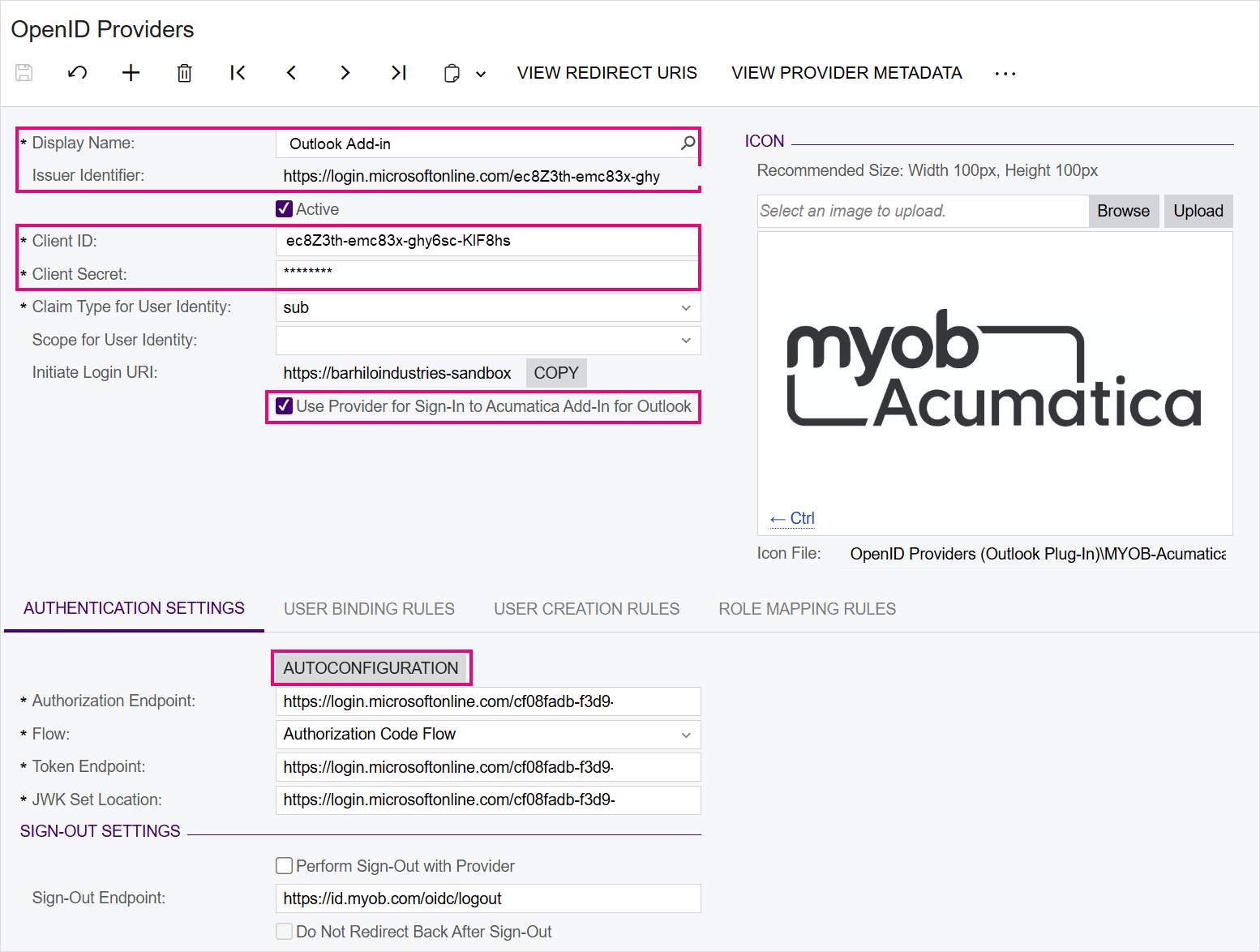
Platform: Allowed Access to OpenID Provider Screen to Enable the Outlook Add-in
As part of our work to fix Outlook add-in compatibility with the latest versions of MYOB Acumatica, we've made the OpenID Provider screen (SM303020) available to some users.
This screen will be available to users with any of the Full user, MYOB_Partner and MYOB_Admin license types.
Creating an OpenID record for the Outlook Add-in
To make the Outlook add-in work in MYOB Acumatica 2025.1.300, you need to set up an OpenID record using values from the Microsof Entra app.
Full information will be available in online help soon, but we've included these instructions so they're available now.
- Open the Microsoft Entra app.
- In MYOB Acumatica, go to the Open ID Providers screen (SM303020), and create a new record.
- Enter the following settings in the summary section:
- Display name: Outlook add-in
- Issuer Identifier:
https://login.microsoftonline.com/<tenant-id>/v2.0
Replace <tenant-id> with the directory (tenant) ID value from the Microsoft Entra app
- Client ID: The application (client) ID value from the Microsoft Entra app
- Client Secret: The client secret value from the Microsoft Entra app
- Use Provider for Sign-in to Acumatica Add-In for Outlook: Selected
- Go to the Authentication Settings tab and click Autoconfiguration.
- Save the new provider entry.