
Form Layout: Box Connotations
You can highlight a value in the textbox control with a color connotation. The color can change depending on the value in the box.
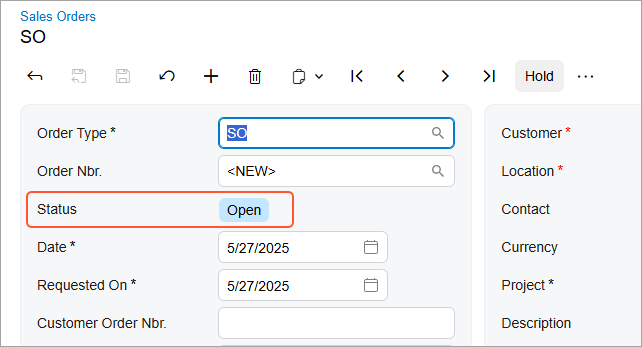
In MYOB Acumatica data entry forms with workflows, the Status box has default connotations. You can add new connotations or change existing ones. The following screenshot shows an example of the color connotation for the Open status.
Changing the Default Color or Defining a New One
You can specify a connotation for any box that has the PXStringListAttribute attribute on the corresponding DAC field. Some forms, such as data entry forms with workflows, have default connotations defined in the style.scss file of the screen folder or in the common folder of the module.
You can change the default connotation or create a new one by doing the following:
- In the screen folder, open the style.scss file or create a new
one.
If you’re creating a new file, in the style.scss file, import the mixin from the WebSites/Pure/Site/FrontendSources/screen/static/status-colors.scss file.
- Define the correspondence between the PXStringList attribute values
and the colors, as shown in the following
example.
@import 'static/status-colors.scss';
@include colored-status('N', var(--status-blue-color));
@include colored-status('H', var(--status-orange-color));
@include colored-status('P', var(--status-red-color));
@include colored-status('V', var(--status-red-color));
@include colored-status('E', var(--status-orange-color));
@include colored-status('A', var(--status-orange-color));
@include colored-status('R', var(--status-red-color));
@include colored-status('C', var(--status-gray-color));
@include colored-status('L', var(--status-gray-color));
@include colored-status('B', var(--status-orange-color));
@include colored-status('S', var(--status-blue-color));
@include colored-status('I', var(--status-blue-color));
@include colored-status('D', var(--status-orange-color));
Specifying the Connotation for a Box
To specify connotations that have been defined in the style.scss file, do the following:
- In the HTML template of the screen, import the
styles.scssfile that defines the connotations.<template> <require from="./style.scss"></require> ... </template> - For the field that you want to highlight, specify
class="colored"in the correspondingfieldtag.<qp-fieldset id="fsColumnA-Order" slot="A" view.bind="Document"> ... <field name="Status" class="colored" pinned="true"></field> </qp-fieldset>