
Leave Earnings History
Overview
It is a requirement of the Holidays Act 2003 that each employee has at least 12 months of Leave History consisting of records for each and every Pay Period processed within that 12 months (or since the employee’s start date if they started within the 12 month period).
This information is required to calculate:
-
The Average Weekly Earnings, based on:
-
For Annual Leave in Hours/Days, the Average gross earnings and days/hours over the 12 months preceding the pay period in which Annual Leave is being taken.
-
For Annual Leave in Weeks, gross earnings for the last 12 months divided by 52 (less any LWOP weeks)
-
The Ordinary Weekly Earnings, based on:
-
For Annual Leave in Hours/Days, the Ordinary gross earnings and days/hours over the 4 weeks preceding the pay period in which Annual Leave is being taken.
-
For Annual Leave in Weeks, gross earnings for the last 4 weeks divided by 4.
-
The calculated Average Daily Pay – ‘ADP’ (if required), based on the Average gross earnings and the total of whole or half days worked over the 52 weeks preceding the pay period in which the Sick / Bereavement Leave or Alternative / Statutory Holiday is being taken.
When Will “Leave Earnings History” Require Loading?
If you have just purchased MYOB IMS Payroll and your company was a going concern prior to utilising the application, e.g. you would need to import Leave History for a period of 12 months prior to the date of commencing to process pays within Payroll Partner.
What Constitutes a Leave Earnings History Record ?
For each employee there must be a Leave History record for each pay period processed within the period range loaded. Each pay period Leave History record will need to contain Ordinary Weekly Gross Earning and Average Weekly Gross Earning totals pertaining to that Pay Period. The reason for the two gross totals is due to slight differences in the types of payments which are to be included in the gross of each calculation type.
Consult MBIE for guidance on which payment types should be accumulated into which gross total for calculation purposes.
The Leave History Records will be required to contain the following details. These fields may be maintained once the import has been performed within the History – Leave Earnings screen (as discussed below).
-
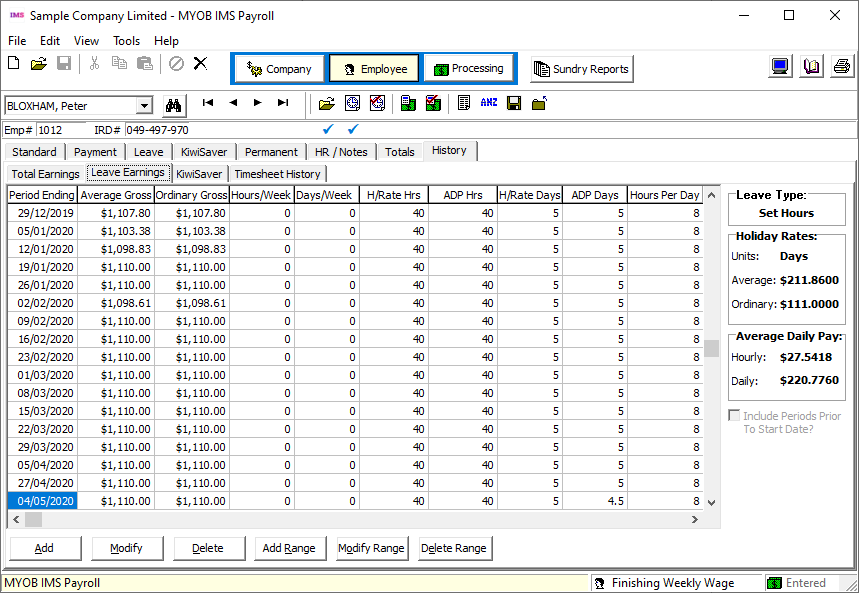
Period Ending: the Period End Date of each pay period processed for the employee.
-
Average Gross: Average gross earnings totals for the pay period.
-
Ordinary Gross: Ordinary Gross earnings totals for the pay period. Only pay periods, and related payments, that occurred within the last 4 weeks are required.
-
Hours/week: The number of Hours per week based on an employee’s Agreed Definition of a Week relating to the pay period.
-
Days/week: The number of Days per week based on Agreed Definition of a Week relating to the pay period.
-
Holiday Rate related Period Hours: Total normal hours relating to the pay period concerned, i.e. Ordinary, Annual Leave, Sick, Salary etc - excluding overtime. These hours are used in the calculation of the Holiday Hourly rate when the employee’s Annual Leave is recorded and paid in Hours (does not apply when Annual Leave in Weeks is enabled).
-
Average Daily Pay (ADP) related Period Hours: Total hours (ordinary & overtime) relating to the pay period concerned, i.e. Ordinary, Overtime, Annual Leave, Sick, Salary etc. These hours will be used in the calculation of the Average Daily Pay. Only required if you may be required to utilise the Average Daily Pay calculation for the employee, e.g. if you will not be able to determine what an employee would have earned on a particular day if they are sick for example.
-
Holiday Rate related Period Days: This is the number of ordinary days worked in a pay period. These days will be used in the calculation of the Holiday Daily Rate when the employee’s Annual Leave is recorded and paid in Days (does not apply when Annual Leave in Weeks is enabled).
-
Average Daily Pay related Period Days: This is the total number of whole or half days worked in a pay period, including those days worked in addition to the ordinary days as contained in Holiday Rate related Days. These Days will be used in the calculation of the Average Daily Pay. Only required if you may be required to use the Average Daily Pay calculation for the employee, e.g. if you will not be able to determine what an employee would have earned on a particular day if they are sick for example.
-
Hours per Day: Hours normally worked per day – excluding overtime - as set up in Employee Information – Payment – Hours worked – Per Day field.
-
LWOP Weeks: The number of Leave Without Pay weeks that would reduce the divisor of Average Weekly Earnings rate.
The difference between the Holiday and the Average Daily Pay related days is as follows. If an employee normally works 8 ordinary hours a day – 5 days a week then both the Holiday and Average Daily Pay days would be 5. However, if the employee worked 4 hours on Saturday then the Holiday rate related days would remain at 5 but the Average Daily Pay related days would then be 6 days. This is currently a requirement of the Holidays Act 2003 in calculating the Holiday and Average Daily Pay.
These records will then be able to be viewed and/or maintained via the Employee Information > History > Leave Earnings tab:
Manually Loading Leave History Information
If, due to a relatively small number of transactions to load or repetitive transactions for employees who have a steady work pattern, you can load and/or maintain employee Leave History, per pay period, using the buttons at the bottom of the Leave Earnings tab. These buttons let you:
-
Add, Modify and Delete individual pay period record(s)
-
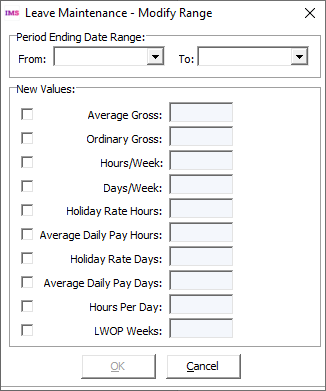
Add, Modify and Delete a range of pay period records
The Modify Range window lets you select a range of existing transactions by Period Ending Date and then indicate which fields to modify with the value entered. The current values of the fields that aren’t selected will be retained.
Bulk Loading Leave History Information
The Leave History Import utility is available from the Tools menu under Files Import. This utility lets you add or maintain Employee Leave History information in IMS Payroll Partner in large volumes without using the standard manual application interface. Employee Leave History data is imported from a data file and applied programmatically to the payroll company that you are currently logged in to.
Bulk Load File Format
The Employee Import Utility will only read information from data files provided in CSV (comma-separated-values) format.
Data files can be generated programmatically, or manually from a spreadsheet or text editing application. If the import is into a new company, the employees must be entered first.
To use Excel to enter into, and generate, a data file, ensure that ALL columns have the format of “General”. When saving the file, ensure that it is saved using the Save as Type option “CSV (Comma delimited) (*.csv)”. The data file cannot contain fields embedded in double quotes.
To create a file programmatically or manually e.g. via text editing using, each record must contain 12 fields separated by a comma.
-
Employee ID or Employee #
-
Employee ID: This method uses the identifier assigned by IMS Payroll Partner (when an employee is created) to match a data record to an employee. The Employee ID for a particular employee is specific to a payroll company and may only be the same in another payroll company by coincidence.
The Employee ID’s of existing employees in a payroll company can be obtained from the ‘Find Record’ window when you are in the Employee Information section of IMS Payroll Partner.
Alternatively you can use the “Files Export – Nimbus” option on the Tools menu that will generate three text files in the payroll company directory. One of the files created is entitled “Employee.txt” and contains the Employee ID, Surname and First Names of each employee in the company (as a CSV file).
If you provide an Employee ID, the verification process will attempt to match it to an existing employee in the payroll company. If a match cannot be made, an error will be generated as the assignment of Employee ID’s is entirely controlled automatically within the system.
-
Employee #: This method employs the user-defined Employee Number, which may be entered in the Emp # field within Employee Information – Standard tab to match employees. (a valid number between 1 and 999999). If a match is made, any other data values held in the data record will be applied to the employee record with the matching Employee Number.
The Employee Numbers of existing employees are listed in the Employee Listing report generated from the IMS Payroll Partner - Sundry Reports screen. Within one constructed Import file, utilise either the Employee ID or Employee # to identify employees, not a mixture of both methods.
-
Pay Period Ending Date – this must be in dd/mm/ccyy format, e.g. 01/02/2019.
-
Pay Period gross earnings relative to Holiday/ADP Average Weekly Earnings calculation.
-
Pay Period gross earnings relative to Holiday Ordinary Weekly Earnings
-
Hours/week
-
Days/week
-
Holiday rate related Hours per pay period – to include ordinary and leave hours (excluding overtime).
-
Average Daily Pay related Hours per pay period – to include ordinary, leave and overtime.
-
Holiday rate related Days per pay period.
-
Average Daily Pay related number of Whole or Part Days per pay period.
-
Ordinary Hours Worked per day (as set up in Employee Information > Payment Tab > Hours Worked per Day).
-
Leave Without Pay weeks
Example of the format required:

Both employees 1002 & 1005 are paid on a weekly frequency.
Employee 1002 earns a static $960 per week for a 8 hour a day – 40 hour week.
Employee 1005 earns a static $800 per week for a 8 hour day – 40 hour week and receives an irregular bonus of $200 (i.e. as per 09/10/2004) which is included in the Average but not the Ordinary Gross.
Employee 1005 worked an extra 8 hours on a Saturday, regular overtime (Period 16/10/2004) earning an extra $160. Therefore the Average Daily Pay Hours increases by 8 to 48 and the Average Daily Pay Days increases to 6 days.
Once created, the spreadsheet must then be saved in CSV format.
Bulk Load Procedure
It is strongly recommended that the payroll company be backed up prior to an import. This can be done using the Backup window (Tools > Backup).
To bulk load Leave History data, open the Leave History Import window (Tools > Files Import > Leave History):
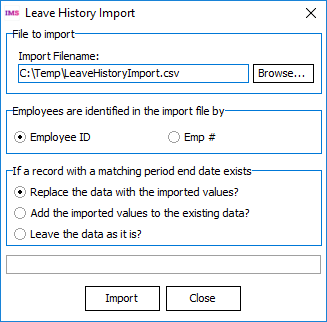
The Leave History Import menu option is only available if the payroll period is closed. Access to the import option is also restricted if User Security is enabled and the user does not have access to the Payroll Processing section of the program and Employee Maintenance ability.
-
Browse and select the CSV file you have created containing the information to import.
-
Indicate which method you have used to identify and match employee data with.
-
Select the action to perform if an import record for an employee matches an existing record with an identical period end date.
-
Click OK to begin the import.
Once the Import has completed, a status window will display the number of records successfully updated and the number of records rejected. The error report can then be previewed and printed as required:
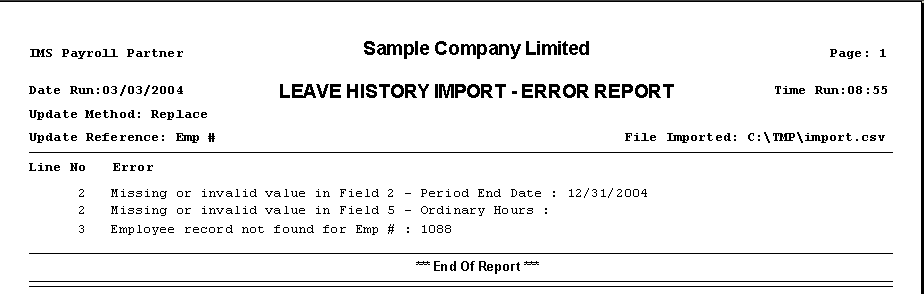
Any rejected records can then be corrected and re-submitted in a separate file or the same file import with the Leave the data as it is? option to selected.
The result of the import can be viewed, per employee, on the Employee Information > History > Leave Earnings tab. This window displays the transactions loaded and the resulting Annual Leave Ordinary and Average rates as per the unit the Annual Leave is recorded in, i.e. Hours or Days. Maintenance can then be done, if required, via the options at the bottom of the tab.
The Leave Rate Report (available in Sundry Reports) can be run to obtain a report of the rates per employee used in determining the payment of Annual Leave and also the calculated Average Daily Pay, which may be used for the payment of Sick and Bereavement leave and Alternative and Statutory Holidays if required.