
KiwiSaver
KiwiSaver
Most New Zealanders and permanent residents over the age of 18 and under 65 must be automatically enrolled in KiwiSaver when they join your organization.
Managing Employee Records
Auto Enrolling
When the new starter wizard takes you to the KiwiSaver screen, select the Auto Enrol
option. 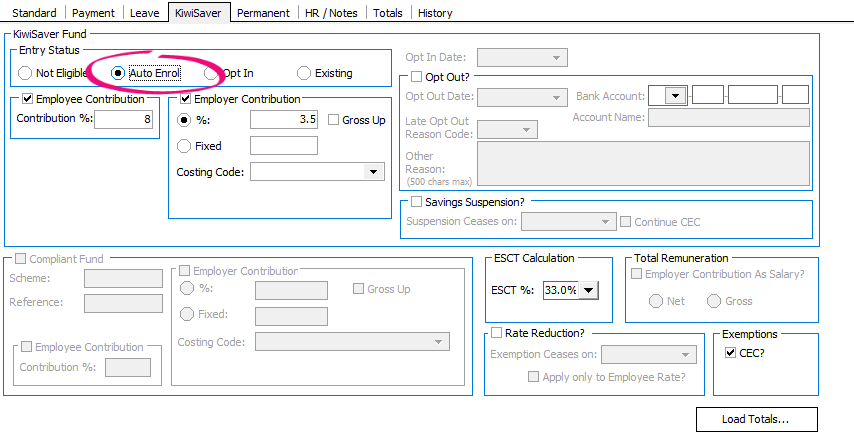
Employee and Employer Contributions will both default to 3.5%.
Check the KS2 form your employee gave you to see if they want to contribute more than 3.5%. Currently the contribution rate can be 3.5%, 4%,6%, 8% or 10%.
Employers can contribute more than 3.5% if they want to.
ESCT
You must also select an option for the ESCT %. Employer Superannuation Contribution Tax (ESCT) can be 10.5%, 17.5%, 30%, 33% or 39%. You can determine what the rate should be for your employee by adding their annual salary/earnings and their employer superannuation contribution together.
ESCT rates must be reviewed each year ending 31 March. This is covered in IMS Payroll’s end of year procedures.
Eligibility
There are exceptions to the auto enrol requirement. These can be found on the KiwiSaver website at:
If your employee is not eligible to join KiwiSaver, select the Not Eligible option.
Opting Out
A new employee may choose to opt out of KiwiSaver. This can be done between days 14 to 56 of employment with their new employer. Should your employee opt out they should provide you with a KS10 form.
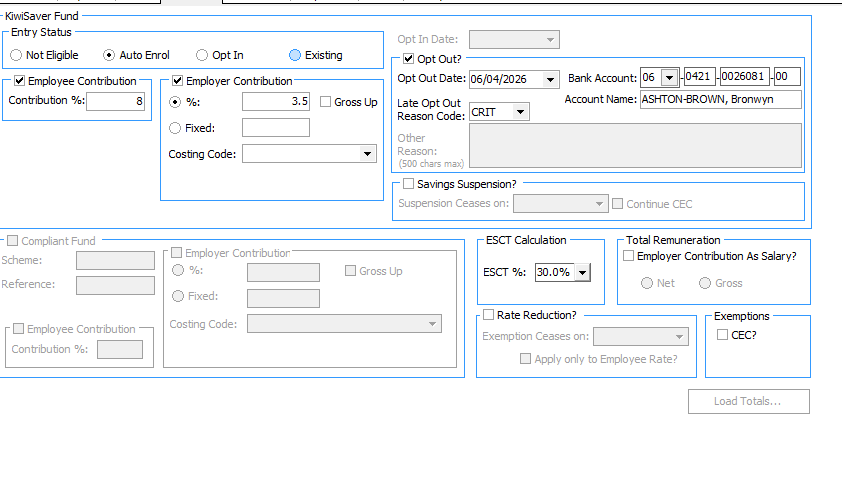
To opt out tick the Opt Out? check box and enter the Opt Out Date. Any date outside days 14 to 56 will not be accepted.
Your employee’s bank account and account name will default in. This information will be placed in your KED file so the IRD can refund any payments made in the first two weeks of employment.
Opting In
If an existing employee chooses to join KiwiSaver after opting out, select the Opt In option. You will then be prompted to filling in the Opt In Date. Untick the Opt Out? box.
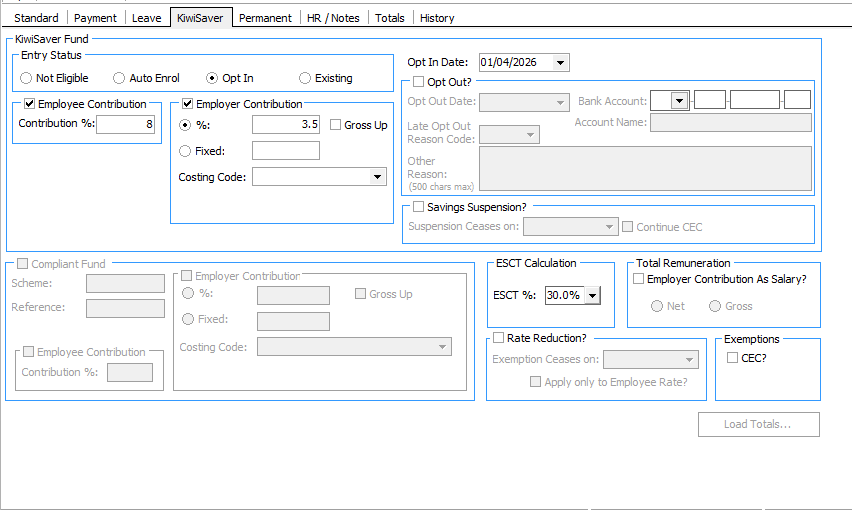
The Opt In option can also be used for employees under the age of 18 or over 65 who want to join KiwiSaver (see page 4).
KiwiSaver Savings Suspension
If you are advised by the IRD that your employee has been granted a savings suspension, tick the Savings Suspension? option:
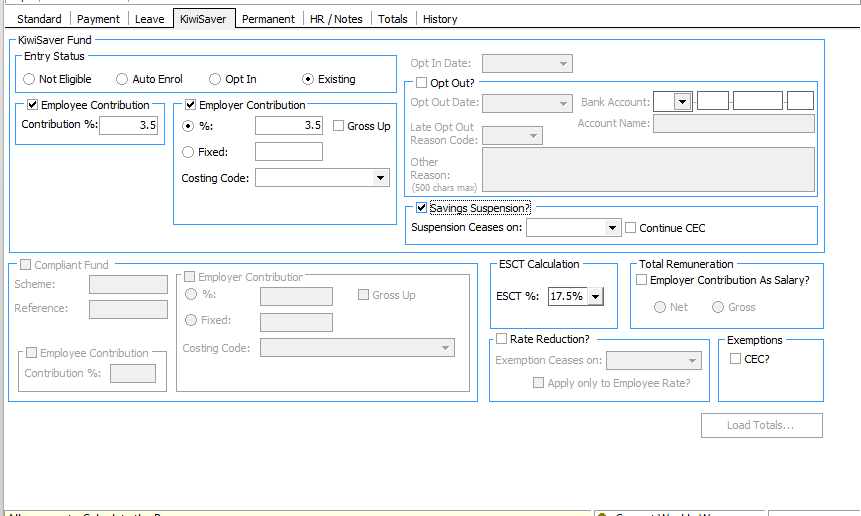
If you want to continue making employer contributions while your employee is on a savings suspension tick the Continue CEC box.
Temporary Rate Reductions
If an employee wants to contribute less than the minimum KiwiSaver amount when they get paid, they can request a rate reduction from Inland Revenue (IR). IR will let you know if an employee's rate reduction is approved.
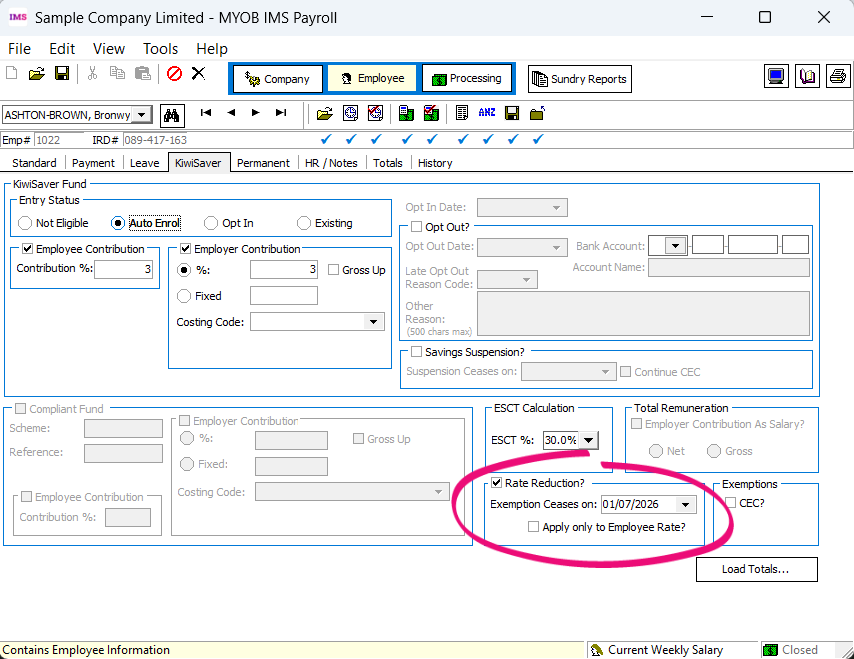
To add a rate reduction, go to the KiwiSaver (or KiwiSaver Compliant Fund) tab of the Employee screen. Select the Rate Reduction? checkbox. If you want a reminder when the rate reduction is almost expired, enter the expiry date in the Exemption Ceases on field.
By default, the employer contribution rate is also reduced to match the employee’s reduced rate. If you don’t want to reduce employer contributions, select the Apply only to Employee Rate? checkbox.
Employees Under 18 or Over 65
Someone under 18 or over 65 can join KiwiSaver, or in the case of someone over 65, can continue to make contributions to KiwiSaver (refer Opt In section of this document).
For those under 18, employer contributions are required
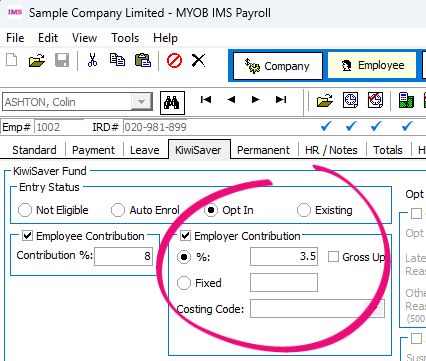
Employees aged 16 or 17 who have opted in to KiwiSaver are eligible for compulsory employer contributions. Select the Employer Contribution checkbox and enter the employer contribution rate in the % field.
For those over 65, you can choose to stop employer contributions
For employees over 65, if you wish to cease employer contributions, go to the Company tab and tick the CEC Exempt? box.

On the employee’s KiwiSaver screen tick the CEC? box under Exemptions. When you do this, a message will pop up advising that you can now untick the Employer Contribution box.
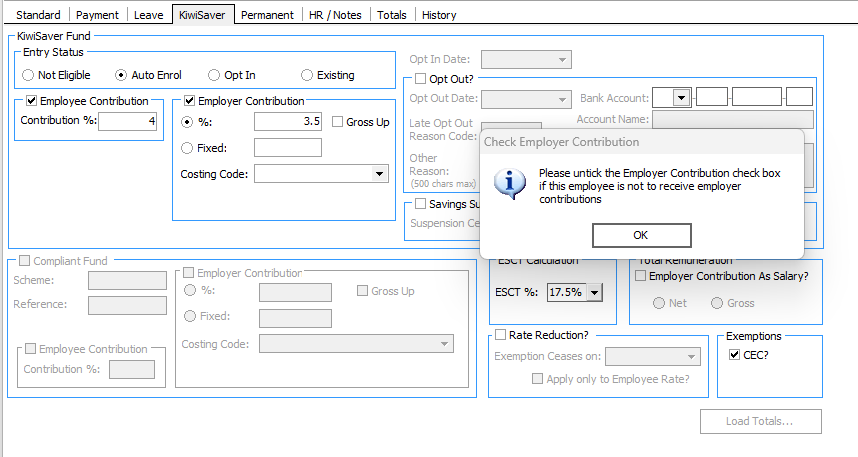
Untick Employer Contribution and save the record.
Total Remuneration Option
With the agreement of their employer who makes an employer’s superannuation cash contribution on their behalf, an employee may choose to have some or all of an employer’s superannuation cash contribution made on their behalf treated as salary or wages under the PAYE rules. The employee’s choice is valid until revoked in writing.
This is outlined under the Income Tax Act 2007 RD 68 (ITA 2007) : Choosing to have employer contribution amount treated as salary or wages.
Currently in the MYOB IMS Payroll application the ‘Total Remuneration’ package (Net or Gross Employer Contribution) can be affected; however it is currently only possible for ALL of an employer’s superannuation cash contribution to be treated as salary or wages.
This section of the Act was added to address the perceived inconsistencies where employees who elected to join KiwiSaver would be receiving an additional employer contribution benefit, which was not available to those employees who chose not to join for whatever reason.
Having the Employer Contribution as part of salary or wages effectively enables employees to either save the employer contribution now into KiwiSaver or receive the contribution in cash.
To enable Total Remuneration, go to the Company tab and tick the Total Remuneration (Employer Contribution as Salary?) check box. You can then choose either Net or Gross.
Net mirrors what generally happens with KiwiSaver employer contributions, in that 3.5% is calculated, then ESCT is deducted so the Net remainder is paid to the employees KiwiSaver scheme. Gross means the full 3.5% employer contribution is paid to the KiwiSaver scheme and tax is calculated on top of this.
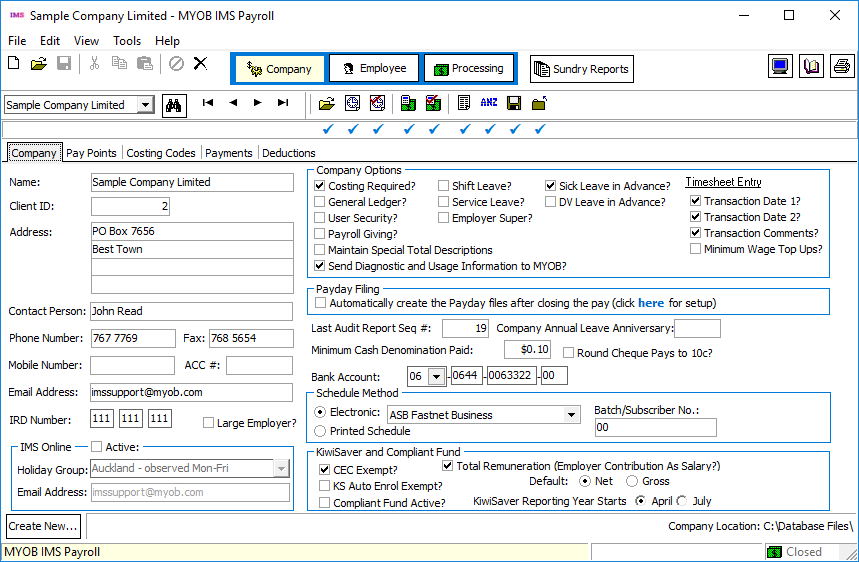
Once you have set these options, go to the Employee’s KiwiSaver screen and tick the Employer Contribution as Salary? option under Total Remuneration. If the Net option has been chosen at the company level, make sure this is selected here. Leave all other settings on the page as they are.
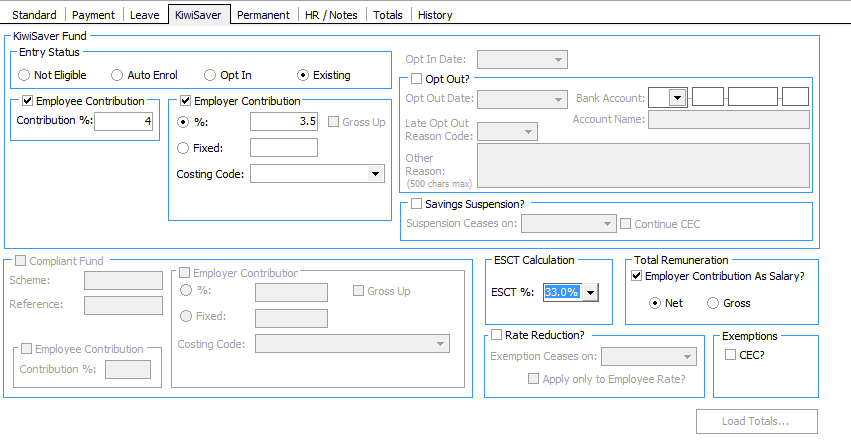 This will generate a payslip that shows both
KiwiSaver employee and employer (net amount) contributions being deducted from the
employee’s gross salary.
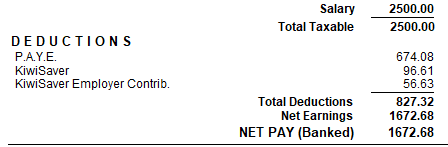
Using Total Remuneration means ESCT deduction amounts are not made, so only the KiwiSaver Employee and Employer details are sent to the IRD. If an Inland Revenue representative contacts you, asking why no ESCT deductions have been made, and you have adopted the Total Remuneration approach for some or all of your KiwiSaver employees, advise them of this fact. At present there is no process or procedure in place within Inland Revenue which will enable you to identify your organisation as having adopted the Total Remuneration approach regarding employer KiwiSaver contributions.
Examples
Examples of how the Total Remuneration calculations are done are shown below
Paul is employed by Company ABC Ltd is a KiwiSaver member. Paul chooses, and his employer agrees, to have the employer KiwiSaver contributions included as part of his salary. Therefore Paul’s weekly salary will now be $500.03 + ($500.03 x 3.5%) = $517.53. Bear in mind that this calculation would need to be performed (and maintained in the payroll company) for all taxable payments Paul may receive which are perceived to contribute towards the calculation of an employer contribution.
Any Student Loan deductions, Working for Families Tax Credits Entitlement or Child Support obligations Paul may have will now be calculated on the new Gross amount of $517.53.
|
Base Weekly Salary: |
$500.03 |
|
Adjusted Weekly Salary: |
$517.53 (inclusive of employer contribution = $500.03 + ($500.03 x 3.5%)) |
|
KiwiSaver Contribution: |
4% (calculated on the Base Weekly Salary amount) |
|
Employer Contribution: |
3.5% |
Calculation Logic – Gross Option
Employer Contribution is INCLUSIVE in the salary/wages as a GROSS amount
Paul’s Payslip:
|
Total Gross wages for Period: |
$517.53 |
(inclusive of employer contribution) |
|
Less PAYE: |
$78.62 |
(as calculated on $517.53) |
|
Less Employee KiwiSaver: |
$20.00 |
($517.53 x 4%) |
|
Less Employer Contribution: |
$17.50 |
(3.5 x $517.53 / 103.5) |
|
Net Pay: |
$401.41 |
Employment Information (EI) - Payday Filing:
|
Gross: |
$517.53 |
|
PAYE: |
$78.62 |
|
KiwiSaver Employee Deduction: |
$20.00 |
|
Net KiwiSaver Employer Deduction: |
$17.50 |
Calculation Logic – Net Option
Employer Contribution is INCLUSIVE in the salary/wages as a NET amount
When the contribution component of the wages is to be regarded as a Net amount contribution then there will be addition tax calculations required to determine what tax is to be deducted.
Step 1:
Determine what proportion of the full Salary ($517.53) is the Employer’s 3.5% contribution:
$517.53 x 3.5 / 103.5 = $17.50
Subtract the contribution component from the full salary to get the base salary:
$517.53 - $17.50 = $500.03
Step 2:
All following tax calculations will be based on the employee’s tax code (in this example ‘M’), not their declared ESCT rate.
|
Calculate PAYE on the Salary inclusive of the employer’s contribution ($517.53): |
= $78.62 |
|
Calculate PAYE on the base salary of $500.03 |
= $75.25 |
|
Subtract the base salary PAYE from the inclusive salary PAYE to get the amount of tax relating to the employee’s contribution of $17.50 - |
= $78.62 - $75.25 = $3.37 |
Step 3:
The employer contribution sent to the provider by the employer is less TAX not PAYE therefore the ACC Earner Levy (currently 1.75%) will need to be identified and deducted from the Employer Contribution calculated PAYE:
|
Gross Employer Contribution: |
= $17.50 |
|
Multiplied by the ACC Earner Levy of 1.75% |
= $0.30 |
|
Subtract this ACC Earner Levy from the PAYE component of $3.37 in Step 2: |
= $3.37 - $0.30 = $3.07 |
Step 4:
Calculate the Net Employer Contribution to be forwarded to the provider:
|
Gross Employer Contribution: |
$17.50 |
|
Less Tax as calculated in Step 3: |
$3.07 |
|
Net Employer Contribution: |
$14.43 |
Paul’s Payslip:
|
Total Gross wages for Period: |
$517.53 (inclusive of employer contribution) |
|
Less PAYE: |
$78.62 (as calculated on $517.53) |
|
Less Employee KiwiSaver: |
$20.00 ($517.53 x 4%) |
|
Less Employer Contribution: |
$14.43 |
|
Net Pay: |
$404.48 |
Employment Information - Payday Filing:
|
Gross: |
$517.53 |
|
PAYE: |
$78.62 |
|
KiwiSaver Employee Deduction: |
$20.00 |
|
Net KiwiSaver Employer Deduction: |
$14.43 |
Further Information
Further information on KiwiSaver can be found at the links below: