
Graph Extensions: Enabling a Graph Extension Conditionally (with IsActive)
You need to disable a graph extension when it isn’t required by the system logic (for example, when the feature that uses the extension is not enabled). When an extension is constantly active, it can impair the system's performance. You can also disable a graph extension for a specific derived graph.
Enabling a Graph Extension Conditionally
To disable or enable a graph extension depending on a condition, you need to implement the public static bool IsActive method in the extension. The following code shows an example of the implementation of the IsActive method.
public static bool IsActive()
{
    return PXAccess.FeatureInstalled<FeaturesSet.rutRotDeduction>();
}
In the code above, the extension is enabled when the rutRotDeduction feature is enabled.
If the IsActive method returns false for an extension, this extension is not loaded. This means the following:
- Form controls bound to views defined in that graph extension are automatically hidden.
- Event handlers implemented in the graph extension are ignored. Overridden event handlers and methods with the PXOverride attribute are also ignored.
- Views defined in the graph extension won’t be available.
Disabling a Graph Extension for the Base Graph and All Derived Graphs
Suppose that you have the following graph and graph extensions (shown in the diagram below):
- The ARInvoiceEntry base graph
- The SOInvoiceEntry and ARSpecificInvoiceEntry graphs, which are derived from ARInvoiceEntry
- The ARInvoiceEntryAdvanceTaxesExt graph extension, which has been declared for ARInvoiceEntry
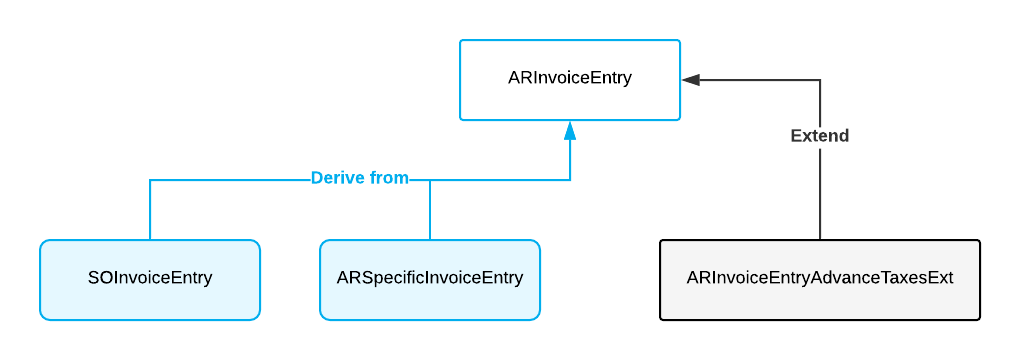
The IsActive method in a graph extension controls whether the graph extension is enabled and applied to the graph specified in the graph extension’s declaration and all of the graph’s inheritors. In the current example, if the IsActive method is declared in ARInvoiceEntryAdvanceTaxesExt and returns false, then the ARInvoiceEntryAdvanceTaxesExt graph extension is disabled for all of the following graphs: ARInvoiceEntry, ARSpecificInvoiceEntry, and SOInvoiceEntry.
Disabling a Graph Extension for a Derived Graph
- Disable a graph extension for a specific graph inheritor. For example, you may not want to apply logic from the ARInvoiceEntryAdvanceTaxesExt graph extension to the SOInvoiceEntry graph.
- Disable a graph extension for only derived graphs. For example, you may need the ARInvoiceEntryAdvanceTaxesExt graph extension to be applied to only the ARInvoiceEntry graph.
public static bool IsActiveForGraph<TGraph>()Inside the method, you need to check the type of the graph to which the extension is applied. You need to use the TGraph generic type argument to check the type of the graph to which the extension is applied.
- Disabling the graph extension for a specific graph inheritor: If you don’t want
to apply the logic from ARInvoiceEntryAdvanceTaxesExt to
SOInvoiceEntry, for example, the implementation of the
IsActiveForGraph method should be coded as
follows.
public static bool IsActiveForGraph<TGraph>() => typeof(TGraph) != typeof(SOInvoiceEntry); - Disabling a graph extension for only derived graphs: If you want the
ARInvoiceEntryAdvanceTaxesExt graph extension to be applied to only
the ARInvoiceEntry graph, for example, the implementation of the
IsActiveForGraph method should be coded as
follows.
public static bool IsActiveForGraph<TGraph>()
    => typeof(TGraph) == typeof(ARInvoiceEntry);
The full code of the ARInvoiceEntryExt graph extension in this example looks as follows.
public class ARInvoiceEntryExt : PXGraphExtension<ARInvoiceEntry>
{
	public static bool IsActive()
	{
		return PXAccess.FeatureInstalled<FeaturesSet.retainage>();
	}

	public static bool IsActiveForGraph<TGraph>()
	    where Graph : PXGraph // Constraint is not obligatory
       {
	    // Check the type of the graph here
	    return typeof(TGraph) == typeof(ARInvoiceEntry);
        }
}
Disabling a Generic Graph Extension
If you have a generic graph extension and graph extensions derived from this generic graph extension, to disable them, you implement the IsActive method in each of the derived graph extensions.
For example, suppose you have a generic graph extension declared as shown the following code.
public class GraphExtBase<TGraph, TDac> : PXGraphExtension<TGraph>
    where TGraph : PXGraph
    where TDac : class, IBqlTable
{ }
The following code shows the derived graph extension.
public class GraphExtAPInvoice :
    GraphExtBase<APInvoiceEntry, APInvoice>{}
To disable the GraphExtAPInvoice graph extension, you need to implement
the IsActive method, as the following code shows.
public class GraphExtAPInvoice :
    GraphExtBase<APInvoiceEntry, APInvoice>
{
    public static bool IsActive()
    {
        return PXAccess.FeatureInstalled<FeaturesSet.AdvancedAPInvoice>();
    }
}
For details on generic graph extensions, see Generic Graph Extensions: General Information.
Restrictions in the IsActive Method
Inside the IsActive method, you shouldn’t create a graph instance because it can lead to deadlocks. If you need to read data from the database, you can use database slots by doing the following:
- In the graph extension where you need to define the IsActive method, you also define a database slot that depends on a DAC from which you need to read data. In the slot, you cache the data that you need to access.
- In the IsActive method, you access the data from the slot.
For example, suppose that you need to enable the extension in the
IsActive method only if the InspectionEnabled property
of SOSetup DAC is true. The following code shows how you can access the
InspectionEnabled property by using a database slot.
private class SOSetupInspection : IPrefetchable
{
    public static bool InspectionEnabled =>
        PXDatabase.GetSlot<SOSetupInspection>(
            "SOSetupInspection", typeof(SOSetup))._inspectionEnabled;
    private bool _inspectionEnabled;
    void IPrefetchable.Prefetch()
    {
        using (PXDataRecord soSetup =
            PXDatabase.SelectSingle<SOSetup>(
                new PXDataField<SOSetup.inspectionEnabled>()))
            if (soSetup != null) _inspectionEnabled = (bool)soSetup.GetBoolean(0);
    }
}

public static bool IsActive() => SOSetupInspection.InspectionEnabled;
In the code above, you’ve done the following:
- In the extension, defined the
SOSetupInspectiondatabase slot, which depends on theSOSetuptable. In the slot, you’ve cached theSOSetup.InspectionEnabledvalue. - In the IsActive method, checked the
SOSetupInspection.InspecionEnabledproperty, which holds the cached value of theSOSetup.InspectionEnabledproperty.
For more information on database slots, see Use of Slots to Cache Data Objects.