
Defining Costing Report Sub-Total Breaks
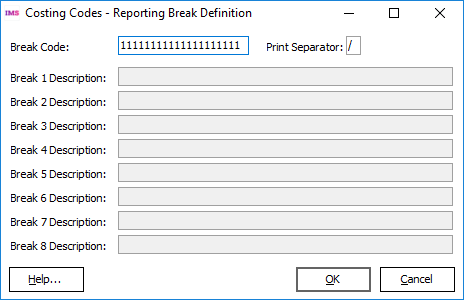
Break Codes
The Reporting Break Definition window allows you to define how sub-totalling is applied to your costing codes when costing reports are generated.
The Break Code field allows for a maximum of 9 breaks distributed over 20 character positions.
The values entered into the Break Code field must be numbers in the range 1 to 9 and the numbers must be entered in sequence. The same number can be entered multiple times.
There must always be 20 characters present in the field. It there are less than 20 characters present or the numbers entered in the field are out of sequence, the Break Code field will be displayed in red and you will not be able to save your changes.
If the Break Code field displays all 1s i.e.  then no sub-totalling will be applied.
Example:
Your costing codes consist of a one character Department Code, a three character Section Code and a five character Job Number, e.g.
A121G0001, A122G0030, A122G0121, B123G1018 etc.
By applying the break-code pattern  , the costing codes exampled above would be sub totalled in your costing reports as follows:
Job Numbers under Section A/121
Job Numbers under Section A/122
Sections under Department A
Job Numbers under Section B/123
Sections under Department B
...
Report Grand Total
Print Separator Enter the character you want use to separate the component parts of your costing codes (when printed in the costing reports) in the Print Separator field, e.g. by entering  in the field, costing code A122G0030 would appear as A/122/G0030. Any alphabetic value can be entered as the Print Separator, including spaces, numbers and visible formatting characters.
Break Descriptions
Break Descriptions are used as titles for sub-totals on the costing reports. As sequential break numbers are entered in the Break Code field a Break Description field will become active for the preceding number.
Entering "12222222222222222222" in the Break Code field will enable the "Break 1 Description" field. Entering "12223333333333333333" will enable Break Description fields 1 and 2.
A Break Code of "11111111111111111111", (i.e. no sub-totalling) will disable all Break Description fields.
Break Descriptions must be provided when required. If a Break Description field becomes enabled but has no value, it will be displayed in red and you will not be able to save your changes. However, if a field has a description entered in it, and you disable that Break Description by changing the Break Code, the description will be ignored.