Purchase Order Receipt Entry
When a purchase order lines with a linked quantity is received, Greentree Desktop releases the linked sales order lines from backorder. If a packing slip is created at the same time is based on:
- If the Purchase Order Preferences option Commit inventory only is selected, the backorder release process commits the backordered quantity to the sales order line without generating a packing slip.
- If the sales order line has a Hold and Commit hold status, backorder quantities are released and committed to sales order lines. No packing slip is generated.
- If the sales order line has a Hold and Don't Commit status assigned, backorder quantities will be released from backorder and become available for general sale. They are not committed to linked sales order lines. When the sales order lines are released from hold, Greentree Desktop rechecks the general availability of the inventory.
- If the Purchase Order Preferences option Commit inventory only is not selected, available inventory is committed and packing slips are automatically generated.
Regardless of whether or not a packing slip is generated, if purchase order lines have serial/lot numbers assigned, they are transferred to the sales order line.
When the purchase order receipt transaction is saved, the SO PO Link Release report form pops-up on form so that you can print details of the automatic release process.
Here's an example of this report:
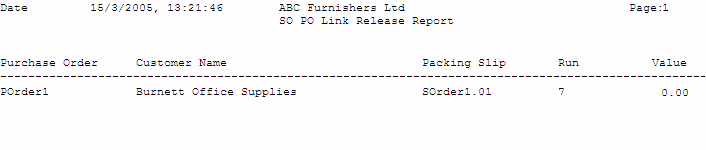
Note: If the Purchase Order Preference option Commit inventory only is selected, or packing slips are not in use, the report displays Released Backorders instead of Packing Slips.
This is a date range report that prints out details of the received purchase order, the customer of the backordered quantity, the packing slip number, run number, and order value.
You can reprint the SO PO Link Release report from the Reports > Sales Order menu.
The PO Shipment Entry form processes a receipt the same way, if PO lines are linked to SO lines.